Is 'dir' a Linux command?
It's a GNU Coreutils command. https://www.gnu.org/software/coreutils/manual/html_node/dir-...
I thought it was just a distro added alias like how some systems used to have '..' for 'cd ..'
231–240 of 260 posts
Windows really needs to ditch CRLF and just use LF, and switch from backslashes to forward slashes. Or better yet, just switch everything to full POSIX. In powershell everything is much better than cmd, but it's just not enough. WSL is generally great, but there are annoying downsides. I often get "catastrophic" crashes and the zone identifier files drive me nuts. Plus it takes so much longer to start VSCode when con…
> Or better yet, just switch everything to full POSIX. Really not possible as most of POSIX semantics arise naturally from the kernel (or are enforced/executed at the kernel level). Windows technically provides some of them (or semantic equivalents) so you could make something work, but in order to do a full port you'd need to strip out too many concepts for it to be worthwhile. For instance the idea that "everything…
The kernels undoubtedly take different approaches. But there's nothing in NT that strictly prohibits POSIX compatibility layers. As we see with the many compatibility layers that have existed for Windows over the years.
> For instance the idea that "everything is a file"
POSIX doesn't have a concept of "everything is a file". That's Plan 9. UNIX and POSIX actually made numerous concessions here and there are plenty of constructs that are not exposed as a file.
Windows does already abstract a few primitives as files too. In fact even DOS has the concept of device files, though in typical Microsoft fashion, it's implementation was a clusterfuck that took MS 40 years to fix.
> or the single root filesystem layout (which iirc is segmented deeply at the kernel level).
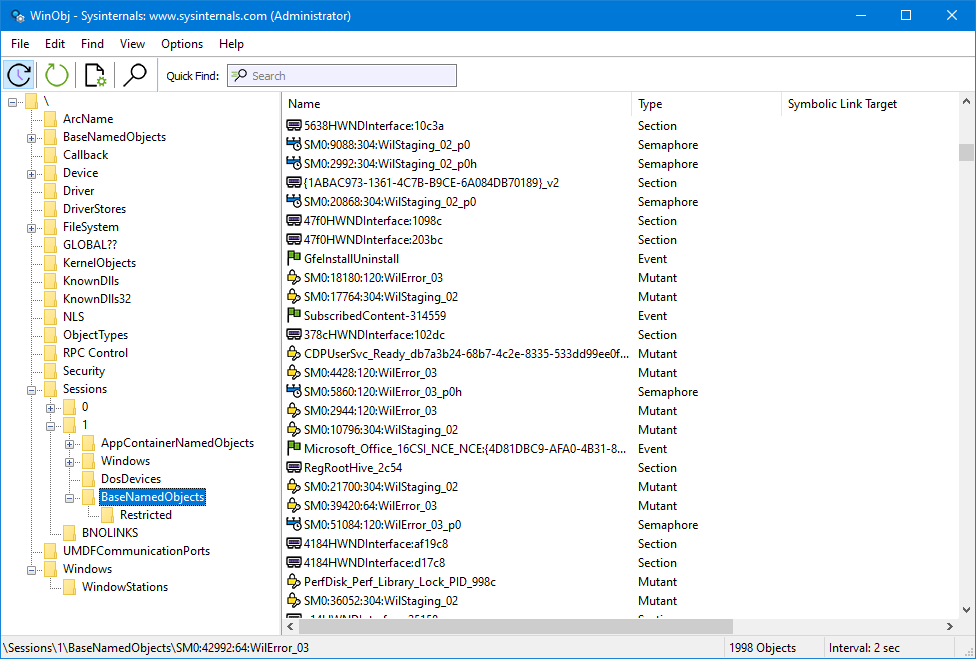
NT uses an object system for filesystem objects, but it still has a root. As you can see in the WinObj (eg screenshot below)
https://learn.microsoft.com/en-us/sysinternals/downloads/med...
The C:\ convention is really more there for compatibility with DOS-lineage software but the underlying filesystem APIs work fine with NT objects.
For example, C:\foo.txt might be equivalent to \Device\HarddiskVolume3\foo.txt
In this regard, it's similar to how POSIX has a database of inodes and the filesystem hierarchy is actually just an abstraction that sits on top of that
Windows really needs to ditch CRLF and just use LF, and switch from backslashes to forward slashes. Or better yet, just switch everything to full POSIX. In powershell everything is much better than cmd, but it's just not enough. WSL is generally great, but there are annoying downsides. I often get "catastrophic" crashes and the zone identifier files drive me nuts. Plus it takes so much longer to start VSCode when con…
"Windows really needs to ditch CRLF and just use LF, and switch from backslashes to forward slashes." Hahahahaha. That's hillarious. Oh god, you're serious ? Do you have any idea how much of Windows, and user software would break? Any idea at all? You really want MS, who has built backwards compatibility as a core feature of Windows, to break countless thousands of pieces of software that run on it? I'm sure there's…
I'd estimate millions
Earlier quoted context omitted.
Yesterday for me was the last time. Visual studio 2026 default to crlf I think maybe and I have autoctlf in git turned off. I should probably turn that back on.
I think you want a .gitattributes file where you set the EOL of the file types you care about. And you might want to try autocrlf=input.
Earlier quoted context omitted.
On Windows, I've mostly avoided CRLF by configuring text editors and git to use LF, and writing text files in binary mode. The only places that still forced CRLF were batch files and clipboard.
> I've mostly avoided CRLF by configuring text editors and git to use LF, That has been my experience as well. I can't remember the last time I had an issue related to CRLF.
Yeah, we don't hate this uutils (NOT coreutils) project enough.
Not sure of it's sarcasm, but you'd be right, everyone involved with this garbage should be banned from IT forever
Earlier quoted context omitted.
I have absolutely zero sympathy for any tool that is incapable of handling \r\n and only works with \n. Literally absolutely no sympathy. All software accumulates warts over time. Linux is overflowing with horrible warts and tech debt. As is any software that has successfully served customers for decades. But multiple line endings are quite possibly the easiest most trivial thing to support and there is absolutely no…
> But line endings are quite possibly the easiest most trivial thing to support and there is absolutely no negative cost of any kind in doing so. Linux ecosystem chooses to be stubborn and provide a strictly worse user experience out of pure spite and for zero user benefit. It’s very irritating. The Linux ecosystem handles it fine (by using a single standard). Windows doesn't. That's its problem.
Earlier quoted context omitted.
It’s arcane and technical for no reason. /Users/ME/Documents, /Media/MyThumbDrive/…, etc. are much clearer and less confusing than C:\…
At the very least, drive letters do make SMB shares a bit simpler for the non technical folks. T:\MyData is easier for them than \\0010-somehost-win.site1.mycorp.loca\Share01\MyData\ I used to support a group of completely tech illiterate users in construction & manufacturing. Them figuring out T:\ was hard enough, ask them to type in a UNC path into the address bar in explorer and you get "Wtf is file explorer? Wtf…
Earlier quoted context omitted.
Nonsense. You can mount filesystems to mount points in much the same way as is done in Unix. No one would ever need to do that.
You can indeed use mount points like C:\mountdir, but that's still on the C drive, which is a drive letter. It's not "no drive letters".
Earlier quoted context omitted.
As hex4def6 said, the idea was that DOS command conflicts are not a good idea, while overriding PowerShell builtins in interactive sessions (PSReadLine) is acceptable, if not a good idea. We open-sourced DOS sort and published a port of the DOS find command. The suite then dispatches to the GNU/DOS variant based on heuristics.
Echo doesn't conflict with the DOS command?