Live data from Hacker News

Split Keyboard for Professionals

ultimatehackingkeyboard.com

231–240 of 331 posts

Re: Split Keyboard for Professionals

#231

I'm maintaining a gallery of split mechanical keyboards, including the Ultimate Hacking Keyboard. Hopefully it's helpful for a quick overview of the options that exist. Many of these keyboards are DIY (available as a kit, or sometimes just a PCB and case plan), but some are available assembled. https://aposymbiont.github.io/split-keyboards/ (There's also https://jhelvy.shinyapps.io/splitkbcompare/ for direct comparis…

It's kind of you to compile this list. Please add this very good product: https://www.goldtouch.com/ergonomic-keyboards/

I am a very satisfied user.

I have used ergonomic keyboards for long time. Some have been passable, such as one or two models of Adesso and Microsoft keyboard. Nothing has offered the combination of qualities that the Goldtouch offers. Comfort, robustness, adjustability, cost.
Re: Split Keyboard for Professionals

#232

I love my keyboard.io Model 01. I think a refresh is coming later this year (Model 100?). Worth the price IMO.

I'm borrowing one of these right now, but I can barely use it because the layout is so different than what I'm accustomed to. I haven't done much research on it - do you know what the reasoning behind the layout is? It wouldn't be a huge deal except that the keycaps are all custom shapes, and I guess I'm not willing to learn a new layout without labeled keys.

Re: Split Keyboard for Professionals

#233

Myself, I have been using a Kinesis RGB Edge with the "lift-kit" for about a month. Have never been a perfect, trained touch-typist - so there has been a learning curve, but it is worth it. My wrists feel so much better, and I am almost back to full speed. (Previously, I would just use laptop KB's). The only complaints... Not from me, but when I am on web meetings, I have to be on mute, because everyone finds the KB…

Same keyboard. Two main issues:

* using it in full vertical is hard because there's two columns of buttons on the left & extra buttons on the right side. i diy but there is a "Ascent" package for some keyboards for full verticle. less arm twisting as you type; it's amazing, keyboard not stellar for it though.

* the stock "split" cable at 18" is pretty skimpy. the used to be an XL cable but even it was not super long and i don't see it on their store right now. RSI is about changing your posture, & when i literally use two keyboards & can put them wherever, i find myself sometimes going into a "butterfly stroke" (from swimming, arms out) position for some variety. and even basic adjustment is pretty limited at 18".

Re: Split Keyboard for Professionals

#234
post #225
post #215

Earlier quoted context omitted.

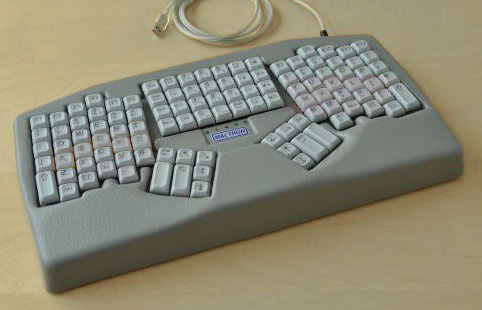
Or to the Maltron dual-handed keyboards. * https://www.maltron.com/uploads/6/1/2/5/61250099/s9751652005...

Those fully vertical layouts are fine, I guess, if you keep your hands pinned to your sides sticking straight forward. And if the keyboard is the exact width of your body. Looks uncomfortable, personally. I prefer to lay my hands out slightly wide on the desk, angled inward. Which exactly matches the slope of `UJM` on any standard keyboard.

Maltron doesn't do just one keyboard.

* https://www.maltron.com/uploads/6/1/2/5/61250099/s9751652005...

Re: Split Keyboard for Professionals

#235
post #77

I started using a dactyl manuform about two months ago and now I can't imagine typo on anything else. I'm already planning on order a second one for the office, assuming we ever return to it.

These keyboards look interesting but how does "space" work on it and how long did it take you to learn the non-qwerty parts of the layout (like space, hyphen, brackets, and tilde)?

For me, space is under the natural resting place of my right thumb. Enter on the left. And then the closer on each is backspace on right, delete on left. As well as layer toggling. It didn't take me too long to get used to the locations of most keys, but tweaked it over time. My weird one is I have `~ where caps lock would traditionally be. I use it a lot for code blocks in slack and things like that. And it really screws me up on another keyboard now where its not there. And then the bottom 4 on each hand, I really don't use much, volume toggles, win key and stuff like that. I need to figure out what else to do with them.

Re: Split Keyboard for Professionals

#236

I'm maintaining a gallery of split mechanical keyboards, including the Ultimate Hacking Keyboard. Hopefully it's helpful for a quick overview of the options that exist. Many of these keyboards are DIY (available as a kit, or sometimes just a PCB and case plan), but some are available assembled. https://aposymbiont.github.io/split-keyboards/ (There's also https://jhelvy.shinyapps.io/splitkbcompare/ for direct comparis…

What a great site, thanks. Really brings home how strange this corner of the market is. Every split keyboard with nice keyswitches has a different layout from every other, and most of them miss one or more of F keys, symmetrical meta keys, standard navigation cluster layout, volume buttons, and so on. Quite extraordinary, considering how much this type of device relies on muscle memory to work. It's like their designers want the device to be less useful, not more!

Particularly annoying when there's such a wide range of non-split keyboards with nice keyswitches. You've got all the bizarre layouts you can eat, but you still get the option of a more standard one too.

I wish people would just copy the MS Natural Ergonomic 4000, but with better keyswitches.

Re: Split Keyboard for Professionals

#237
The timing of this post is a bit funny. The UHK blog is just about due for an update on the manufacturing status for the thumb modules - the next post should indicate whether the modules are going to be available imminently, or delayed for some reason. These accessories are the clear differentiator for this product IMO.

Re: Split Keyboard for Professionals

#238
I hardly ever use a mouse, so having a fantastic keyboard appeals to me. But I have two main concerns:

1) I have no desire to own multiple of these for each of my working environments (home, work, and occasional remote from elsewhere). And no desire to always carry one around.

2) I fear making myself too attached to something which may go out of production. In case it breaks, I'd be sad.

To those who use these keyboards: are these legitimate concerns?

Re: Split Keyboard for Professionals

#239
post #28
post #24

Earlier quoted context omitted.

I started out using Microsoft Natural keyboards in the 90s. Ergonomic pain using straight keyboards at work brought me back to them in the 2010s. The Sculpt (wireless) is really wonderful. Favorite keyboard ever for me. (<-- that sentence, and this one, typed on a Sculpt. Thank you, unknown engineers.)

I do love the sculpt but they tend to die within a couple of years. I went through two of them before switching to something more durable. The build quality is just bad - many times my computer was behaving weirdly, traced to one of the function keys being stuck down (this also manifested as the keyboard eating new batteries within a couple of days).

Logitech makes a very similar keyboard now and I love it (I had to return a sculpt because the g key would keep getting hung up on the shell).

https://smile.amazon.com/gp/product/B07ZWK2TQT

Re: Split Keyboard for Professionals

#240

I've had Ergodox EZ for 5+ months, and not loving it at all! It's unnatural and uncomfortable. Tried changing switches a few times, armrest changed, angels and keyboard layout adjusted many times and it's not any better. I feel I have to force myself to keep trying to use it because of the cost! I'm not sure if it's worth it at all, none of the parts are that expensive but I guess novelty cost money. I bought it beca…

I was in your boat, and I have small fingers. Here are the things I did to change that:

I had a keyboard tray at work, so decided to get one of those from M3. It seems like a no brainer now.

Removed the side rests from my chair, and lowered the keyboard height so that the lower wrist rests easily on my keyboard tray's wrist rest.

I use the 'timed' shift functionality of the ergodox EZ. Check the video here: https://www.youtube.com/watch?v=F1rj9ZSBggg

I use vim extensively, and changed from hjkl to jkl; to keep touch typing in vim consistent with typing outside of it.

I use the layer 1 extensively, and have mapped my thumb keys to enable those on a long press.

My layout configuration is here: https://configure.ergodox-ez.com/ergodox-ez/layouts/BN33O/la...

I still struggle a bit due to small fingers. I am currently in the process of ditching my pinky for typing, but 95% of my complaints are now resolved. I also don't have the default keycaps, the ones I have are a random assortment of SA/DSA keys I got for cheap from a grab bag, I want to switch to cherry profile which aren't as deep and would hopefully work well for my small fingers.

Post reply on HN