Live data from Hacker News

macOS Sonoma Boot Failures

github.com

221–230 of 290 posts

Re: macOS Sonoma Boot Failures

#221

Earlier quoted context omitted.

The messiness of resolutions during boot always annoyed me on PCs. It was understandable back in the days of BIOS, but ith the advent of UEFI it seems like it should be possible to run EFI config screens and the like at monitor native rez (or at minimum, native aspect ratio) but I’ve never seen this… it’s always 1024x768 or somesuch stretched to fit a 16:9 monitor which looks awful.

EFI config screens should be text mode only, full-stop. So they can easily be used over serial console redirection. Ran into one recently that was high-rez graphical. It needed a USB mouse to change critical settings because the tab order for the onscreen widgets didn't work. Anyone responsible for creating graphical EFI config screens should stop writing software for the good of humanity.

You know what's funny?

UEFI actually lets you provide both touchscreen-capable bells&whistles gui, and a text UI for the frankenstein VT-UTF8 standard (essentially, VT-220 compatible with UTF-8, kinda like linux console) - all in mostly one codebase.

There's a standard UI description language which is used to specify menus, options and values (and how they are written into nvram), which is then interpreted by text mode interface driver (enabled when you connect over serial port) and graphic mode interface driver (where you can drop all sorts of graphical bells & whistles).

It's also how you can integrate menus from add-on cards into firmware setup.
Re: macOS Sonoma Boot Failures

#222

Interestingly I ran into this exact problem with my work MacBook Pro M1 upgrading to Ventura 13.6 and assumed it was a totally isolated incident. I don't have a dual-boot setup either, just a single macOS install. The computer was connected to a Thunderbolt Display during the update which I assume had the same effect of changing the refresh rate to something other-than-ProMotion that the linked article mentions. I ha…

Also with the M1 Pro MacBook, my LG USB-C monitor broke during the upgrade. Black screen, same on another connected USB-C laptop. Tried different cables, unplugging power from the monitor and factory reset on the monitor, no luck. Other inputs like HDMI and DisplayPort still work. I don't think the breakage during the upgrade is a coincidence.

I would really advise against having anything connected to the Macbook during upgrades, except the charger...

Re: macOS Sonoma Boot Failures

#223
post #184

Earlier quoted context omitted.

Marcan's post contains apple ticket numbers... presumably you show them those.

Apple store employees probably may not have access to bug reports that their engineers would be able to access?

In many countries Apple stores aren't run by Apple and won't have access to bug reports.

Re: macOS Sonoma Boot Failures

#224
post #166

Earlier quoted context omitted.

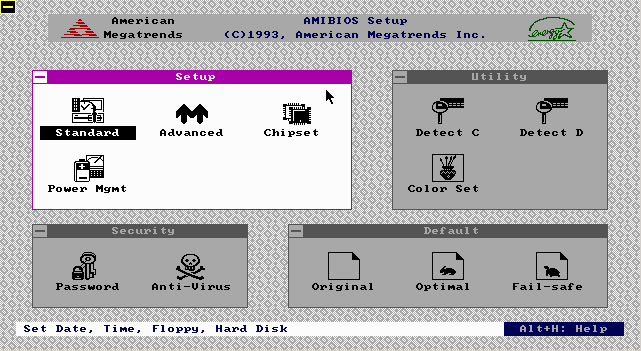
> Text-only BIOS setup was the norm for a long time I've had a GUI BIOS setup on almost every PC I've owned since the first 486 I built back in 1993.

The GUI was rendered in text mode. It's called a TUI (Text-based User Interface)

Plenty of 486 era machines had the AMI ”WinBIOS” whose setup utility kinda-sorta emulated a Win 3.x look and ran in (EGA 640x350 4bpp?) graphics mode, with mouse support:

https://media.moddb.com/images/groups/1/4/3107/winbios.gif

Re: macOS Sonoma Boot Failures

#225

Earlier quoted context omitted.

By the standard of "do you ever need to consult forum posts to solve a problem", sure, Linux is worse than macOS. By the standard of "do you ever need to consult forum posts to fix hardware that has apparently been bricked by a software update", macOS seems to be considerably worse. At least, that's my experience. I've never had hardware damaged by Linux, which I've run almost exclusively. On the other hand the one A…

> macOS seems to be considerably worse Most users will just take their machine in to the Apple Store when this kind of thing happens, rather than try to fix it themselves.

Sure, doesn't make this any less inconvenient though. I would much prefer to finish whatever I want to finish today (even if I spend a few hours trying to fix an issue) than wait whatever amount of days waiting until my hardware is fixed.

Re: macOS Sonoma Boot Failures

#226

First I've heard of any issues.. I have done a couple upgrades already with no issue. I'm sure there are some scenarios where it fails, but Sonoma has been out a while with millions of users being prompted constantly to upgrade. Feels like less than a "you're holding it wrong" problem. HN is obv going to bring out the edge cases, but it doesn't seem like the world is on fire with "Sonoma Bricks" by any means.

We have a fleet of several hundred Macs, most are M1/2 at this point. I heard reports of several Macs coming in for support that booted to a black screen after Sonoma's .0 landed. So many that the JAMF team blocked Sonoma until the .1 landed.

Definitely shoddy QA on Apple's part. Also, your sample size is too small. Everyone works differently and it takes a certain set of settings/workflows to trigger this compatibility issue.

Re: macOS Sonoma Boot Failures

#227

Earlier quoted context omitted.

This issue in GP is unrelated to Linux, it happens on single-boot macOS.

That's the point, I think - Linux gets derided because people say it just breaks at random and you have to wade through forums to find arcane incantations to fix it, either implying or outright stating that their favorite proprietary OS would never just blow up in your face and force you to resort to exotic troubleshooting steps. So when macos, the poster child for "user friendly", proceeds to brick the machine and r…

I concur, the amount of times I had to Google dozens of minutes for issues happening in my work-issued Macbook Pro, and never finding answers because things are supposed to "just work" is maddening.

For one example on top of my head, sometimes I can't adjust the brightness of the monitor in the Macbook using the Notification Center (it is grayed out), but if I open the "Settings -> Displays" I can do it. Never found a solution for it after searching for a while, so I just gave up.

Or the fact that I can't enable retina or font smoothing in my 1440p monitor, so the fonts looks ugly (I got used eventually, but they still looks worse than Windows or Linux in the same monitor). I used a workaround in the past using "Better Display" to create a 4k framebuffer that was downscaled to 1440p, but this was so slow and also prone of other issues so eventually I just got used to the ugly fonts.

Another one: I have a TouchBar Macbook (again, this is a work-issued laptop), but I just want it to work as a normal keyboard: show the Function keys, if I press Fn show the shortcuts. Yep, doesn't work: while you can do this, pressing Fn while pressing some of the shortcuts in the TouchBar doesn't work. This is especially infuriating because one of the shortcuts that doesn't work is the brightness one. Go back to the first issue and you can see why this drive me mad sometimes.

Re: macOS Sonoma Boot Failures

#228
I don’t know what’s going on with Apple lately. They’ve built one of the world’s best brands after a near-death experience via a ruthless focus on and fanatical commitment to providing a holistically premium experience (for the people who want their version of that) to justify their premium pricing and huge margins. If you like what they do, it Just Works from purchase on. Or did until recently.

Just today I had an experience that was so Kafkaesque it felt like a mean spirited prank, and because they never fuck up this badly, I had no contingency plan for one of the times it matters a lot.

Any advice on how to get the “we fix things for loyal customers by doing what’s required” people on the phone would be appreciated, but based on the runaround, infinite hold Ferris wheel the primary support line apparently is now, I’m not getting my hopes up.

Re: macOS Sonoma Boot Failures

#230

This seems like a very unusual bug by Apple standards. Makes me consider upgrading to new macbooks...

I don’t know, it’s pretty high there on the list of their complete fuckups, like allowing anyone to log in as root from the login dialog…
Post reply on HN