Live data from Hacker News

Redesigned Notepad for Windows 11

blogs.windows.com

221–230 of 314 posts

Re: Redesigned Notepad for Windows 11

#221

Earlier quoted context omitted.

The problem is that Microsoft is still pretending that UWP/WinUI isn't a complete mistake. All those issues are inherent to that technology.

The same Microsoft who said UWP was not the future only two years ago, is still continuing to rewrite applications in it? https://news.ycombinator.com/item?id=19873198 https://news.ycombinator.com/item?id=19883351

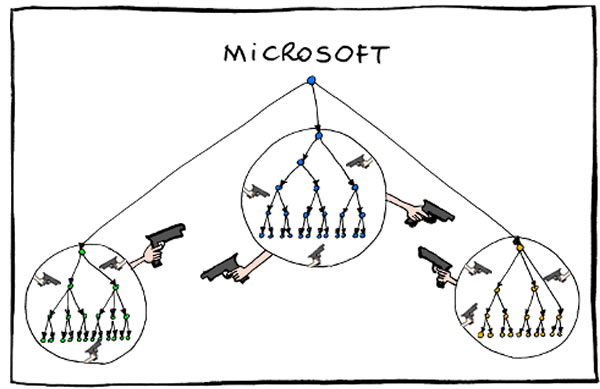
Well, who said it? Where are they on this org chart: https://www.globalnerdy.com/wordpress/wp-content/uploads/201...
Re: Redesigned Notepad for Windows 11

#222
post #208

Earlier quoted context omitted.

Please tell me you forgot to add /s

Windows is stuffed full of anti-patterns. You can't avoid them just by using notepad.

Windows is garbage. I’m not disagreeing with that part, butdesktop Linux is hot garbage too. The audio stack is garbage. X is decades old and Wyland is a meme.

Re: Redesigned Notepad for Windows 11

#223

Earlier quoted context omitted.

Years ago I reported a bug in a VB function, something to do with date calculations. I spent quite a while on the phone with them, feeling like I was banging my head against a wall. They readily admitted that the output of their function was wrong, yet steadfastly maintained that they would not fix it because other programs might depend on that incorrect output. If the answer to any bug report is that the buggy behav…

Excel famously has a date calculator bug that cannot be fixed without breaking spreadsheets everywhere (which of course now expect the bug).

This all can be worked around given enough will. Excel files do have a format version number in them somewhere, right? I'm sure they do. So support the old behavior for older files, and the new one for the newer ones. All files created with the new version of Excel won't be affected by that bug, but the older ones, that might rely on it, won't break either.

Re: Redesigned Notepad for Windows 11

#224
post #208

Earlier quoted context omitted.

Windows is stuffed full of anti-patterns. You can't avoid them just by using notepad.

Yes, but modern Gnome 3 and KDE Plasma have also similarly regressed.

Fortunately, using Linux doesn't necessarily entail installing or using either.

Re: Redesigned Notepad for Windows 11

#226

I worked on Windows back in 2014, probably the most surprising thing joining there out of college was looking through the bug database. Every issue that gets complained about online -- and many more -- are in there, and have been for a long time, marked WONTFIX due to a potential compatibility break, lack of priority, or some other policy reason. I don't know if anyone even owned Notepad or any other older inbox apps…

I've always liked Apple's approach more. There are public APIs that are mostly guaranteed to work across system versions. Then there are private ones. You can reverse engineer them. You can use them in your apps. They might even do what you wanted. But you're on your own with them, as Apple rightfully considers itself free to break anything that isn't part of the public SDK.

Microsoft, on the other hand, sees that some app calls an undocumented internal function, or has a bug that causes it to misuse an API call that just happens to still work correctly, or even worse, hooks into a system library or something, and considers that now to be a part of the public SDK that is to be maintained and made compatible with everything that might use it, forever.

Re: Redesigned Notepad for Windows 11

#227

Earlier quoted context omitted.

Excel famously has a date calculator bug that cannot be fixed without breaking spreadsheets everywhere (which of course now expect the bug).

This all can be worked around given enough will. Excel files do have a format version number in them somewhere, right? I'm sure they do. So support the old behavior for older files, and the new one for the newer ones. All files created with the new version of Excel won't be affected by that bug, but the older ones, that might rely on it, won't break either.

It gets worse. This workaround is also in VBA, which has an enormous install base.

Books on Excel programming explicitly call out this issue. This is one thing I definitely would not want fixed.

You will break countless workflows that have operated for decades.

Re: Redesigned Notepad for Windows 11

#229
post #2

Well that’s the one decent remaining bit of windows fucked up.

It's 2028. You're done writing a text file and go to save. It's not there. Where's the save button? Oh, there has been another automatic update. You wonder what you have to do this time. You press Ctrl+S. The screen locks. "Microsoft Account is signed out" Sigh. You enter your password. "Please verify it's you by saying 'Microsoft Edge is Great!'" Sigh. "Microsoft Edge is Great !" A Sarcasm Error Has Occurred. Please…

This must be inspired by “we see you have Acrobat DC installed so we upgraded your experience to open PDFs in Microsoft Edge”.

This thing is responsible for a lot of helpdesk tickets.

Re: Redesigned Notepad for Windows 11

#230
post #102

Earlier quoted context omitted.

If I could literally change any of those things in my FOR FREE, INSTANTLY, AT NO MARGINAL COST, AT THE PRESS OF A BUTTON, WITH EASY UNDO then yes I would. I would also be happy to always help out other people and share my changes with my friends. And I do this when I can. Guess why I can't, now. Come ON people.

The more you configure stuff, the less it interoperates. That's my experience. Defaults for life.

I'm sorry you're bad at interoperating things? Works fine for me.
Post reply on HN