Live data from Hacker News

Firefox 76

mozilla.org

221–230 of 274 posts

Re: Firefox 76

#221
post #133

Earlier quoted context omitted.

I like how Visual Studio code auto-updates when you close it. It never slows me down. Both Firefox and VSCode take about 3 seconds to install updates on my PC, so it hardly matters anyway.

If only other microsoft products had the same thinking. Microsoft Autoupdate needs to die.

meh, I mostly like it.

Re: Firefox 76

#222

Earlier quoted context omitted.

That’s because Safari was ported to Windows by porting a large chunk of AppKit to Windows - it didn’t make direct use of Win32.

Wow this is interesting! Does that means technically we could have any OSX app compiled for windows while still retaining OSX-like appearance? Did Apple ever released this AppKit windows port for others to use? Does apple still maintaining the port for MacOS as well or did it die along with Safari for windows?

Please do no try to make osx-like appearance on Windows. It's too alien

Re: Firefox 76

#223
post #209

Earlier quoted context omitted.

I think I was pretty clear up above: > Browsers can't use the OS control implementations, because the demands of DOM/CSS simply can't be handled by those native implementations. But Firefox is trying to emulate the look and feel of the OS controls, using native theme drawing APIs when possible. Then Wowfunhappy wrote: "I wonder if that applies even to Safari on Mac and iOS". It absolutely does, Firefox and Safari wor…

I would call that quite native, because you can see what they do when they can't actually use the platform APIs. In my mind, blitting pixels onto a screen is non-native; using a NSView/NSCell or similar "generic" view and drawing into that wouldn't really cut it either, but using an actual button cell is basically as native as you get. Like, that platform API exists for exactly the thing Safari and Firefox are using…

The drawing code is not what people typically mean by "native". What they mean is the behavior. No browser relies on the built-in behavior of e.g. an NSButton. The source code of "native" Mac apps looks nothing like RenderThemeMac.cpp.

Re: Firefox 76

#224

i just want to say, Firefox is seriously fast now, while Chrome continues to get slower [1]. my 10M datapoint uPlot benchmark runs in half the time, for both pure js (fake data gen) and canvas workloads (chart rendering). check out the console in [2]. however, i'm still waiting for the performance assessment in devtools to improve so i can get an easy summary as i can in Chrome. also, better default form input stylin…

Firefox uses Direct2d on windows, while Chrome will just use Skia.

Re: Firefox 76

#225
post #209

Earlier quoted context omitted.

I think I was pretty clear up above: > Browsers can't use the OS control implementations, because the demands of DOM/CSS simply can't be handled by those native implementations. But Firefox is trying to emulate the look and feel of the OS controls, using native theme drawing APIs when possible. Then Wowfunhappy wrote: "I wonder if that applies even to Safari on Mac and iOS". It absolutely does, Firefox and Safari wor…

I would call that quite native, because you can see what they do when they can't actually use the platform APIs. In my mind, blitting pixels onto a screen is non-native; using a NSView/NSCell or similar "generic" view and drawing into that wouldn't really cut it either, but using an actual button cell is basically as native as you get. Like, that platform API exists for exactly the thing Safari and Firefox are using…

I guess you can use the word "native" to mean whatever you want, but I assure that (as a former Mozilla developer) if you claim "Firefox uses native controls" (because internally it calls into platform APIs for some rendering sometimes), people are going to get mad at you.

Re: Firefox 76

#226

> The shadow around the address bar field is reduced in width when a new tab is opened; I mean, at least they're trying, I guess. Still seems to me like lipstick on a pig. I'm still trying to figure out what UX problem the expanding bar was intended to address.

In the last update (75) I had this bizarre problem that any amazon.co.uk links in my history weren't showing up in the "most used links" that the url bar is usually populated with if you click the down arrow (or in this update where the down arrow used to be) I have a browser profile that is used almost exclusively for amazon content as well. The most visited links in that profile are amazon.co.uk and prime video but…

The new searchbar uses the top sites from the new tab page, which is a different algorithm from the one used for the old list (which I don't understand either). However, the one upside to this is that you can edit the top sites from the new tab page, and the edits will show up in the searchbar dropdown.

Re: Firefox 76

#227

> The shadow around the address bar field is reduced in width when a new tab is opened; I mean, at least they're trying, I guess. Still seems to me like lipstick on a pig. I'm still trying to figure out what UX problem the expanding bar was intended to address.

They should just put a toggle for it under the Customization page. I think that would be the simplest way to placate peope that dislike it. (Yes I know you can about:config to fix it, but a toggle makes more sense.)

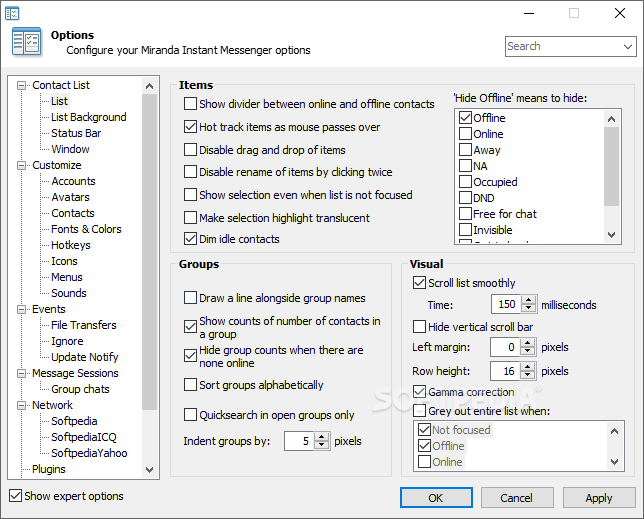
Ah yes the 90s/early 2000s way of designing desktop apps.

https://windows-cdn.softpedia.com/screenshots/miranda-im_12....

Re: Firefox 76

#228
post #174

Earlier quoted context omitted.

I disabled it in the first 15 minutes. I just hope they don't remove the disable recipe. (about:config browser.urlbar.update1 -> false)

It has already been removed https://phabricator.services.mozilla.com/D70023

Ah Goddamnit. That "megabar" is going to drive me away from Firefox. (And into the arms of Vivaldi, or something like that...)

Re: Firefox 76

#229
post #45

Whenever I start up Firefox it tells me to wait a few moments while it updates. The browser obviously doesn't care about me. It has its own agenda. This is why I won't use it.

Ah that happens to me too every once in awhile and it's absolutely infuriating every time. Classic UI fail. It wouldn't be so bad if it just asked for permission first.

Re: Firefox 76

#230
I wish there were more options to control tab priority and UI latency in firefox.

I have a respectable (2x8 core xeon, 164gb ram) workstation running linux and I have many tabs/windows open with various references spread across virtual desktops optimised for tasks (work project 1, 2, education, personal project,... etc).

I've experimented with various extensions that pause tabs and currently use tab wrangler to auto-close tabs but it still gets slower to respond with ~50 tabs open across all windows. Sometimes I check the firefox & system task managers to see some basic reference tab (i.e. blog post) taking most of the CPU...

It would be great to be able to aggressively throttle inactive tabs or even pause them completely so only ram is used.

Some options around this use case would be much appreciated. Responsiveness under (almost) all conditions is much more important than raw benchmark throughput. Near instant tab resuming would be a huge help towards this goal as well.
Post reply on HN