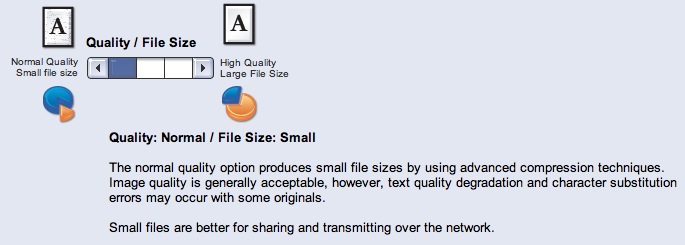
So they claim that the fine print warns about character substitution. But they still are willing to label the option with that problem "normal quality" and suggest using "high quality" to get strictly image compression applied with no OCR. They don't seem to understand that a photocopier should in its normal operating mode never do post-processing that creates such surprising and misleading artifacts - better illegib…
> We do not normally see a character substitution issue with the factory default settings however, the defect may be seen at lower quality and resolution settings. I might have read it wrong, but from how I understood it the default settings don't have this problem. It's when people adjust the quality settings to be lower. Am I wrong?
Xerox responds to the recent character substitution issue
21–30 of 72 posts
Re: Xerox responds to the recent character substitution issue
#22"We do not normally see a character substitution issue with the factory default settings..." It shouldn't be seen with any setting. Nothing you can do to the device (short of involving a hammer) should change the content in any way. Compress, resize, zoom, do whatever, but it simply must not change the content at any time at any resolution/quality. I'm just flabbergasted that such a compression scheme was ever implem…
So you only want non lossy compression as an option?
Re: Xerox responds to the recent character substitution issue
#23Sounds like the "recognized industry standard JBIG2 compressor" is just about useless for copy machines. Why even give a user the ability to do this? The only acceptable fix for this is to disable the ability to use lower compression qualities that have could EVER cause this to happen.
Re: Xerox responds to the recent character substitution issue
#24Earlier quoted context omitted.
This has nothing to do with OCR. It's an issue with the JBIG2 compression re-using similar patches as substitutes for certain areas of the images if they're "close enough". This issue is exacerbated at lower resolutions.
Thats OCR...
"Textual regions are compressed as follows: the foreground pixels in the regions are grouped into symbols. A dictionary of symbols is then created and encoded, typically also using context-dependent arithmetic coding, and the regions are encoded by describing which symbols appear where."
Then from the OCR wiki[2].
"Matrix matching involves comparing an image to a stored glyph on a pixel-by-pixel basis; it is also known as "pattern matching" or "pattern recognition"."
Furrow your brow and smash the down-vote arrow all you wish. It won't stop JBIG2 from doing much of what people consider OCR as doing today. Recognizing characters, just JBIG2 adds in making it's own dictionary which opened the path to this topic today.
[1] http://en.wikipedia.org/wiki/JBIG2 [2] http://en.wikipedia.org/wiki/Optical_character_recognition
Re: Xerox responds to the recent character substitution issue
#25Sounds like the "recognized industry standard JBIG2 compressor" is just about useless for copy machines. Why even give a user the ability to do this? The only acceptable fix for this is to disable the ability to use lower compression qualities that have could EVER cause this to happen.
JBIG2 is not the problem. It is perfectly possible to do lossless compression with JBIG2. They just set its options to do some overly aggressive compression.
"Normal" is an overly aggressive compression setting? Is that an overly aggressive setting for the end-user or for Xerox to be implementing in their hardware marketed to law firms?
Re: Xerox responds to the recent character substitution issue
#26I expected something better from Xerox, instead it is a sort of: "You are a stupid costumer, leave it on default and stop bothering me, it is not my fault you find bugs when not using the default."
Re: Xerox responds to the recent character substitution issue
#27Earlier quoted context omitted.
Well, it doesn't go all the way, at least in this implementation (contrary to Xerox's statement, we've been told compression is not standardized), to actually recognize the symbols it finds. If it did , it would presumably make many fewer of these errors, maybe almost none since when it's uncertain it could just go with the original.
O-SubC-R then perhaps. Still is recognizing shapes/symbols which is the very basis of OCR. This seems a bit hair splitty when the end result is the same as invalid OCR dictionaries.
Re: Xerox responds to the recent character substitution issue
#28Earlier quoted context omitted.
So you only want non lossy compression as an option?
By "lossy" you mean "17" may look like a crappier "17" with reasonable confidence, but will never, ever , become "21" at any compression setting, then I don't mind lossy. That's not asking for too much, is it?
Having various compression/quality options allows you to pick the tradeoff (file size/resulting quality) that is acceptable for your situtation. There is no perfect setting for all situations. Even the original bitmap is an imperfect (i.e. lossy) rendering of the original document.
Re: Xerox responds to the recent character substitution issue
#29Earlier quoted context omitted.
So you only want non lossy compression as an option?
By "lossy" you mean "17" may look like a crappier "17" with reasonable confidence, but will never, ever , become "21" at any compression setting, then I don't mind lossy. That's not asking for too much, is it?
Re: Xerox responds to the recent character substitution issue
#30Earlier quoted context omitted.
> We do not normally see a character substitution issue with the factory default settings however, the defect may be seen at lower quality and resolution settings. I might have read it wrong, but from how I understood it the default settings don't have this problem. It's when people adjust the quality settings to be lower. Am I wrong?
You are correct. The default setting is "high" or "higher"; I don't know which. The setting that may copy blocks of characters around is the lowest setting and is called "normal", and comes with some small print on the screen that actually warns you for the character substitution.