Live data from Hacker News

Mac external displays for designers and developers, part 2 (2022)

bjango.com

21–30 of 47 posts

Re: Mac external displays for designers and developers, part 2 (2022)

#21
post #3

This is an older article: Published 1 April 2022. Not about the new Apple Displays.

To be fair, the new Apple displays use the same panel so much of this still applies.

Do they? The new Apple monitor supports 120 Hz.

Re: Mac external displays for designers and developers, part 2 (2022)

#22
post #15
post #10

Earlier quoted context omitted.

Dell U4025QW. 40" Ultrawide 5k2k@120hz with Thunderbolt 4 built-in and 2.5Gbe.

Hah! I just ordered that today. ~$2200. Going to use it with a new Mac Studio.

Just make sure to test it out before the return window expires because the macOS is infamous, as you are probably aware, for struggling with monitor resolutions. I personally use a 32:9 ultrawide scaled to 2560x720 to get it to look crisp. Don't forget to look into BetterDisplay as well, neat application

Re: Mac external displays for designers and developers, part 2 (2022)

#23
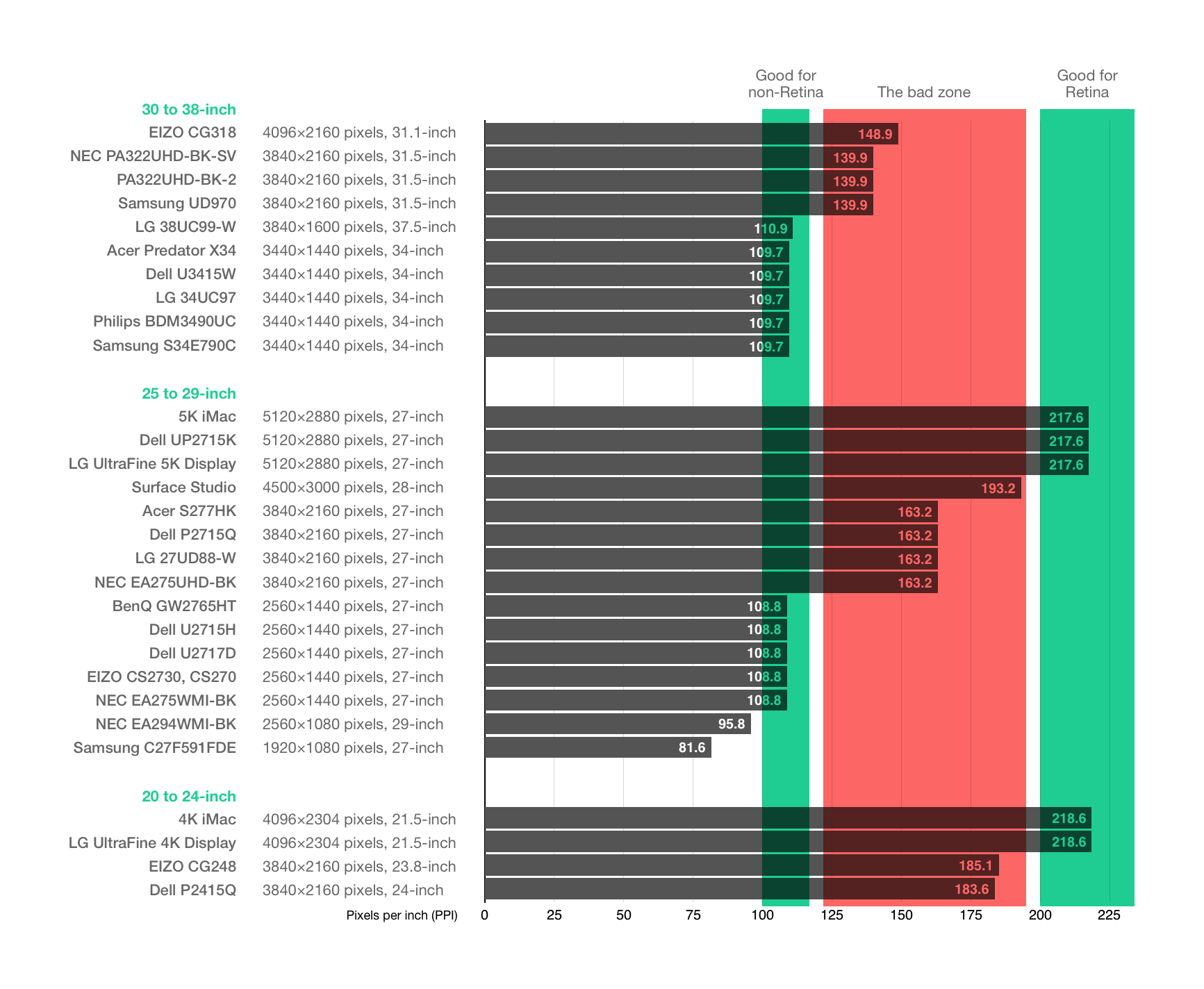
It’s clear that even in 2026 most people still don’t get the pixel density (PPI) argument. Or perhaps they get it but they don’t appreciate it. For me, any monitor that is not HIDPI (218 ppi) is a non starter. Maybe my eyesight is better than the average but looking at a non-retina display seems atrocious after having spent time working on a retina display.

Re: Mac external displays for designers and developers, part 2 (2022)

#24
>macOS has been designed to be legible and usable with a pixel density of about 218PPI (pixels per inch) for “Retina” class desktop displays. If a display’s PPI is higher, text and the macOS user interface will be smaller. If a display’s PPI is lower, text and the macOS user interface will be larger. Stray too far from 218PPI and macOS becomes unusable.

I some ways I wish I'd never seen a Retina display. I'm cursed to buy expensive monitors for the rest of my life.

Re: Mac external displays for designers and developers, part 2 (2022)

#25
post #10
post #6

Which monitor is recommended for work + gaming these days? Been on the fence for a new one but couldn't find any that is within my price range. The requirement I have is that it has to be 120Hz, probably OLED and it must have built in speakers. Any recommendations?

Dell U4025QW. 40" Ultrawide 5k2k@120hz with Thunderbolt 4 built-in and 2.5Gbe.

I too have this one. It is a great monitor, but mine has some coil whine unfortunately. And the coil whine is more noticeable when running the monitor at 120Hz. Before getting the U40 I tried 2x U2725QE but both had coil whine that was absolutely unbearable. Either I’ve been very unlucky or the 25 series monitors just all suffer from the same issue.

Re: Mac external displays for designers and developers, part 2 (2022)

#26
It would be nice if these comments were used to discuss this specific article rather than becoming a general dumping ground for unannotated brief announcements about what monitor somebody uses. What’s particularly frustrating is when a commenter posts their setup, it goes against the advice given in the article, but then there is no acknowledgement that the poster has even read the article or wants to justify their choice!

Re: Mac external displays for designers and developers, part 2 (2022)

#27
post #3

This is an older article: Published 1 April 2022. Not about the new Apple Displays.

To be fair, the new Apple displays use the same panel so much of this still applies.

The first sentence doesn’t: “ Since writing about Mac external displays in 2016, not much has changed.”

Quite a few Mac-oriented 5K and 6K displays have been released in the last few years. LG, Asus, Dell, Samsung, Benq, Viewsonic. Maybe some others as well.

Re: Mac external displays for designers and developers, part 2 (2022)

#28
It doesn't help the way that Apple is using "internal" resolution and scaling versus how Windows does it. If you aren't within the density of "retina" display [1.] then there's solid chance the image you're looking at will be blurry. Even though you might have high quality display (whatever the size and resolution are) if you don't play by the rules Apple had imagined you're in tough spot.

[1.] https://www.caseyliss.com/images/2017/5/marc-edwards-display...

Re: Mac external displays for designers and developers, part 2 (2022)

#29
Other displays with Mac-compatible PPI densities that have come out since 2022:

- BenQ PD2730S (5K)

- BenQ MA270S (5K, Thunderbolt 4)

- Asus PA27JCV (5K)

- Acer ProCreator PE270XT (5K)

- Asus PA32QCV (6K)

- Acer ProCreator PE320QXT (6K)

Announced at CES, not yet for sale:

- MSI MPG 271KRAW16 (5K)

- MSI MAG 271KPD7 (5K)

Re: Mac external displays for designers and developers, part 2 (2022)

#30
I use two LG 5K Ultrafine models. The quality is fantastic. Only two things to watch out for.

The first is burn-in. I now move windows about when I can, and also tend to use Dark mode for everything. I also set up BetterTouchTool to give me 10%, 20%, 30% etc brightness mapped to Cmd plus the numeric keypad. I use a comfortable level of brightness, and only bump it up for a short while when I need to examine something. I also have some anti burn-in videos downloaded with yt-dlp to clear burn-in when I find a ghost of it on the screen.

The other problem is screen activation. There is no power button on the LG displays. I like to keep the Macbook Pro in sleep mode when not in use, so I can resume with my app windows in the same state from the previous session. My whole desk setup is behind a smart switch. Often, when resuming from sleep, one of the displays would not wake and the only workaround was to unplug and replug the thunderbolt cable at the Macbook side. I work around this by having the Macbook continuously powered by my Orico dock when in use or sleeping, and this seems to address the problem. There is also an occasional issue of a single display switching off when I am using it, and this just means a thunderbolt unplug and replug at the Macbook side. But fortunately this has been fairly rare.

So, visually great hardware that I’m thankful for, but Apple’s “it just works” doesn’t really apply here. Just mentioning these in case someone is experiencing similar issues.
Post reply on HN