Does anyone have experience with carpal tunnel or RSI and mechanical switches? I’ve heard some people recommend ZSA keyboards for ergonomics but I’m unsure if mechanical keys are healthy compared to the softer keys of older ergonomic keyboards like the ones Microsoft made.
Membrane "switches" have a pretty high actuation force all things considered (40-100g+), which is what the older MS keyboards use. There are plenty of mechanical switches that require less force to actuate, and Hall Effect switches can even have an adaptable activation point.
A Beginner's Guide to Switches
21–30 of 42 posts
Re: A Beginner's Guide to Switches
#22No mention of buckling-spring?
Re: A Beginner's Guide to Switches
#23Does anyone have experience with carpal tunnel or RSI and mechanical switches? I’ve heard some people recommend ZSA keyboards for ergonomics but I’m unsure if mechanical keys are healthy compared to the softer keys of older ergonomic keyboards like the ones Microsoft made.
Re: A Beginner's Guide to Switches
#24Earlier quoted context omitted.
Membrane "switches" have a pretty high actuation force all things considered (40-100g+), which is what the older MS keyboards use. There are plenty of mechanical switches that require less force to actuate, and Hall Effect switches can even have an adaptable activation point.
I’m not familiar with Hall effect switches - any recommendations on a keyboard for ergonomic use?
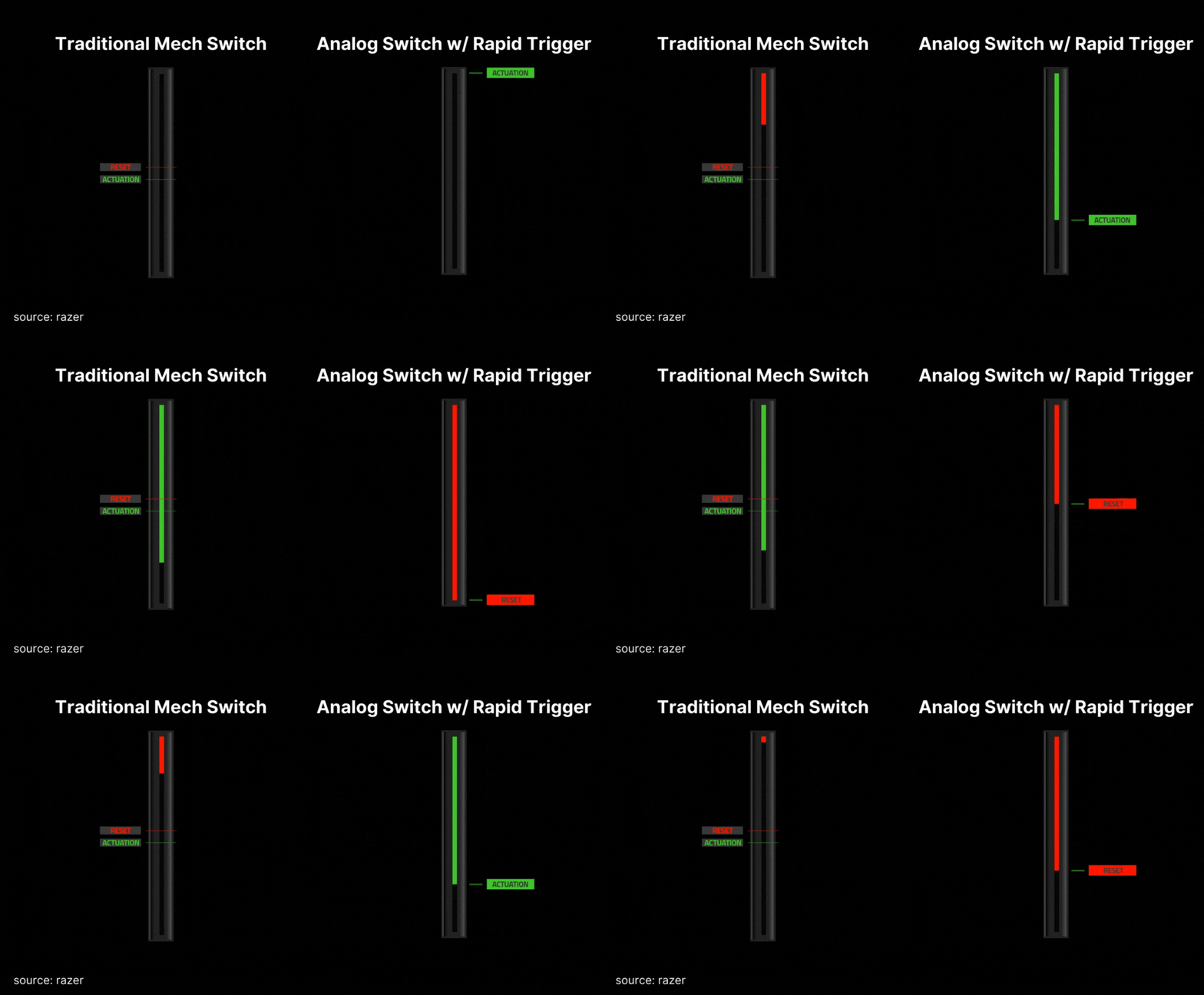
Most of them are on gaming keyboards due to the possibility of getting super small actuation and rebound windows for faster input.
So you'd probably need to do some DIY (there are switches available for purchase, might have to do more reasearch).
Re: A Beginner's Guide to Switches
#25Anyone else here prefer just a good old fashioned chiclet style keyboard? I've tried mechanical keyboards before and they don't appeal to me at all.
Re: A Beginner's Guide to Switches
#26I thought this was about network switches But it does amaze me how big the consumer market has become about keyboard switches, it has become insanely hobbyist. From buying a new keyboard I can appreciate how different each key can sound and feel but its become huge.
Re: A Beginner's Guide to Switches
#27Anyone else here prefer just a good old fashioned chiclet style keyboard? I've tried mechanical keyboards before and they don't appeal to me at all.
You mean Membran Keyboards? While there are membrane keyboards which feel half decent when new, they degrade very fast and especially uneven depending on key usage Thus I generally dislike them
I use three membrane chiclet keyboards since around 2018 that have no wear signs apart from plastic desaturation of a package.
There are good models and bad models, regardless of a type.
Re: A Beginner's Guide to Switches
#28I thought this was about network switches But it does amaze me how big the consumer market has become about keyboard switches, it has become insanely hobbyist. From buying a new keyboard I can appreciate how different each key can sound and feel but its become huge.
Result: got a WASD keyboard with clear switches in 2017 and have had no issues since, no sign of any wear, and little need to go down the endless rabbit hole. You're right though, the market for rabbit-holers has somewhat exploded.
Re: A Beginner's Guide to Switches
#29Aren't mag switches the new hotness?
Another semi recent one were optical switches (uses a tiny laser for when to actuate, lowest latency). Hall Effect is the one that's probably going to stay longer, due to the possibility of changing the actuation point to your liking.
This thing is here to stay, in the past I've tried all types of mechanical switches (Blue/Brown/Red) and this easily beats them all in competitive FPS, the responsiveness is on another level, and you just can't go back after that.
[1] https://prosettings.net/cdn-cgi/image/dpr=1%2Cf=auto%2Cfit=c...
Re: A Beginner's Guide to Switches
#30Maybe it would be useful to add "keyboard" to the title?