> ALSA is the core layer of the Linux audio stack. It provides low-level audio hardware control, including drivers for sound cards and basic audio functionality. > ... > Ulike PuleAudio and JACK, PipeWire does not require ALSA on a system, in fact if ALSA is installed the output of ALSA is very likely pushed through PipeWire I don't get this part. If ALSA represents the kernel level hardware drivers for audio, how do…
The Linux audio stack demystified (and more)
21–30 of 136 posts
Re: The Linux audio stack demystified (and more)
#22Earlier quoted context omitted.
Pipewire is a major development that's especially important for Wayland desktop. It was hard to miss unless you haven't used Linux in a long time.
I've been a WSL user for years now. Way less effort.
But yeah WSL is just too easy. Specially with native vscode support it has become a favourite for many developers
Re: The Linux audio stack demystified (and more)
#23Re: The Linux audio stack demystified (and more)
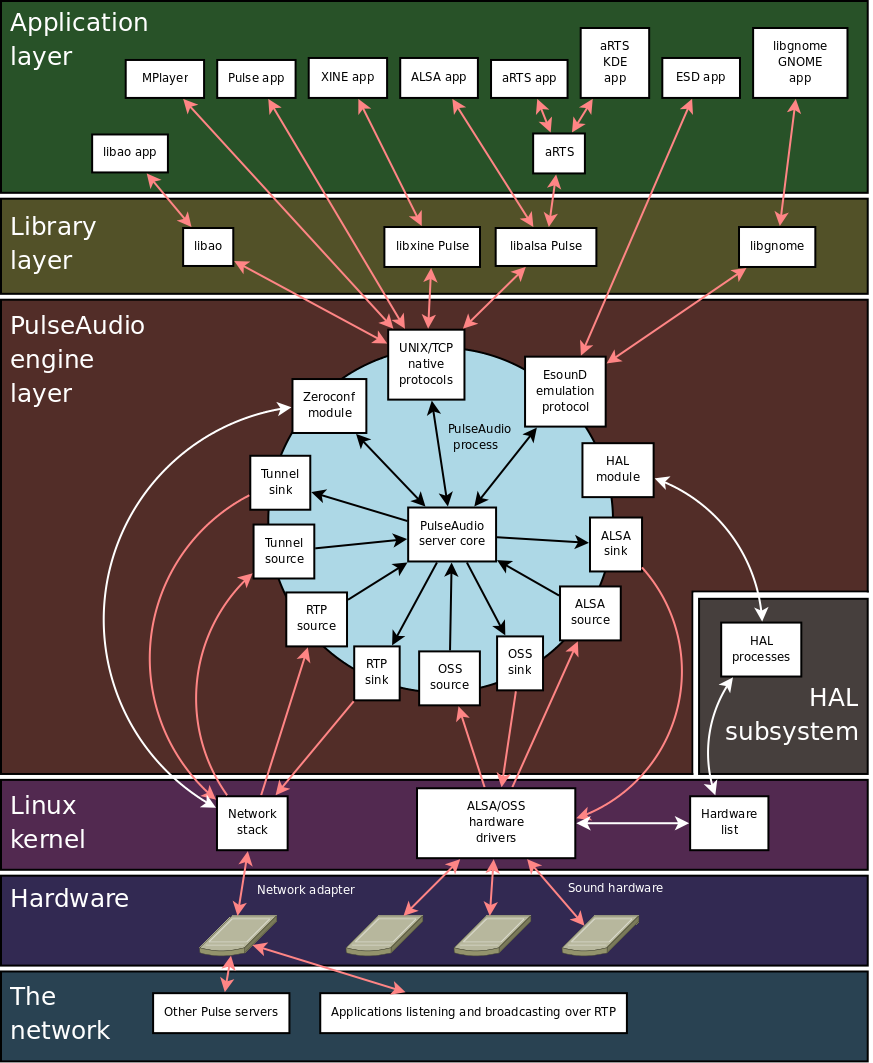
#24First, in the article, [1] shows in one single diagram where the complexity is coming from; the audio system has to handle a good deal of different hardware on many different systems and also provide extra functionality for multiplexing, network features, wireless headsets and their codecs, etc. All this: open source.
Second: linux is the only platform where everything works right now flawlessly for me: My Bose joins without any problems, switches to headset mode during zoom calls, switches back to high definition audio otherwise. I can select a different sink, even networked, whenever I want the output to appear on a different networked device. MacOS sometimes needs a reboot so that the bluetooth subsystem works, what the hell.
And all this worked with PulseAudio, and now works with Pipewire, which is an even higher quality iteration of PA.
I don't complain. I wish MacOS/Windows had such a versatile, configurable, but sanely-working-out-of-the-box audio system as an off-the-shelf Fedora, or even freaking Arch linux has.
HTH
[1]: https://blog.rtrace.io/images/linux-audio-stack-demystified/...
Re: The Linux audio stack demystified (and more)
#25I now have flashbacks to when I tried to get sound working on my Gentoo install 15 years ago. It seems that now everything has changed (wtf is pipewire) and still requires arcane knowledge to get everything working smoothly...
To be honest, I wouldn't say it requires arcane knowledge these days. When setting up both Arch and Gentoo, I did a bit of research, determined that Pipewire was probably the best for me (because it seems to be largely a superset of the other options), and installed it following the wiki instructions. That's it. I haven't had to configure things in any sort of detail, it just worked smoothly the first time without an…
Re: The Linux audio stack demystified (and more)
#26Re: The Linux audio stack demystified (and more)
#27Earlier quoted context omitted.
To be honest, I wouldn't say it requires arcane knowledge these days. When setting up both Arch and Gentoo, I did a bit of research, determined that Pipewire was probably the best for me (because it seems to be largely a superset of the other options), and installed it following the wiki instructions. That's it. I haven't had to configure things in any sort of detail, it just worked smoothly the first time without an…
Let me guess, you don't have a Realtek controller for audio.
Re: The Linux audio stack demystified (and more)
#28Re: The Linux audio stack demystified (and more)
#29I now have flashbacks to when I tried to get sound working on my Gentoo install 15 years ago. It seems that now everything has changed (wtf is pipewire) and still requires arcane knowledge to get everything working smoothly...
PipeWire is drop-in replacement for pshshaudio with additional features (while preserving pshsh part sometimes). Only difference is 15 years ago half of the problems with sound were fixed by uninstalling pulseaudio as it was in early stages full of bugs but still pushed to many distros similar to systemd. Today's pipewire is as easy as uninstalling pulseaudio, installing pipewire, and most of the times it will contin…
Re: The Linux audio stack demystified (and more)
#30I hear many complaining (even here) about "the mess" of linux audio. First, in the article, [1] shows in one single diagram where the complexity is coming from; the audio system has to handle a good deal of different hardware on many different systems and also provide extra functionality for multiplexing, network features, wireless headsets and their codecs, etc. All this: open source. Second: linux is the only platf…
OEMs also love to include all kinds of audio related bloatware, which makes getting audio hardware to work reliably(!) quite challenging. The HP laptop I'm typing this on has an "Intel microphone array" (just 2 mics) which has it's own intel drivers, but there's also some HP control panel, realtek and 'sound research' branded stuff, Fortemedia SAMsoft effects(?), Intel smart sound...
If I'm recording seriously, I usually just go to the device manager (devmgmt.msc) and disable as much as I can and enable devices in a trial-and-error way to see what the minimum is to get audio to work again. Otherwise, all kinds of 'enhancements' end up in the audio path.