Live data from Hacker News

Here is why vim uses the hjkl keys as arrow keys

catonmat.net

21–30 of 100 posts

Re: Here is why vim uses the hjkl keys as arrow keys

#21
Doesn't this go way back though?

The reason that keyboard had those arrows keys on it was because those keys correspond to CTRL-H, J, K, L and the CTRL key back then worked by killing bit 6 (and bit 5) of the characters being typed.

The effect was that H which is ASCII 0x48 would become 0x08 which is backspace. If you look at an ASCII table (e.g. http://www.asciitable.com/) you will notice how the uppercase ASCII letters line up nicely with the control characters so that just dropping bit 6 will get you there. Same thing with the lowercase (drop bits 5 and 6) and you are on the control characters.

The CTRL-H, J, K, L therefore correspond to BS, LF, VT, FF. BS is backspace (i.e. left), LF (down), VT is vertical tab (so up) and FF is form feed (which in this case takes you up). I'm not sure why FF was used for up.

This is also why CTRL-I is tab, CTRL-D ends a communication. All of that goes back to teletype days. Also for telnet users out there you'll see that CTRL-[ lines up nicely with ESC. And when you see a ^@ being printed on the terminal you can see why it corresponds to a null byte.

One other interesting thing about ASCII: uppercasing and downcasing can be done by twiddling a single bit.

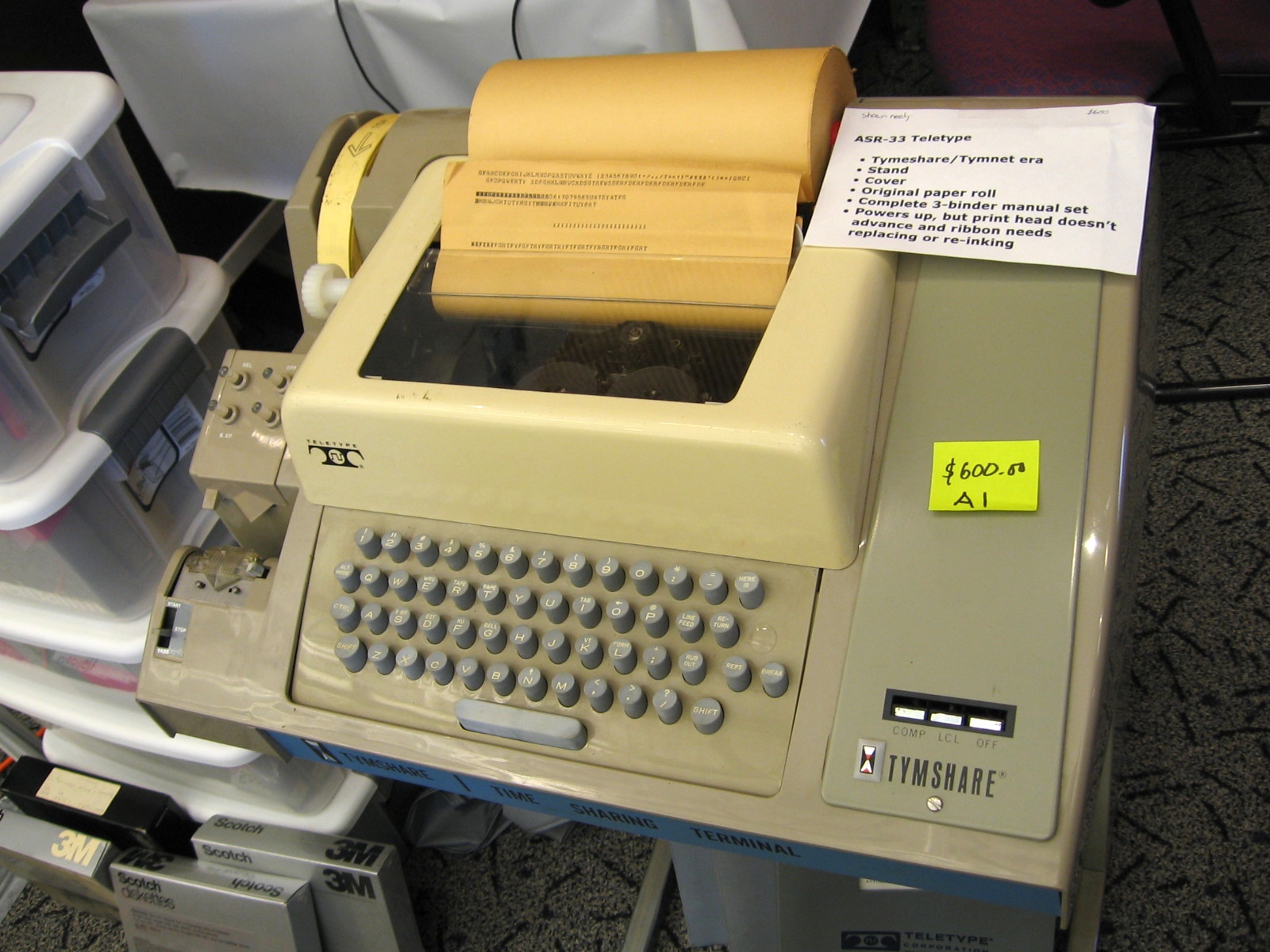
If you look at this picture of an ASR-33 Teletype you'll see that come of the control characters on the keyboard correspond to those in the ASCII set. This is because ASCII evolved from the earlier teletype character sets: http://upload.wikimedia.org/wikipedia/commons/0/0b/ASR-33_2....
Re: Here is why vim uses the hjkl keys as arrow keys

#22
post #10
post #4

I worry that the tone of the article seems dismissive of the choice that went into mapping those keys to arrow directions in vi ("That's the whole story"). As if to say it was mere happenstance that vi uses hjkl, and any other outcome was equally likely. It seems more the case that the designers of that computer chose those particular keys on the basis of a desire for efficiency that vi also followed, so there was no…

The "article" is barely three full sentence and includes two images. To me it clearly states why hjkl were chosen as the keys for navigating around the editor. How does the author's "That's the whole story!" ending make you feel like he's saying hjkl being used as the navigation keys was a coincidence?

Honestly perhaps it's partly a defensive reaction about a tool I like. If so, my bad. Maybe I can't help but feel like the "article" could be perceived as saying "see, vim chose these keys simply because that's what the keyboard said without any thought toward efficiency". The idea that they're chosen for efficiency seems so self-evident that it doesn't need a flourish to reveal. It's likely I'm thinking too hard about it. In any case, it is a neat little bit of history and the link gets my upvote.

Re: Here is why vim uses the hjkl keys as arrow keys

#23

Most of the answers I've seen as to why hjkl have fallen into the "so your fingers stay on the home row / it's actually quite fast once you get used to it" realm. But those answers were never completely satisfactory to me. Once you get used to it, it's fine. But I feel like it would have been fine as adsw, or jkl; (so that your hand really is on the home keys) or some other 4 key combination near the home row, too. T…

I use JKLI. The two main advantages are that you don't use your pinky finger repetitively, and the layout of JKLI makes intuitive sense as to what each key does.

Re: Here is why vim uses the hjkl keys as arrow keys

#25
post #2

Oh lord! I remember these unibody terminals. I had to use the Volker-Craig VC4404 . That thing was built like a tank. You had to hammer at the keys with great force. Soon one got into the habit of hammering on the keys all the time. And then one day I walked into the lab with shiny new VT-100 terminals with their soft keys; but started hammering on them by habit. And everybody turned around and looked at me as if I w…

I smiled when I saw how you call them "unibody" terminals. We have come a long way since then. :)

Re: Here is why vim uses the hjkl keys as arrow keys

#26
post #22
post #10

Earlier quoted context omitted.

The "article" is barely three full sentence and includes two images. To me it clearly states why hjkl were chosen as the keys for navigating around the editor. How does the author's "That's the whole story!" ending make you feel like he's saying hjkl being used as the navigation keys was a coincidence?

Honestly perhaps it's partly a defensive reaction about a tool I like. If so, my bad. Maybe I can't help but feel like the "article" could be perceived as saying "see, vim chose these keys simply because that's what the keyboard said without any thought toward efficiency". The idea that they're chosen for efficiency seems so self-evident that it doesn't need a flourish to reveal. It's likely I'm thinking too hard abo…

Maybe "efficiency" is implied, since folks using the initial version of vi would be used to using those keys for navigation anyway. So, I read this more as "Bill Joy used a convention" rather than "Bill Joy chose the most efficient keys for touch typists."

Re: Here is why vim uses the hjkl keys as arrow keys

#28

Most of the answers I've seen as to why hjkl have fallen into the "so your fingers stay on the home row / it's actually quite fast once you get used to it" realm. But those answers were never completely satisfactory to me. Once you get used to it, it's fine. But I feel like it would have been fine as adsw, or jkl; (so that your hand really is on the home keys) or some other 4 key combination near the home row, too. T…

I use JKLI. The two main advantages are that you don't use your pinky finger repetitively, and the layout of JKLI makes intuitive sense as to what each key does.

Once you get used to hjkl,it's pretty "intuitive" (in that you don't need to think about what you're doing).

Re: Here is why vim uses the hjkl keys as arrow keys

#30
post #11
post #7

It would have been a lot more useful if the link had said how/why the ADM-3A used hjkl as cursor keys.

Probably because it didn't have dedicated arrow keys. Many older terminal keyboards didn't.

But why did the terminal choose those keys? Most games have chosen an up-down combo that are up-down from each other, rather than right-left.

The thing about ASCII Control characters doesn't quite map to left-up-down-right, and even if it were part of the answer, we could ask again: why were those characters chosen for those control-roles?

Post reply on HN