Live data from Hacker News

Implementing Web accessibility guidelines for nondisabled users (2016)

journals.sagepub.com

21–30 of 42 posts

Re: Implementing Web accessibility guidelines for nondisabled users (2016)

#21
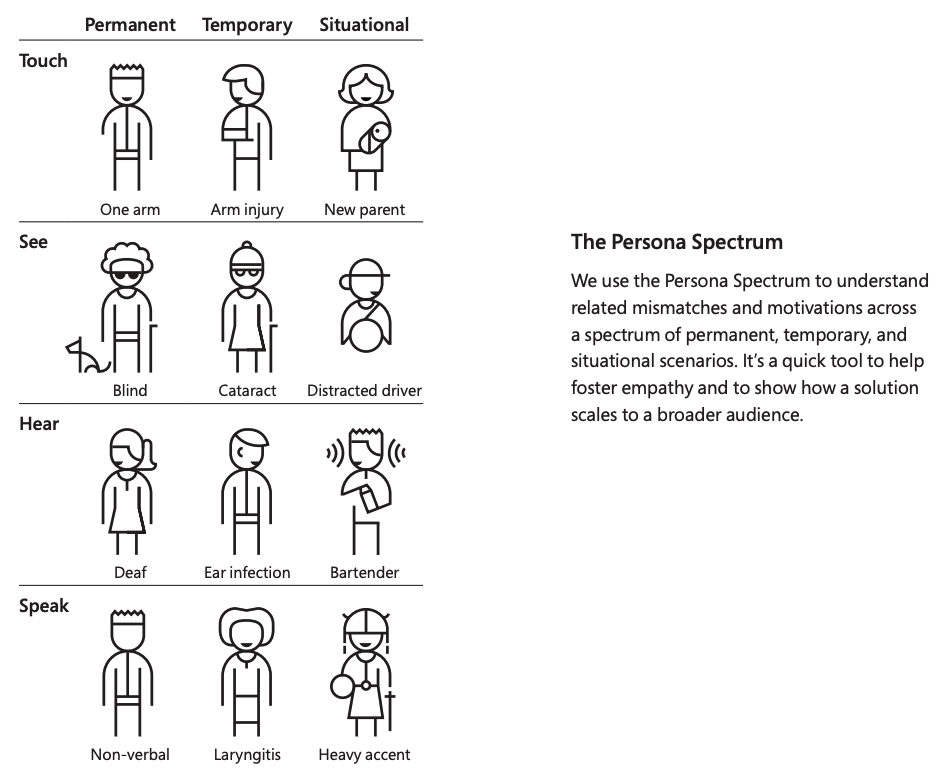
Absolutely, because not all disabilities are permanent. They can broken into lifelong disabilities, acquired, temporary, situational, and chronic (potentially among others). Just think of how many people who can hear still use captioning on their TVs. Or how easy your website is to reading on a phone during a bright, sunny day. Or how usable your stuff is for someone holding a child in one arm. Accessibility (and thus, WCAG’s success criteria) helps everyone.

I don’t think it’s unusual that creators who have thought about accessibility have also thought a lot about UX, etc. So there may be some correlation there. But as others have posted, while there are some criteria more targeted at those using assistive technology (like screen readers), there are just as many things helping everyone else.

Besides all that, none of us are getting younger, and with age comes reduced mobility, dexterity, sight, hearing, etc. You never know what tomorrow brings. Someone who self-identifies as having no disabilities today may have a different experience tomorrow.

But then again, web accessibility is what I do for a living, so of course I’m a bit biased. :)
Re: Implementing Web accessibility guidelines for nondisabled users (2016)

#22

Certainly many things recommended for disabled users are of great benefit to non-disabled users, but there are also things that are recommended against for disabled users that the lack of can slightly hinder the usability of sites or applications. One particular thing is that it is generally recommended against auto focusing in fields, but for sighted non-keyboard navigating users there are many applications in which…

It would seem browsers would benefit from an easily-toggleable "disable auto-focus" option. That seems like a win/win to me

Re: Implementing Web accessibility guidelines for nondisabled users (2016)

#24

Absolutely, because not all disabilities are permanent. They can broken into lifelong disabilities, acquired, temporary, situational, and chronic (potentially among others). Just think of how many people who can hear still use captioning on their TVs. Or how easy your website is to reading on a phone during a bright, sunny day. Or how usable your stuff is for someone holding a child in one arm. Accessibility (and thu…

Famous pic about situational disabilities:

https://devblogs.microsoft.com/xamarin/wp-content/uploads/si...

(Google keyword: "microsoft inclusive design situational accessibility"; ironically, the canonical image comes from a guideline at https://www.microsoft.com/design/inclusive/ which is a PDF -- nowhere as accessible as web)

> people who can hear still use captioning on their TVs

Something that is rarely mentioned: foreigners who are learning the language. Captions are a turbo booster of learning, without them it can take years to understand what's up in TV when you're learning from zero.

Re: Implementing Web accessibility guidelines for nondisabled users (2016)

#25
Accessibility is about much more than aria tags. When done well it is a holistic approach that benefits any user. It really shines when included in the design process because it can depend on how information is organized. Having a rational flow to the sections of content pages helps anyone. For example, modals are often a cheat to escape good content design. Also, every site that I have made an effort to implement accessibility had SEO benefits.

Re: Implementing Web accessibility guidelines for nondisabled users (2016)

#26
What is accessibility, exactly?

I think the name says a lot: access ability.

To me, it means allowing to access.

There is no word disability anywhere in there. It has nothing to do with disability.

It is about thinking ahead about different scenarios and situations you users could find themselves in and trying to address them.

Is a slow or unreliable connection an accessibility issue?

Well, does it prevent someone from accessing your service?

What if someone has an older browser and has no control over it, unable to upgrade either the device or the software?

Will your service refuse service to them?

Vision impaired and such "extreme" accessibility challenges are only the tip of the iceberg, and I think most Web developers today are hiding their head in the sand, creating a rather rude experience for all except those privileged enough to be both physically able and not situationally impaired.

Re: Implementing Web accessibility guidelines for nondisabled users (2016)

#27
At the university, no less, I could never get my web accessibility push validated by anyone. It was awful.

Finally, I flipped the script. Making something more accessible generally gives it more SEO juice, in my experience (such as it was back then), and I could always sell people on that.

Re: Implementing Web accessibility guidelines for nondisabled users (2016)

#28

Certainly many things recommended for disabled users are of great benefit to non-disabled users, but there are also things that are recommended against for disabled users that the lack of can slightly hinder the usability of sites or applications. One particular thing is that it is generally recommended against auto focusing in fields, but for sighted non-keyboard navigating users there are many applications in which…

> One particular thing is that it is generally recommended against auto focusing in fields [...]

What do you mean by "generally recommended"? The publication reviews WCAG 2.0. I don't know any WCAG recommendation that fits your described annoyance. In fact, WCAG 2.1 does recommend to e.g. put focus on the first form element with failing form validation, see https://www.w3.org/WAI/tutorials/forms/notifications/#after-...

More information: https://www.w3.org/WAI/WCAG21/Understanding/on-focus.html

Re: Implementing Web accessibility guidelines for nondisabled users (2016)

#29
post #24

Absolutely, because not all disabilities are permanent. They can broken into lifelong disabilities, acquired, temporary, situational, and chronic (potentially among others). Just think of how many people who can hear still use captioning on their TVs. Or how easy your website is to reading on a phone during a bright, sunny day. Or how usable your stuff is for someone holding a child in one arm. Accessibility (and thu…

Famous pic about situational disabilities: https://devblogs.microsoft.com/xamarin/wp-content/uploads/si... (Google keyword: "microsoft inclusive design situational accessibility"; ironically, the canonical image comes from a guideline at https://www.microsoft.com/design/inclusive/ which is a PDF -- nowhere as accessible as web) > people who can hear still use captioning on their TVs Something that is rarely mentioned…

Absolutely! Low literacy and illiteracy effects about 2 billion people in the world, and can include everyone using your primary language as their secondary language. Even if they’re getting by with running your site through Google Translate or whatever, the less you write in complex concepts, jargon, or regional idioms, the more likely they’ll be able to accurately comprehend your message.

And Microsoft’s toolkit is wonderful. My favorite part of working in accessibility for [big company] is that we don’t have business rivals in the a11y space. Everyone is in it to get better together.

Good accessibility is too often a competitive advantage in web products, when it should be the standard.

Re: Implementing Web accessibility guidelines for nondisabled users (2016)

#30

Absolutely, because not all disabilities are permanent. They can broken into lifelong disabilities, acquired, temporary, situational, and chronic (potentially among others). Just think of how many people who can hear still use captioning on their TVs. Or how easy your website is to reading on a phone during a bright, sunny day. Or how usable your stuff is for someone holding a child in one arm. Accessibility (and thu…

I often use a hypothetical case of a user who’s mouse just ran out of batteries when trying to pitch how important keyboard accessibility is. Most of the time my bosses become empathetic towards that situation.
Post reply on HN