Live data from Hacker News

Paperlike Color: Color E-Ink Monitor

indiegogo.com

181–190 of 199 posts

Re: Paperlike Color: Color E-Ink Monitor

#181
post #32

Earlier quoted context omitted.

I don’t know that there is any technical reason why e-ink can’t develop a better refresh rate to match what we are used to, at least theoretically. I don’t think its refresh rates are capped in that way. The real problem is cost of course. Part of that is e-ink is still governed under a patent you must license and pay royalties to if I recall correctly

The ink has to actually move; all sorts of physics sets hard caps to the refresh rate. Not saying they won't improve from what we have; but compared to the switch time of an OLED this isn't just lack of investment.

Whats the theoretical cap? Gen pop likely can live with 30fps if we eventually get there.
Re: Paperlike Color: Color E-Ink Monitor

#182
post #69

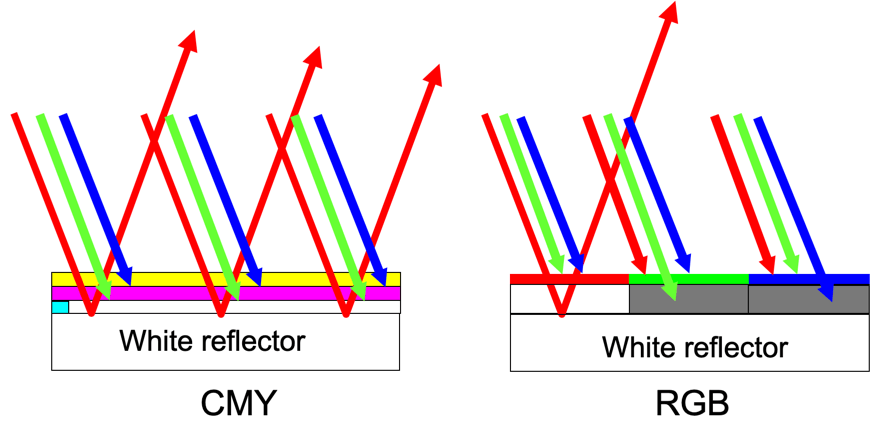
Do not miss an important detail: it is Kaleido. It means, it uses an overlaid colour filter matrix (RGBW, if I remember correctly). This allows for the comparatively high refresh rates of B/W EPD, but it is B/W EPD with a semi-transparent multi-tinted layer on top, which obviously impacts the brightness. (The alternative would be multi-pigmented EPD cells - "Advanced Color E-Paper"... Which suffers from dramatically…

Here's a diagram to help explain your point: https://etulipa.com/wp-content/uploads/2020/04/lightreflexti...

The one on the right is Kaleido (CFA tech). See how you lose 2/3 of the light? Monochrome (and ACEP etc) doesn't have that problem. Just CFA.

(This diagram is from Etulipa, and is meant to explain a benefit of their billboard-sized passive displays compared to CFA tech; Etulipa tech is really cool but it's not suitable for e-readers or desktop monitors, as they found out the hard way back in ~2010.)

(CFA = Color Filter Array)

Re: Paperlike Color: Color E-Ink Monitor

#183
post #161

Earlier quoted context omitted.

I have a remarkable 2 and use it to read PDF and e-books. e-pub was slow, so I use PDF. It doesn't have to phone home or use the cloud, which is sort of refreshing. I have never hooked it into any network or even bothered updating the software. I use USB which becomes a network interface, then connect to http://10.11.99.1/ and drag/drop files. This is all local. No built-in lighting, but it works great with a reading…

> remarkable 2 Fun fact, you can hook this up to your computer and use it as a drawing tablet, maybe I should open-source my plugin for this :) > only nit, is sometimes swipe when turning pages is ignored and I have to do it a couple of times. (Maybe it is sleeping and needs to be woken?) It's an issue with how you do the gesture, I have the most luck doing it around 60% down the screen, from one edge to the other, a…

Your comment about the gesture made me laugh. It reminded me of when Jobs said that people were holding the iPhone incorrectly for antenna gate

Re: Paperlike Color: Color E-Ink Monitor

#184
post #161

Earlier quoted context omitted.

I have a remarkable 2 and use it to read PDF and e-books. e-pub was slow, so I use PDF. It doesn't have to phone home or use the cloud, which is sort of refreshing. I have never hooked it into any network or even bothered updating the software. I use USB which becomes a network interface, then connect to http://10.11.99.1/ and drag/drop files. This is all local. No built-in lighting, but it works great with a reading…

Epub is basically just html, so it being slow on remarkable is pretty damning for the device.

It really depends on how large the book is. I believe that when you first open the book the remarkable has to render all the pages, that way the page content doesn't drift as you navigate between pages like on a normal e reader, but you can't do that with something that you annotate based on pages and location on the page.

Re: Paperlike Color: Color E-Ink Monitor

#185
post #117

Earlier quoted context omitted.

Have been thinking about one of these for writing. Is it something you recommend for that express purpose? Note: I can't just use an e-ink screen w/keyboard and a simple text editor, I used a handful of specialized writing programs like Scrivener and FinalDraft and often collaborate in Gdocs, so I need something that mirrors the screen of a personal computer unfortunately. My goal is to be able to spend more time out…

You can, but satisfactory text editors on Android can be hard to find. No issue with a large enough EPD tablet, a BT keyboard, a good text editor, good configuration and your ability to adapt to the system (latency etc.)

If you install termux you can use micro or vim.

Re: Paperlike Color: Color E-Ink Monitor

#186

My unsolicited advice: turn on a lamp in your workspace, and turn down your monitor brightness. An app like twinkle tray makes adjusting screen brightness as easy as adjusting speaker volume. Your eyes really don't care about emissive or reflected light.

One advantage here is for well-lit areas, like if you have a window seat. More light makes the kaleido display sharper, rather than making it frustrating. It can change how you lay out your office, and make things like adjusting blinds less necessary.

Re: Paperlike Color: Color E-Ink Monitor

#187
post #168

Earlier quoted context omitted.

If the update was truly pixel based there should be no ghosting/artifact whatsoever. Looks like global refreshes or cleanup are still relevant, while ideally each pixel could be completely independent. Trade-offs are a problem, but in this case i don't see any physical reason for this to be a theoretical trade-off. More like a limit of the current technology.

It is pixel-based, it just doesn't result in perfect updates. I'm not entirely sure why this is the case: maybe the power is too low (as a trade-off between speed and accuracy), maybe clear a cell affects neighbouring cells, or maybe something else. E-ink displays are hardly new and lots of people have been thinking about/working on the slow refresh rates for over 2 decades. Do you really think that anything you can…

There's a big difference between having a solution and point out that there is no theoretical hard trade-off. ^^"

Re: Paperlike Color: Color E-Ink Monitor

#188
post #99

Earlier quoted context omitted.

If the update was truly pixel based there should be no ghosting/artifact whatsoever. Looks like global refreshes or cleanup are still relevant, while ideally each pixel could be completely independent. Trade-offs are a problem, but in this case i don't see any physical reason for this to be a theoretical trade-off. More like a limit of the current technology.

> If the update was truly pixel based there should be no Why? Nobody said that the cell is "reset". The cell is modified. The resulting state depends on the former state. This causes ghosting. To achieve what you are suggesting, the procedure would be e.g. to first set the pixel black, then white (reset to a base state), then the greyscale value of the intended content. This would slow down rendering dramatically, an…

That's a fair point, well made. In that case --- yeah, we just have to wait and hope for better solutions/materials for our screens!

Re: Paperlike Color: Color E-Ink Monitor

#189

Earlier quoted context omitted.

If the update was truly pixel based there should be no ghosting/artifact whatsoever. Looks like global refreshes or cleanup are still relevant, while ideally each pixel could be completely independent. Trade-offs are a problem, but in this case i don't see any physical reason for this to be a theoretical trade-off. More like a limit of the current technology.

It is pixel based logically, which comes out only imperfectly physically. Believe what you will.

Yeah, the other replies were pretty convincing about that point.

Re: Paperlike Color: Color E-Ink Monitor

#190

Earlier quoted context omitted.

> remarkable 2 Fun fact, you can hook this up to your computer and use it as a drawing tablet, maybe I should open-source my plugin for this :) > only nit, is sometimes swipe when turning pages is ignored and I have to do it a couple of times. (Maybe it is sleeping and needs to be woken?) It's an issue with how you do the gesture, I have the most luck doing it around 60% down the screen, from one edge to the other, a…

Your comment about the gesture made me laugh. It reminded me of when Jobs said that people were holding the iPhone incorrectly for antenna gate

I mean it's sort of true! I'm not sure exactly which heuristics reMarkable is using but they seem not to work super well. I have the same issue on the rM2 unless I do like a Perfect High-Quality Swipe, so it's apparently important. Though, IMHO, waiting for the screen to finish refreshing is the most important part.
Post reply on HN