Live data from Hacker News

Redesigned Notepad for Windows 11

blogs.windows.com

181–190 of 314 posts

Re: Redesigned Notepad for Windows 11

#181
They added much more whitespace. In line with modern UI fashion trends.

Please can we stop this trend? It's ridiculous. It universally makes the user experience worse by reducing the effective screen real estate for actual work. Nobody cares about the aesthetic, they get used to it after a few session.
Re: Redesigned Notepad for Windows 11

#183

I hope they put in some way to search Bing using Edge, with no way to change the search provider or browser I use.

The Windows 10 version of Notepad already has a Search with Bing feature in the edit menu with keyboard shortcut Control-E. However, it does respect the default browser choice.

Re: Redesigned Notepad for Windows 11

#184

Earlier quoted context omitted.

For the record, I also dislike smooth scrolling in the Start menu, settings app etc. With Edge, they lowered the animation speed from baseline Chromium to match that I think. In Chrome it's nice at high refresh rates and looks buttery smooth, but at 60Hz it's too choppy so I turn it off there. It seems that the Edge devs have opted for a slower (=smoother) animation, optimized for 60Hz screens, whereas Chrome has opt…

There are flags for this. There is a flag to toggle “Microsoft Edge scrolling personality” in Edge and there is a flag to toggle smooth scrolling overall.

I am aware of these, yeah - "Microsoft Edge scrolling personality" is only for touch scrolling gestures as far as I can tell, it doesn't affect scroll wheel scrolling for me.

I've disabled smooth scrolling in Edge because of this, yes.

Re: Redesigned Notepad for Windows 11

#185

windows 10 + 11 is such a mess. It's just a pretty skin on top of the same Windows NT Window chrome. The modern UI skin is baked in with a bunch of none-sensical UX decisions. I also hate how Windows' happy-path setup, does not encourage use to create and operate with a low privileged local account. Instead, if you click through the setup process, you end up running the OS w/ an admin level account.

Isn't that how most operating systems are? macOS and most Linux distros direct the user to creating and living in an "Administrator" account, but require confirmation from the user (or extra steps) whenever invoking the privileges that comes with.

Re: Redesigned Notepad for Windows 11

#186
post #111

I worked on Windows back in 2014, probably the most surprising thing joining there out of college was looking through the bug database. Every issue that gets complained about online -- and many more -- are in there, and have been for a long time, marked WONTFIX due to a potential compatibility break, lack of priority, or some other policy reason. I don't know if anyone even owned Notepad or any other older inbox apps…

I have an app that has run on every version of Windows from 2000 through Windows 10. It now doesn't work in Windows 11 because they didn't reimplement the IDeskBand interface for the taskbar that my app uses to show remaining battery time. My app is even part of their compatibility test suite (they asked me for permission and a license). I understand the need to move forward and that BW compatibility can be hinder th…

Are you the author of the BatteryBar pro by any chance?

Re: Redesigned Notepad for Windows 11

#187

Earlier quoted context omitted.

Also, Windows 10 removed the window borders so now you have to resize windows by grabbing their shadow. Years later I still regularly misclick.

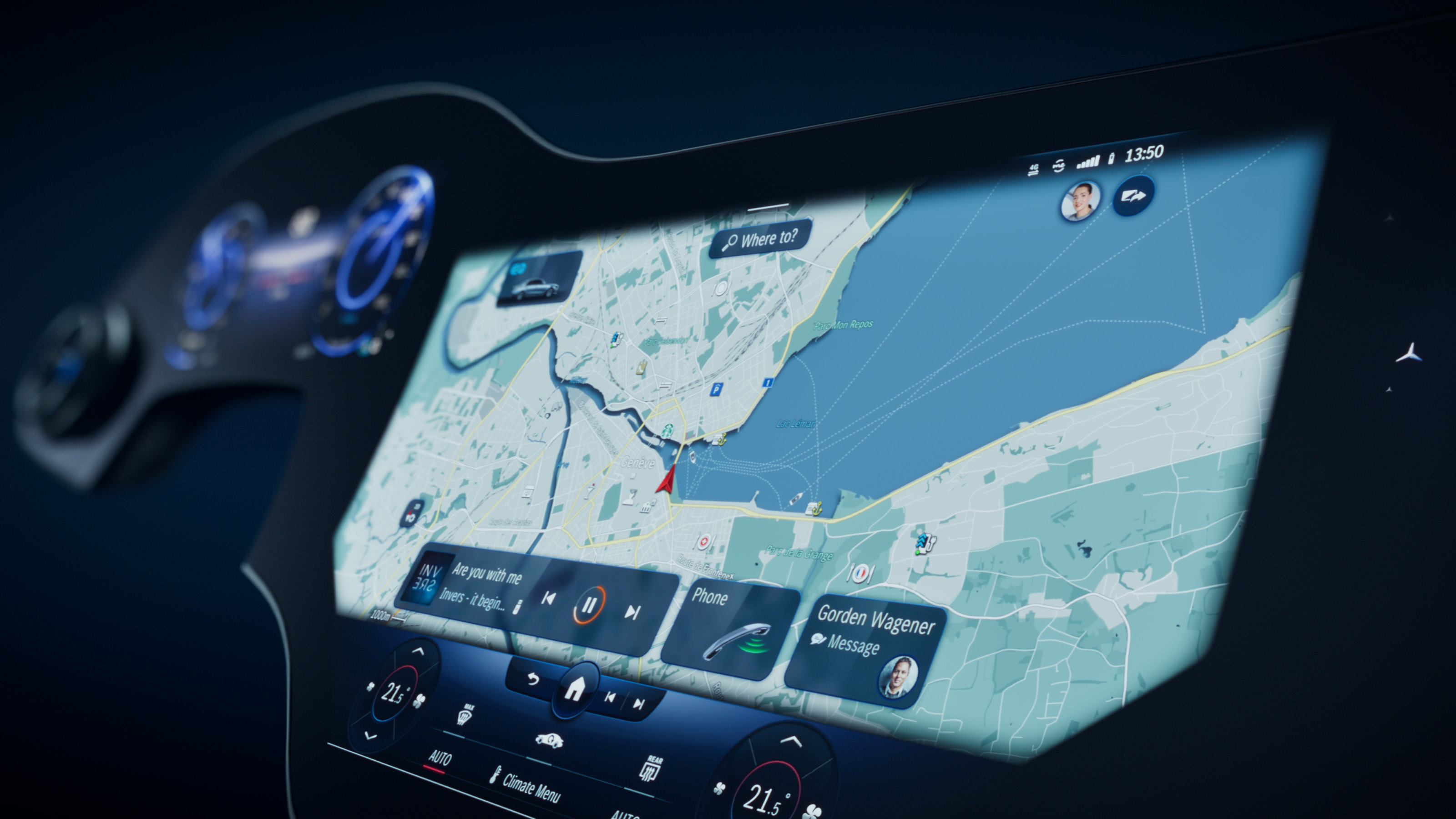
One of the things I've been rolling around in my mind for a while now is what would a "what's old is new again" reversion to the non-flat/minimalist style look like if done now. One of the things that strikes me with 4k displays is that there's a lot more pixels to throw around at elaborate designs, along with the skeuomorphic/physical representation of interactivity. I'm thinking back to the winxp era uxstyles skins…

It's probably only a matter of time.

I had a similar thought when I saw Mercedes new infotainment UI [0] -- the dark blue with heavy use of gradients is very reminiscent of vista-era design to my eyes.

[0] https://mediacloud.carbuyer.co.uk/image/private/s--av_nNtkN-...

Re: Redesigned Notepad for Windows 11

#188
post #186
post #111

Earlier quoted context omitted.

I have an app that has run on every version of Windows from 2000 through Windows 10. It now doesn't work in Windows 11 because they didn't reimplement the IDeskBand interface for the taskbar that my app uses to show remaining battery time. My app is even part of their compatibility test suite (they asked me for permission and a license). I understand the need to move forward and that BW compatibility can be hinder th…

Are you the author of the BatteryBar pro by any chance?

Yes, check their profile ;)

Re: Redesigned Notepad for Windows 11

#189

What happened to UI customizablity since windows 7/8? Windows XP use to have software to make shell look like anything. Only ever felt the need for skinning since windows 8 to go back to old UI which has clear borders and boundaries for everything including windows, buttons, menu bars, menus taskbar buttons...and lots of other things. Is it harder to skin now? Why there aren't any software to give windows its classic…

Designers happened.

Re: Redesigned Notepad for Windows 11

#190

10 minute QA because they don't seem to have done it: - It consistently starts slower than Notepad3 while having substantially fewer features to load (and also slower than the old Notepad of course) - THEY ANIMATED THE SCROLLING OMG PLEASE DONT DO THIS (especially when grabbing the scroll bar handle). Any amount of delay is too much in notepad - the animation runs at 60Hz even on a high refresh rate screen, so it loo…

The problem is that Microsoft is still pretending that UWP/WinUI isn't a complete mistake. All those issues are inherent to that technology.

Doesn't UWP/WinUI render using DirectX? What makes it so slow?
Post reply on HN