Earlier quoted context omitted.
VLC doesn't do anything particularly interesting, though. There are plenty of CDs that already apply this filter to the music, meaning there's no way you can play that CD without damaging their speakers. The problem is simply that the Dell speakers are piles of shit.
Yeah, this sort of dynamic range compression is standard for the music industry (sadly).
Installing VLC Media Player voids your speaker warranty
171–180 of 224 posts
Re: Installing VLC Media Player voids your speaker warranty
#172Earlier quoted context omitted.
Be fair, those caps are easily two or three times that much.
In relatively low quantities, yes: http://www.digikey.com/product-detail/en/CL05A105KP5NNND/CL0... But when you're buying them in quantities that a company like Samsung would (that above link is, amusingly enough, to ones that Samsung themselves make), the price drops off rather steeply. $0.001USD is around what I can find for buying them from China in 100Ku.
Re: Installing VLC Media Player voids your speaker warranty
#173Earlier quoted context omitted.
Agreed in principal, however all the ways that could prevent rogue userland software from playing damaging audio (eg. using a limiter of some sort) would either distort or introduce quite a bit of delay to otherwise perfectly safe audio played by responsible software.
How would it distort audio played by responsible software? Pick a limit where "100%" doesn't destroy the hardware. Enforce it. No distortion, done.
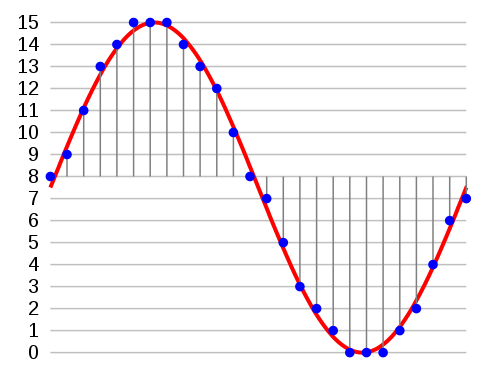
Audio is typically passed into a soundcard's digital audio converter (DAC) as integers representing samples of the audio waveform. For example, a full volume sine wave looks something like this[0]. That signal is perfectly safe to play on any hardware. However, if you take that same sine wave and increase the amplitude you end up with values outside the valid range so you have to cap them. You get something that looks like this[1].
Lopping off the tops and bottoms of the waveform is clipping, and the newly created sharp edges in the waveform are what can damage your speaker. They require a ton of energy to play (producing heat) and in some cases can trigger the buildup of high frequency harmonic oscillations in your speaker's voice coil that can eventually crack it. More expensive speakers last longer but virtually all speakers eventually "blow" under such circumstances.
The trouble is playing waveforms like that once in a while is totally ok and short bursts of very similar waveforms exist benignly in lots of stuff you listen to every day. And while it's trivial to know if you're creating clipped audio, it's very difficult (read: processor intensive) and error-prone to detect it after the fact. When you do detect it, your solutions are to either drastically lower the global volume so the edges have a lot less energy, or distort the waveform to make those edges more smooth. It's really, really hard to avoid false positives though and not end up "enforcing" against audio data that's natural and perfectly ok in moderation.
[0] http://upload.wikimedia.org/wikipedia/commons/thumb/b/bf/Pcm... [1] http://www.st-andrews.ac.uk/~www_pa/Scots_Guide/audio/clippi...
Re: Installing VLC Media Player voids your speaker warranty
#174As the main developer of VLC, we know about this story since a long time, and this is just Dell putting crap components on their machine and blaming others. Any discussion was impossible with them. So let me explain a bit... In this case, VLC just uses the Windows APIs (DirectSound), and sends signed integers of 16bits (s16) to the Windows Kernel. VLC allows amplification of the INPUT above the sound that was decoded…
Just from this comment, it seems like you guys have a pretty interesting problem domain. I'm going to take a look at the VLC repo and see if there's anything I can contribute, thanks for getting me interested!
Re: Installing VLC Media Player voids your speaker warranty
#175Earlier quoted context omitted.
> I don't know of any widely used definition of "clipping", But there is one. In electrical engineering, it's any process that arbitrarily limits a signal's amplitude. By far the most common meaning is a signal that exceeds the voltage range of an amplifier or signal pathway. > nor any definition that fits the context of this discussion, that allows for a signal's peak value not to be reduced. See above. > It's calle…
We must be talking past one another. I thought I was speaking in the electrical-engineering sense of clipping (my undergrad studies were in EE). In any case, to make sure we're talking about the same things, I'll be more formal. Let y ( t ) by a time varying signal. Now define a maximum amplitude V > 0. Let us say that clipping occurs at time t if | y ( t )| > | V |. Define the clipped version of y to be w ( t ) = ma…
Re: Installing VLC Media Player voids your speaker warranty
#176Earlier quoted context omitted.
How would it distort audio played by responsible software? Pick a limit where "100%" doesn't destroy the hardware. Enforce it. No distortion, done.
It's more complex than that. Let me explain: Audio is typically passed into a soundcard's digital audio converter (DAC) as integers representing samples of the audio waveform. For example, a full volume sine wave looks something like this[0]. That signal is perfectly safe to play on any hardware. However, if you take that same sine wave and increase the amplitude you end up with values outside the valid range so you…
If it's a factor of 2, for example, just take the 3dB volume loss and move on.
I don't see why detecting the situation is so hard, though. Build a simplistic model of the amount of energy dumped into the speaker and the amount dissipated, run the audio through that model, and then limit the volume when the amount still in the speaker gets too high. This would let through small amounts and limit large amounts, just like you'd want. For a really simplistic model, run the signal through a high pass filter, integrate the output, then apply a running average to that. When the running average surpasses a value that indicates the speaker is reaching its limit, cut the volume. I take it that this doesn't work?
Re: Installing VLC Media Player voids your speaker warranty
#177Earlier quoted context omitted.
Low quality speakers and a poor hardware design. It isn't even a challenge to match amplifier output to speakers in such a way that the amplifier can't break the speaker. There are easily a dozen cheap ways to make this work properly that don't rely upon a probably non-existent WMP based solution. >VLC does not, and cannot modify the OUTPUT volume to destroy the speakers. That would be remarkable. >And as VLC is pres…
Dell may be using poor quality parts. VLC can also make the sound louder than any other media player that I've used while generating destructive square clipping. The problem is it's too easy to set the volume above 100%. I've done so with the mouse wheel. And I now have a $2000 out-of-warranty laptop with blown speakers. Fixes could include: * Not remember settings above 100% between sessions unless an advanced optio…
That makes a lot more sense than force software to not do something it can and should do "just in case Dell failed at their job".
Re: Installing VLC Media Player voids your speaker warranty
#178Earlier quoted context omitted.
Then one should figure out why nobody needed this feature. I'm no expert but maybe it's actually possible to create speaker that doesn't go bad. (I could code the protection into the sound driver in half a day probably)
> I'm no expert but maybe it's actually possible to create speaker that doesn't go bad. Of course it is, but nobody wants to do that; it's not profitable. * sigh * . I sometimes wonder how difficult would it be to create, say, a brand of kettles with lifetime warranty, designed to last 50+ years instead of 50+ weeks the ones we have do. How hard would it be to sell them and to what ends would the competition go to st…
We've given up trying to buy "good" coffee makers. We just buy something cheap that's on sale and throw it away when it breaks. There should be the equivalent of "Gresham's Law" for consumer goods (the bad eliminates the good). But I don't know the name of that. Perhaps "China's Law" would be appropriate.
Re: Installing VLC Media Player voids your speaker warranty
#179Earlier quoted context omitted.
Audio is generally handed over to the OS via a format called Pulse Code Modulation. This is a series of audio "samples", which in the Windows case are individual signed 16-bit integers. Typically each second of audio is broken into about 44,100 of these integers. Each integer represents the sound amplitude during a particular 1/44,100th of a second, with a large negative number (-32,768) being a small amplitude and a…
While any software that accesses an audio interface using integer formats, VLC is to my knowledge the only average user-oriented program that can end up in such situations. I would suggest VLC disables this feature for new installs and move it to an easily discoverable preference. Or if they really care enough to allow their users to boost the volume levels of quiet movies to replace the gain multiplication with a pr…
Re: Installing VLC Media Player voids your speaker warranty
#180Earlier quoted context omitted.
wait, so you currently have an infected computer on your home network?
Secunia reports that I need to update VLC Media Player on a computer from which I recently removed a lot of malware (with the help of Malware Bytes, of which I have a purchased copy on that computer). I installed Secunia on the same computer, and it has not been able to do its update of VLC Media Player, nor have I been able to get an update of that to install by going directly to the VLC Media Player website and dow…