Live data from Hacker News

Building a Budget Homelab NAS Server

mtlynch.io

171–180 of 316 posts

Re: Building a Budget Homelab NAS Server

#171
post #132

Earlier quoted context omitted.

Yeah, Ubuntu has done a pretty good job with ZFS on root installation. Zero setup, works out of box. Highly recommend ZFS and Ubuntu with ZFS!

I think for me I am more concerned about trying to get the OS bootable again, if something becomes corrupted on the OS level. Even with MD RAID it came be a bit of a struggle to recover, but ZFS on Root seemed much harder to troubleshoot and repair. Perhaps I am mistaken in this belief though?

Isn’t ZFS there precisely to address your concern?!

If OS doesn’t boot, you boot from the latest snapshot! Every time you run apt-get upgrade, a system snapshots is taken automatically and an entry is added to boot menu.
Re: Building a Budget Homelab NAS Server

#172
post #49

Author here. I consider myself an intermediate homelabber and a TrueNAS beginner. I just built my first NAS server, so wrote this to capture everything I wish I'd known at the start. I hope it's helpful for anyone else thinking about building their first NAS server. Any questions or feedback about the post are more than welcome.

> Performance topped out at 111 MiB/s (931 Mbps), which is suspiciously close to 1 Gbps.

That's because of overhead in TCP over IPv4. You're testing the payload throughput, not the physical throughput. The theoretical maximum performance without jumbo frames is around 95%.

https://en.wikipedia.org/wiki/Jumbo_frame#Bandwidth_efficien...

Re: Building a Budget Homelab NAS Server

#173

> Power usage A 500W PSU won't necessarily draw more than a 250W PSU, that is merely its maximum sustained load (what the rest of the system asks for) rating. The Bronze 80+ rating is likely part of the problem here, that indicates what the power draw from the wall is compared to what is being provided to your system. Titanium 80+ would net you about 10% reduction in wall power usage. Keep in mind that manufacturers…

"A 500W PSU won't necessarily draw more than a 250W PSU"

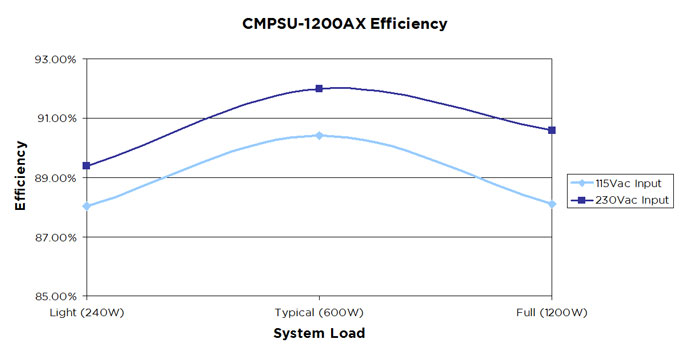
Mostly true, but not exactly. Most computer PSUs are more efficient when operating around 50% of their rated load. So if a computer consumes 125W internally, a 250W PSU would translate to lower power consumption measured at the wall than a 500W PSU, typically by about 2-5%.

For example see the chart https://www.sunpower-uk.com/files/2014/07/What-is-Effciency.... (115 VAC input) : 88% efficiency at 25% load, vs 90.5% efficiency at 50% load. In practice if the consumption is 125W at the PSU's DC output, this translates respectively to 142W vs 138W measured at the wall.

This 2-5% difference may not seem much, but it's similar to upgrading 1 or 2 levels in the 80 PLUS ratings (Bronze, to Silver, to Gold, to Platinum, to Titanium).

Re: Building a Budget Homelab NAS Server

#174
Thought I'd chime in here with my low-cost NAS/backup server/home server.

It's running in a 2U case I got from servercase UK that takes 6 hard drives, it's running:

- Core i3 9100T (35w TDP, configurable down to 25W)

- Asrock Rack WS246I (mini itx workstation board, no need for an HBA as there are 8 SATA ports on board, 4 standard and another 4 from the OCuLink)

- 32GB ECC DDR4 (2 16 GB sticks)

- Solarflare 7 series 10Gb SFP+ NIC (second hand, from ebay)

- 6 ironwolf 4TB NAS drives

Total cost was just a shade under 1000 GBP and it's racked up with my networking gear in the garage.

Re: Building a Budget Homelab NAS Server

#175
post #123
post #63

I wonder if it’s possible to back up ZFS (eg, a ZFS server) to btrfs (eg, a synology nas)? I mean backing up the file system (as with ZFS send) not scanning all files (using rsync of restic).

The target of a zfs send can be a plain file on another filesystem- btrfs, ext4, xfs, exfat, whatever.

Yes, but it’s usually not recommended, because the receiver side doesn’t verify that the data is identical to that at the sender side, and a small error could corrupt the file system.

ZFS send and receive is a good way to do it, but there is no ZFS send and btrfs receive!

Re: Building a Budget Homelab NAS Server

#176

This is really cool. I've been tinkering, trying to get away from Dropbox and repurposed an old server to SMB share a disk that I occasionally rsync with another disk via ssh. I feel like it's not sufficient to protect against errors. What's a reliable, easy to maintain NAS solution for that purpose, Synology?

I have a similar setup to yours, but with more disks in the machine and a hot swap bay for offline backups.

Did the price comparison for sonology a few years ago and felt it just made more sense to build my own. It’s just the current LTS Ubuntu release and it runs plex, pihole, file sharing, cups print server and some other stuff

Re: Building a Budget Homelab NAS Server

#178

> I chose raidz1. With only a handful of disks, the odds of two drives failing simultaneously is fairly low. Is this how the math works? Does having more drives mean the individual drives themselves are more likely to fail? Is running 4 drives safer than 100?

Depends on how you look at it I suppose. The lifespan of a singular disk is likely rather long, but put a dozen of them in the same place and you'll see a failure or two every few years.

Of course, we know that having a larger sample size and seeing more failures doesn't _actually_ mean that groups of disks are less reliable, but it could seem that way if you don't think too hard about it.

Re: Building a Budget Homelab NAS Server

#179

> I chose raidz1. With only a handful of disks, the odds of two drives failing simultaneously is fairly low. Is this how the math works? Does having more drives mean the individual drives themselves are more likely to fail? Is running 4 drives safer than 100?

The number of parity drives is often fixed, so the odds of the number of failures being higher than the number of parity drives goes up as you increase drive count.

Re: Building a Budget Homelab NAS Server

#180
post #49

Author here. I consider myself an intermediate homelabber and a TrueNAS beginner. I just built my first NAS server, so wrote this to capture everything I wish I'd known at the start. I hope it's helpful for anyone else thinking about building their first NAS server. Any questions or feedback about the post are more than welcome.

> Performance topped out at 111 MiB/s (931 Mbps), which is suspiciously close to 1 Gbps. That's because of overhead in TCP over IPv4. You're testing the payload throughput, not the physical throughput. The theoretical maximum performance without jumbo frames is around 95%. https://en.wikipedia.org/wiki/Jumbo_frame#Bandwidth_efficien...

Ah, good to know. Thanks!
Post reply on HN