Live data from Hacker News

Everything I Know About SSDs

kcall.co.uk

171–180 of 190 posts

Re: Everything I Know About SSDs

#171

Earlier quoted context omitted.

I guess what I meant is that the overall concepts are understandable. Nuclear fuel gets hot, boils water, drives a turbine. For transmissions, different sized gears allow things to turn at different rates. But as soon as I dive into the details, I get lost. How exactly can you control the nuclear decay? How exactly does do the gears in the transmission move around and combine with eachother to create a specific gear…

Start here: https://www.youtube.com/watch?v=pWWjbnAVFKA Scott Manley explains things so well. Highly recommended channel.

For anyone who hasn't seen it, Scott's video on Chernobyl is also well worth a watch: https://www.youtube.com/watch?v=q3d3rzFTrLg
Re: Everything I Know About SSDs

#172
post #85

Earlier quoted context omitted.

Io schedulers would also understand the geometry and reorder commands to minimize seek distance (and therefore seek time).

At some point, I think around the mid '90s or early 2000s but maybe earlier, though, seek time was fast enough on widely available drives that on average for random access you spent about as much time on the right cylinder waiting for the sector you wanted to rotate to under the head as you did on seeking to the right cylinder. You could get some decent gains then if you made your scheduler take rotation into account…

> take rotation into account.

...

> I don't think that there were any drives that would tell you this

Old MFM/RLL drives would not only tell you this, they'd let you alter it during the low-level format procedure.

There was a parameter called "sector interleave" that would let you deliberately stagger the sector spacing, so it would be like 1,14,2,15,3,16,4,17,5,18,6,19,7,20,8,21,9,22,10,23,11,24,12,25,13,26 or something.

This was because controllers didn't do caching yet, and PIO mode and CPUs of the era were so slow they couldn't necessarily keep up with data coming off at the full rotation rate. If you missed the start of the next sector, you had to wait a whole rev for it to come around again, a nearly-26x slowdown. Whereas a 2:1 interleave would virtually guarantee that you'd be ready in time for the next sector, for only a 2x slowdown. (Really crap machines could even need a 3:1 interleave, the horrors!)

Re: Everything I Know About SSDs

#173
post #13

Anyone know how TRIM works with Linux? I find myself copying entire partitions between SSDs from time to time, is there a utility to clear the destination SSD before copy? Is it possible to do the same for an SD card, so that writing a new Raspi OS to it doesn't do unnecessary garbage collection?

If you're trimming an entire device rather than just blkdiscard as mentioned elsewhere you can just issue a secure erase which will restore speed to basically the same as it was out of the box. If you just want to wipe one single partition and not the entire drive then blkdiscard is the best you're going to get.

Re: Everything I Know About SSDs

#174

Earlier quoted context omitted.

So stay under 8 physical NVME and it should be fine?

A typical NVMe SSD has a four-lane PCIe link, or 2+2 for some enterprise drives operating in dual-port mode. So it usually only takes 2 or 3 drives to saturate an 8-lane bottleneck. Putting 8 NVMe SSDs behind a PCIe x8 controller would be a severe bottleneck for sequential transfers and usually also for random reads.

I can’t edit my other post anymore, but I it’s worse than I thought. I’m not sure the PERC 740 supports nvme at all. Only examples I can find are S140/S150 software raid.

No idea if 7.68TB RAID1 over two drive with software RAID is much worse than a theoretical RAID10 over 4 3.92TB drives.... apparently all the RAID controllers have a tough time with this many IOPs.

Re: Everything I Know About SSDs

#175

Earlier quoted context omitted.

archive.is links have not been working for me for a while now. I wasn't sure if something was wrong with the site or what, but seeing this link posted here convinced me to do a bit of digging. I have news: 1.1.1.1, aka CloudFlare's DNS, resolves archive.is to 127.0.0.5. Live proof: https://digwebinterface.com/?hostnames=archive.is&useresolve... Archived proof: http://archive.is/utJfW Of course the moment I changed 1.…

1.1.1.1 has been acting up for me recently as well but haven’t had a chance to investigate. Glad to hear it’s not just me

[deleted]

Re: Everything I Know About SSDs

#176
post #75
post #62

Earlier quoted context omitted.

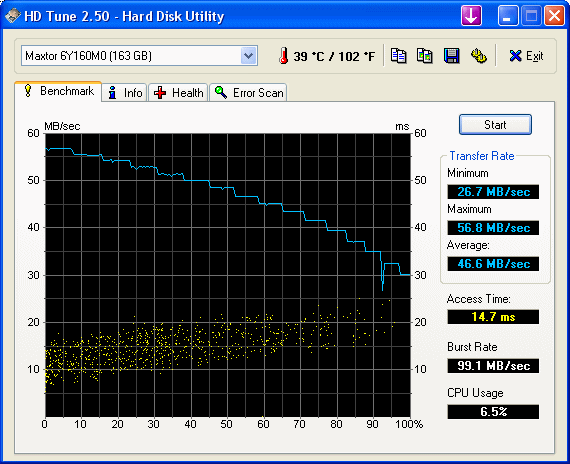
> However, I'm not seeing conclusive proof that modern HDDs show performance variation with respect to radius. They definitely still do; it's fundamental to drives that run at fixed RPM but maintain high areal density across the entire platter. One of the 1TB drives I have lying around does about 183MB/s at the beginning of the disk, 148MB/s in the middle, and 97MB/s at the end.

I'm really interested in how you benchmarked that? Is there a "simple" way to specify the physical location on a HD data should be written to?

HDTune is a very simple benchmark tool that shows it off.

http://www.hdtune.com/HDTune_Benchmark.gif

Re: Everything I Know About SSDs

#177
post #163

Earlier quoted context omitted.

Either way, far more people die prematurely every day from causes due to pollution from coal-fired plants. But if you're a journalist or documentary filmmaker trying to make something look all cool and edgy and scary and shit, an exploding nuclear power plant makes for a much more interesting story than just another day in the pulmonary ward.

If not for some very edgy heroics, it would have been millions, and most of Ukraine down to the Black Sea uninhabitable for centuries. What did happen was not just "because nuke", but because of a whole series of design and management failures, very far from the least of which was denialism. They did finally fix the cause of the explosion in the other reactors of that design, remarkably many years later. Nobody here…

If not for some very edgy heroics, it would have been millions

That seems a tad unlikely.

Nobody here will defend coal, but graphite-moderated reactors are not the tech you want to be defending.

Exactly. And the reason we're stuck with 60-year-old reactor technology is...

Re: Everything I Know About SSDs

#178
post #75
post #62

Earlier quoted context omitted.

> However, I'm not seeing conclusive proof that modern HDDs show performance variation with respect to radius. They definitely still do; it's fundamental to drives that run at fixed RPM but maintain high areal density across the entire platter. One of the 1TB drives I have lying around does about 183MB/s at the beginning of the disk, 148MB/s in the middle, and 97MB/s at the end.

I'm really interested in how you benchmarked that? Is there a "simple" way to specify the physical location on a HD data should be written to?

Just open /dev/sda and run a while loop doing an fread and time each one.

You'll end up with a graph like: http://broadley.org/disk/consumer-no-vibration.png

Unless of could you put a consumer disk in a server with many high RPM fans causing substantial vibration, then you get: http://broadley.org/disk/consumer.png

A server/enterprise/RAID edition disk handles the vibration MUCH better, around 3x the bandwidth: http://broadley.org/disk/server.png

Re: Everything I Know About SSDs

#179
post #3

I was under the impression that if you do not encrypt an SSD from the first use, then any attempt at overwriting with 0s is futile, as well as any other method to securely delete the files. The files will be easily recovered. This guy seems to say the opposite, in that the files are "simply not there anymore", contrary to everything I've read: who's right here?

Depends on the drive. Some setup a password when initialized and the SATA secure erase command zero's the password. So you can technically read all the old data (or if the firmware blocked you, you could by directly accessing the chips), but you would end up with encrypted data, not the original bits.

That's why the secure erase takes seconds and not drive size/bandwidth seconds.

Re: Everything I Know About SSDs

#180
post #77

I get that it's meant to be subjective, but the premise makes it clear that it's an ongoing knowlegde collection, but for that some sources would be nice. Currently my troubles with SSDs in PC/Server/NAS environment are a somewhat more practical, more about compatibility NVMe/SATA, M.2 key types, PCIe port bifurcation support vs PLX switches, none of them are even mentioned. Advice for this is notoriously hard to fin…

On forums like ServeTheHome all this information is readily available. It's spread between some guides and posts but if you have a specific question those people will be able to answer it most of the time.
Post reply on HN