Live data from Hacker News

iPhone 14 Pro Camera Review: Scotland

austinmann.com

161–170 of 229 posts

Re: iPhone 14 Pro Camera Review: Scotland

#161
post #25

The Verge also mentioned that Apple goes overboard when it comes to noise reduction lately with their phones. It becomes really obvious when you compare an iPhone 13 with say a Pixel phone and there have been many complaints about it. Instead it looks like they continued to double down with it on the iPhone 14. It's a shame since they have such good hardware and ruin the pics with their photo processing pipeline.

Pixel 6 photos are dramatically over processed. You can shoot RAW on them too, but that looks even worse.

no, iPhone is far more overprocessed. see dpreview or any other legitimate camera review site. iPhone cameras/software are just lackluster compared to the competition. things like HDR on iPhone have been bad for years.
Re: iPhone 14 Pro Camera Review: Scotland

#162

I’ve been kinda unimpressed with the iPhone 13 mini camera coming from the pixel 6 pro. I like everything else about the iPhone better, but the camera seems substantially worse. I have to edit pictures quite a bit to fix color balance issues. Here’s a recent example: https://adobe.ly/3qEZRVx (Lightroom won’t let me share both my edit and the unedited original but the blueish picture was taken at almost the same time…

this is true. you can follow @dalevon_digital on Twitter and he frequently does slr/iPhone/pixel blind comparisons. the pixel has won every single one when compared to a reference SLR picture.

Re: iPhone 14 Pro Camera Review: Scotland

#163

> Offloading photos/videos via Lightning cable is another story. I’ve had some serious pains trying to transfer content from my iPhone to my MacBook Pro. I’ve been on YouTube watching videos, unplugging, switching Lightning cables, restarting devices — doing all the things I can think of. I finally found a tip that said if you turn on Airplane mode, then Apple Photos will properly load, and thankfully it did. > These…

AirDrop is 100x slower than the equivalent wired solution. I say this as someone transfering 350GB of media off their phone on friday, Apple needs to fix wired file access from mac to phone.

Re: iPhone 14 Pro Camera Review: Scotland

#164
post #71

Earlier quoted context omitted.

I would agree with you, but read about what they’re actually doing with this camera. They’re actually binning the pixels back down to the same resolution as before and only using the extra size to enhance sharpness and dynamic range. You only actually get higher resolution if you shoot raw.

why not just have larger photodiode to increase dynamic range? can't see how using more photodiode would equal more dynamic range or better noise levels? never seen a sony,canon etc get less noisy and better dynamic range as they add more mega pixels..

The iPhone is using a quad-bayer filter. Most of the time, it is behaving as a 12MP camera with error correcting photodiodes.

Compared to a normal 12MP camera, the 48MP one will collect slightly less light due to there being more gaps, but the bet is that the increased noise from that is less than the noise reduction from the pixel-binning.

Every photodiode has three others around it with the same colour. If they’re all similar, the sensor will average them, and if one of them is way off, it’ll throw that one away and average the rest.

This is better than doing noise reduction on either a 12MP, or a standard 48MP sensor because the space between comparable diodes is reduced, making it less likely to falsely treat small things like stars as noise.

As a bonus, if the user zooms in on a really sunny day, the 48MP might actually be worth using directly.

Re: iPhone 14 Pro Camera Review: Scotland

#165
post #163

> Offloading photos/videos via Lightning cable is another story. I’ve had some serious pains trying to transfer content from my iPhone to my MacBook Pro. I’ve been on YouTube watching videos, unplugging, switching Lightning cables, restarting devices — doing all the things I can think of. I finally found a tip that said if you turn on Airplane mode, then Apple Photos will properly load, and thankfully it did. > These…

AirDrop is 100x slower than the equivalent wired solution. I say this as someone transfering 350GB of media off their phone on friday, Apple needs to fix wired file access from mac to phone.

Lightning is limited to 53 MB/s by the sheer virtue of being USB 2.0, and probably is even slower in real life, so AirDrop would be at maximum 0.5 MB/s?

Re: iPhone 14 Pro Camera Review: Scotland

#166

> Offloading photos/videos via Lightning cable is another story. I’ve had some serious pains trying to transfer content from my iPhone to my MacBook Pro. I’ve been on YouTube watching videos, unplugging, switching Lightning cables, restarting devices — doing all the things I can think of. I finally found a tip that said if you turn on Airplane mode, then Apple Photos will properly load, and thankfully it did. > These…

Apple still can't figure out which formats to use. I've seen Photos compress photos to something like 256x256 PNG when sending via AirDrop. And this depends very randomly on the versions of OSes on your phone and your laptop and on the year of your phone and laptop.

Re: iPhone 14 Pro Camera Review: Scotland

#167

> Offloading photos/videos via Lightning cable is another story. I’ve had some serious pains trying to transfer content from my iPhone to my MacBook Pro. I’ve been on YouTube watching videos, unplugging, switching Lightning cables, restarting devices — doing all the things I can think of. I finally found a tip that said if you turn on Airplane mode, then Apple Photos will properly load, and thankfully it did. > These…

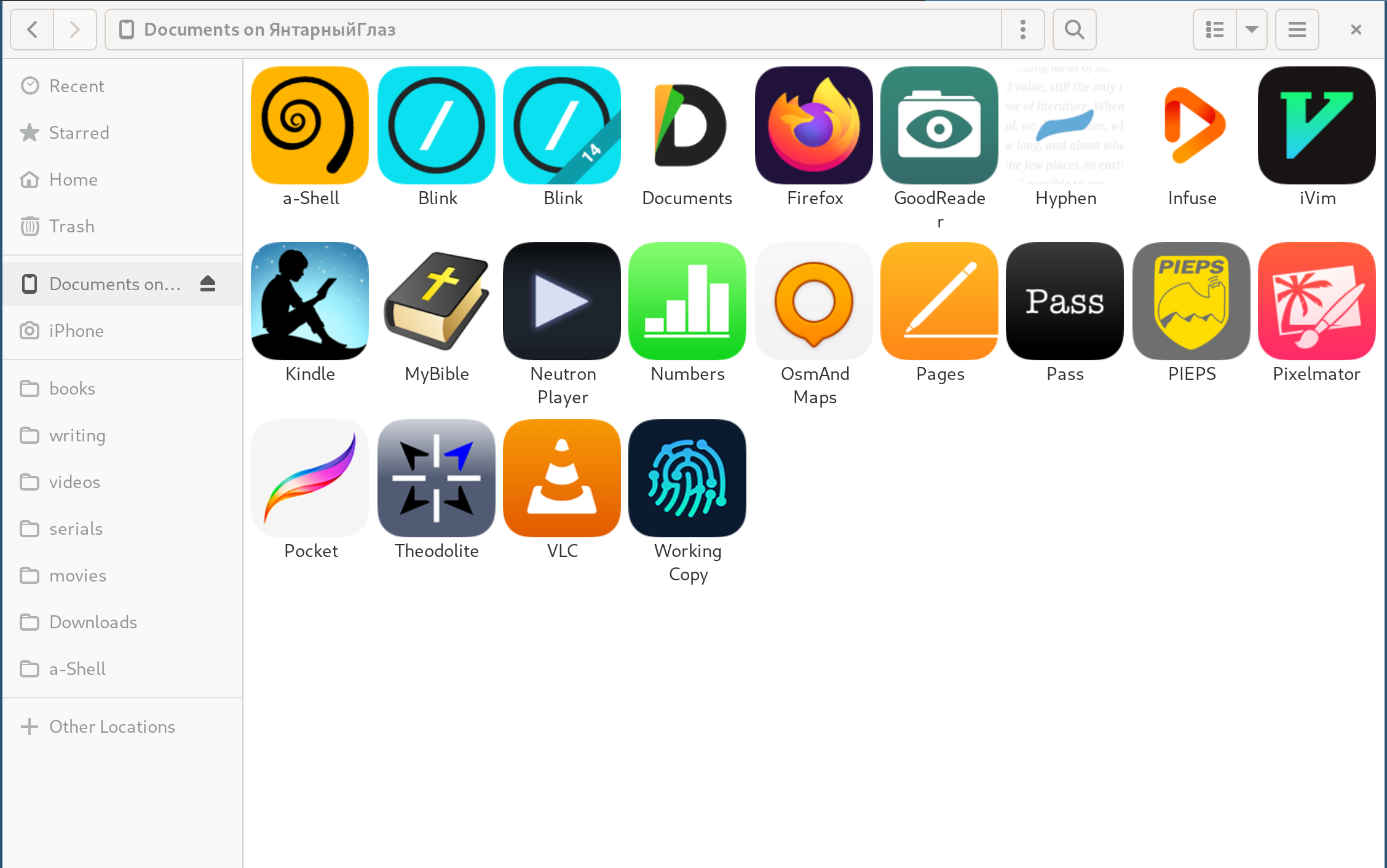
The crazy thing is how well libimobiledevice + AFC (1) work on Linux. All I do is plug in my iPhone and open Nautilus (2) to see a list of my apps (3) that support file sharing.

The phone shows up as a camera with photos, as well.

1: https://wiki.gnome.org/Projects/gvfs

2: https://apps.gnome.org/app/org.gnome.Nautilus/

3: https://nexus.armylane.com/files/Gnome-Nautilus-iPhone.png

Re: iPhone 14 Pro Camera Review: Scotland

#168
post #167

> Offloading photos/videos via Lightning cable is another story. I’ve had some serious pains trying to transfer content from my iPhone to my MacBook Pro. I’ve been on YouTube watching videos, unplugging, switching Lightning cables, restarting devices — doing all the things I can think of. I finally found a tip that said if you turn on Airplane mode, then Apple Photos will properly load, and thankfully it did. > These…

The crazy thing is how well libimobiledevice + AFC (1) work on Linux. All I do is plug in my iPhone and open Nautilus (2) to see a list of my apps (3) that support file sharing. The phone shows up as a camera with photos, as well. 1: https://wiki.gnome.org/Projects/gvfs 2: https://apps.gnome.org/app/org.gnome.Nautilus/ 3: https://nexus.armylane.com/files/Gnome-Nautilus-iPhone.png

I have to look into that. I was not aware of it.

But as far as I can tell there are no image-related apps in that list you shared in your number 2 link?

Re: iPhone 14 Pro Camera Review: Scotland

#169

Earlier quoted context omitted.

Is that why my wife has been complaining all her pictures make her look like she has a smooth/filter-applied face? She just switched from Android to Iphone 13. I tried playing around with the settings but couldn't make it look 'normal'.

It's certainly a part of it. A comment I left 4 months ago[0]: "After watching far too many videos comparing the iPhone 13 Pro Max, Samsung S22 Ultra, and Pixel 6 Pro, I decided against the iPhone because of the automatic skin smoothing.[1] The iPhone 13 Pro Max removed wrinkles, sun spots, moles, hair, etc to the point where the results looked like overprocessed, manually edited photos. This wasn't subtle -- the rev…

They probably run a bilateral filter [0] to get rid of sensor noise, but the settings are way too aggressive. Bilateral filters aren't there to explicitly smooth out skin, but they do this very well by being edge preserving and noise removing.

0: https://answers.opencv.org/question/557/face-lifting-on-ios/...

Post reply on HN