Live data from Hacker News

Plasma Bigscreen – 10-foot interface for KDE plasma

plasma-bigscreen.org

141–150 of 247 posts

Re: Plasma Bigscreen – 10-foot interface for KDE plasma

#141

Earlier quoted context omitted.

I'm on Debian bookworm, and a screenshot is one Meta-Shift-S -- I just highlight the region I want to capture, and I get a dialog prompting me to (with one click) copy to clipboard, save to file, or annotate. There's a handful of out-of-the-way options as well, depending on what exactly you want to do. What's --- so abominable about that?

Why does it need a dialog? Just save the file AND copy it to clipboard. If user wants to annotate they can paste or go get the file.

It does. If you paste (to slack, email, whatever) after taking a screenshot on Gnome, you will attach your screenshot. It is also saved on ~/Pictures/Screenshots.
Re: Plasma Bigscreen – 10-foot interface for KDE plasma

#142
post #81

Earlier quoted context omitted.

I'd have to disagree with you on that one. I recently migrated to Fedora from Windows 11, which gave me the chance to try Plasma, GNOME, and a couple other desktops. Plasma is exactly what I don't want in a DE. It’s extremely configurable, but also overwhelming, and I don’t think that’s something the average user would feel comfortable navigating. I ended up choosing GNOME. It feels visually cohesive, and the design…

Dude, default plasma breeze theme, remove rounded corners, you have the windows 10 interface. What else do you want?

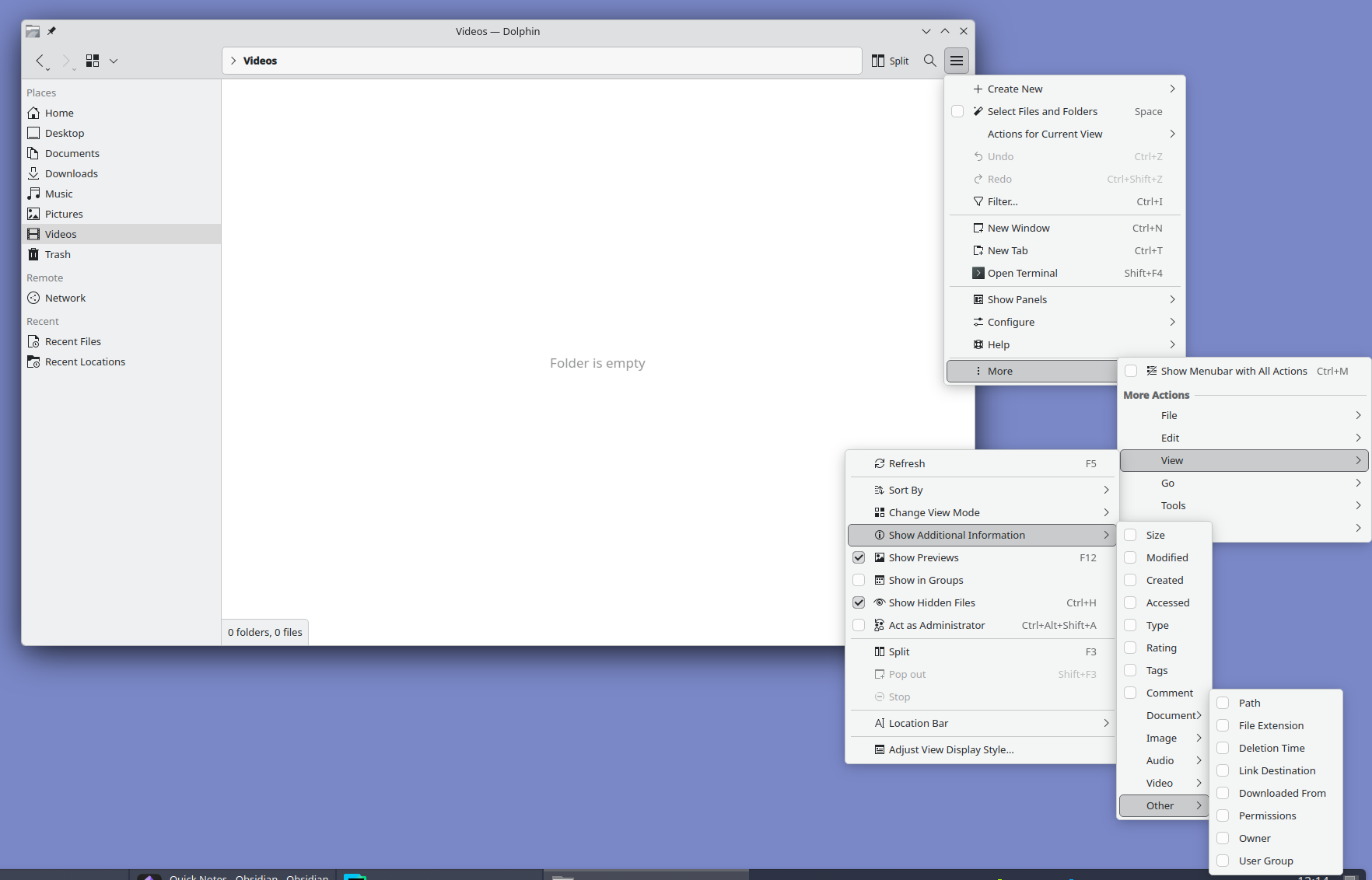
I just want less of this: https://files.catbox.moe/uvxbea.png

Look at it and tell me this is normal. I love Plasma but oh man do they need to hire a real designer. Someone with balls to unfuck the interface and move all advanced settings out of GUI into a well documented config file.

Re: Plasma Bigscreen – 10-foot interface for KDE plasma

#144
post #16

Big things from KDE lately. If you haven't tried it since the pre-Plasma days, I really recommend giving it a go. Fabulous as a general DE.

I did, but I don't share the sentiment. Moved this year from macOS and KDE is over-engineered with little thought put into the UX. For example, try to take a screenshot. I was quite literally shaking my head for good couple minutes looking at this abomination. It's so extremely confusing, all over the place, bogged down with tons of switches, modes, it's like you need to spend 30 minutes to understand how this thing…

So you chose the outstanding screenshot utility to highlight the problems with KDE Plasma interface? Really? Why not something like this?: https://files.catbox.moe/uvxbea.png

Re: Plasma Bigscreen – 10-foot interface for KDE plasma

#145

This sounds awesome but reading the comments it sounds not quite there yet? Right now I use an AppleTV with Kodi installed via developer account. Unfortunately, Kodi on AppleTV is not well supported so it crashes a ton. I'm not much of an Apple dev. After much gnashing of teeth I managed to get a from source build running so I could maybe look into why it crashes and contribute but I've never debugged an AppleTV app…

"Kodi on AppleTV is not well supported so it crashes a ton"

That's just Kodis default behavior on any platform.

Re: Plasma Bigscreen – 10-foot interface for KDE plasma

#146
post #136

If you have regular KDE I urge you to just shake your mouse vigorously for ca. a minute. The cursor has this mouse finding feature where the mouse cursor gets bigger if you shake it. It can get comically big, like fill the whole screen big. One of the best features I have ever seen.

I discovered it yesterday by accident. Not the feature but the fact the cursor just keeps on growing and growing. Kinda funny but also possibly a bug.

Re: Plasma Bigscreen – 10-foot interface for KDE plasma

#148
post #8

but it will be hard to play DRM protected media, eg Netflix on a device like this, right?

the magic trick is just to not, netflix won't even stream you 4k 90% of the time even if you do have all the requirements.

why won't they?

Re: Plasma Bigscreen – 10-foot interface for KDE plasma

#149
post #137

KDE is amazing. For an open-source project the desktop environment looks really slick. Not that any other desktop environments are particularly ugly but KDE can compete with the best commercially developed desktops. For a moment though I thought that this story was about the launch of a new plasma TV 'big screen' and it got me really excited.

Yes! KDE is the only thing in the Linux world that legitimately looks better than the big competitors. Not always, and not all the time; programs that are really focused on design are still a cut above, but I truly believe that KDE looks (and feels!) better than macOS I don't understand why there aren't more folks like us shouting it from the rooftops. It's almost bizarre how good it looks.

I’m curious about which distros are working well with Plasma, as I had some trouble with stability in the past. I have the feeling Plasma works better with rolling release.

Re: Plasma Bigscreen – 10-foot interface for KDE plasma

#150
post #122

Earlier quoted context omitted.

Not only that, because it has so many options and more of a bazaar-style development, nothing is optimized. Right now the systray has a very ugly delay when opening applets like WiFi or sound. Up to 1.5 seconds (!). This doesn't happen with the applets bare in the menu bar, so there must be some sort of negative interaction there between the systray code and applet code. This is on a bog standard KDE install too. I d…

That's definitely a bug. It's instant for me. But I do think some of the systray things are overly complicated. E.g. why does the volume widget list all audio outputs and inputs by default? On the other hand some things are really great. E.g. which other DE lets you adjust the screen brightness (the real one via DDC/CI) from the systray, or start video screen capture by pressing print screen? KDE is definitely better…

I've encountered the same KDE bug in NixOS though from what I understood when I did some digging[0][1] it doesn't manifest on distros like Fedora.

Now I'm using Cinnamon until the bug gets fixed which I enjoy too but it doesn't come close to the ease of use of KDE. And when I say ease of use on KDE I refer to the fact that out of the box you can pretty much do everything you need to without having to search for extensions or hunt for settings, someone already thought of what you wanted to do and made it straightforward to do. Sure it's overwhelming to be presented with a lot of things at once e.g. the screen capture UI but when you need to do something that's not the base case it's easy to see that the UI has got you covered.

[0]: https://www.reddit.com/r/NixOS/comments/1pdtc3v/kde_plasma_i...

[1]: https://github.com/NixOS/nixpkgs/issues/126590

Post reply on HN