Live data from Hacker News

Pass: Unix Password Manager

passwordstore.org

141–150 of 186 posts

Re: Pass: Unix Password Manager

#141

I have a different approach I’ve used for about 10 years that I like a lot. All password metadata is stored in a plain JSON file indexed by name (usually site name). Each entry contains at the minimum a username. Optionally it has a version number and some password rules like the length (20 if absent) and the character classes that are allowed, along with how many of each character class are required. None of this da…

I found the idea of a password generator appealing, mainly due to vault anxiety. I didn't (and still don't) like the idea that I can't access a resource without this precious vault. If I'm home with my tools, great. Otherwise, give me the right hash function, and I can MacGyver my way to PBKDF2 and generate my password.

However, once you introduce metadata (e.g., to deal with password rules), the idea loses most of its appeal. I wouldn't feel any more comfortable posting such a thing publicly than I would a vault.
Re: Pass: Unix Password Manager

#142
post #84

Earlier quoted context omitted.

For the structure I "solved" that problem by creating folders with three main files: Websites/foo.com/username Websites/foo.com/password Websites/foo.com/email Sometimes I add "/notes" with unstructured text contents, and for a few special cases I created a file "/json" with some machine-readable things in JSON format. It's not perfect, and I do dislike the way that the metadata isn't encrypted, but on the whole I'm…

Yeah sure, but then are the conventions you came up with shared by all the tools in the ecosystem too (ex: browserpass)? Since the keystone (pass) declined to provide strong guidance, you end up with fragmentation and incompatibility.

I view this as a feature.

Re: Pass: Unix Password Manager

#143
post #21

This is interesting for CLI lovers, but I feel KeepassXC on desktop + KeepassDX on Android (with the password DB stored on my own machine and accessed remotely via Wireguard) is a better solution for normies.

I would love to use KeepassXC but it doesn't make it easy to share credentials with the wife. I _could_ use a dedicated vault, but we'll then need to cut-paste things for sharing existing credentials.

So, for now, I've settled on Vaultwarden and it has been surprisingly stable so far.

Re: Pass: Unix Password Manager

#144

Earlier quoted context omitted.

This app wasn't working for me last time I tried it. Granted that was a few years ago.

For me it's working very well, now even using my own git remote in tailscale. This app is keeping me on iOS as there is no single-app replacement on Android afaik.

If I were to go back to Android, I'd have to built the app first. Although I would built it with age support :)

Re: Pass: Unix Password Manager

#146

Pass is great, but GPG keys are complicated and add a lot of extra overhead if you don't have one already. Frankly I cannot recommend anyone use GPG today for any purpose. I wrote a much simpler CLI password manager instead that meets explicit security models. https://codeberg.org/jwgarber/napa/src/branch/main/database....

From the linked page:

> Notably, pass fails both of these requirements, ... , and the files themselves do not use authenticated encryption.

With pass you can turn authentication on by setting an option to sign the files by default. That comes at the cost of requiring an extra entry of the passphrase so most do not turn this on. Few people are concerned with the idea that an attacker might modify their passwords so they don't work. There is no real benefit to an attacker. They could just delete the files.

Even if signatures are not turned on the regular PGP integrity protection would still be in effect so in the unlikely event that an attacker changed the file an error would be generated and presumably passed on to the user.

Re: Pass: Unix Password Manager

#147
post #118

Earlier quoted context omitted.

I made the switch from pass recently too. I had ~400 secrets stored in it for almost the same time as you. Ultimately I wanted something easier to sync between multiple devices. Now that I am traveling more seriously I can't get away with only having a few important passwords saved on my phone and laptop. It was a lot easier to sync (1) file with KeePassXC and it has 2 well supported Android apps to choose from. It t…

That's curious. I moved from KeePassXC to pass precisely because the synchronization story for the database file wasn't working so well. For too many times I ended up with an outdated database in the backend server because the sync process failed to work properly. After I moved to pass, every credential became its own file and I rarely edited the same credential in way too many devices. For the rare conflicts I had,…

I didn't like the idea of pushing a pass git repo to a private GitHub repo.

For now I just temporarily drop the DB onto Google Drive manually (through the web site since I don't use the app) to quickly share it to the other devices without worrying about USB cables or running native apps on each device. Then I delete it from Google Drive.

I'm hesitent to use "sync" type of tools that run on each device because I don't have a central server. Also I really don't like the idea of running any type of cloud hosted network storage desktop app on each device to have a network drive.

We'll see how it goes I suppose.

I wonder if it'll involve writing a tiny shell script that I run on my desktop machine to handle syncing it across devices and it always ensures the latest copy makes its way onto each device. That would allow me to freely add new entries on any device and worry about syncing it across devices when I am 100% sure all devices are on the same local network. I think that will work out in the end.

I don't need real-time replication because if I'm on the road using my phone, I don't mind my desktop being outdated until I get back home.

Re: Pass: Unix Password Manager

#148
post #58

There's a ton of positivity here, but on the balance there are some significant issues with pass that I think bear mention: - The fact that it's essentially unstructured data makes it hard to work with generically. If you have a username + password and need to use those in a script, you'll need to implement your own parser in your shell language in every script you need it in. - `pass generate` to generate new passwo…

Other significant issues I've had with `pass`:

- Important processes are undocumented. E.g. sharing the pass repository with another computer is not obvious: you need to copy more than the `.password-store/` directory...

- Hard to install if not packaged. I tried to install `pass` on a headless NAS, but it required gpg, which looked hard to cross-compile to aarch64.

- `pass` is a light interface over `gpg`. So it has all the problems of GPG – I've had a few annoyances with `gpg-agent`. Many organizations are trying to ditch GnuPG and switch to simpler and better cryptography tools, like age. https://github.com/FiloSottile/age

- Android with `pass` was a bad experience. The official package was unmaintained. The fork was not packaged in F-Droid. The UI was cumbersome.

I still use pass, for lack of an obviously better universal solution. There's FiloSottile/passage for minimal change, just replacing gpg with age, but no Android. A better alternative would be gopass, which is portable across all unixes, is compatible with `pass` and has an age plugin. But still no Android packaging. https://www.gopass.pw

Re: Pass: Unix Password Manager

#149
post #58

There's a ton of positivity here, but on the balance there are some significant issues with pass that I think bear mention: - The fact that it's essentially unstructured data makes it hard to work with generically. If you have a username + password and need to use those in a script, you'll need to implement your own parser in your shell language in every script you need it in. - `pass generate` to generate new passwo…

You have to love how this whole thread embodies Cunningham's Law

https://en.wikipedia.org/wiki/Ward_Cunningham#%22Cunningham'...

Re: Pass: Unix Password Manager

#150

Earlier quoted context omitted.

You can use Qubes OS for true VM-level isolation, or use hardware security keys where possible, or run sensitive applications in dedicated VMs. I think that in general it is game over the moment you have malicious processes running. I use firejail for most applications, which I believe is the bare minimum, or bubblewrap.

Yeah. Personally, I'm crossing my fingers for SpectrumOS[0] to make things a bit easier. As the developer notes on her website[1]: I have embarked on the ultimate yak shave it started with "I wish I could securely store passwords on my computer" And now I am at the "I have funding to build my own operating system" level [0]: https://spectrum-os.org/ [1]: https://alyssa.is/about/

What else can you tell me about Spectrum OS? Is it actively maintained? Is it usable? How does it compare to Qubes OS?

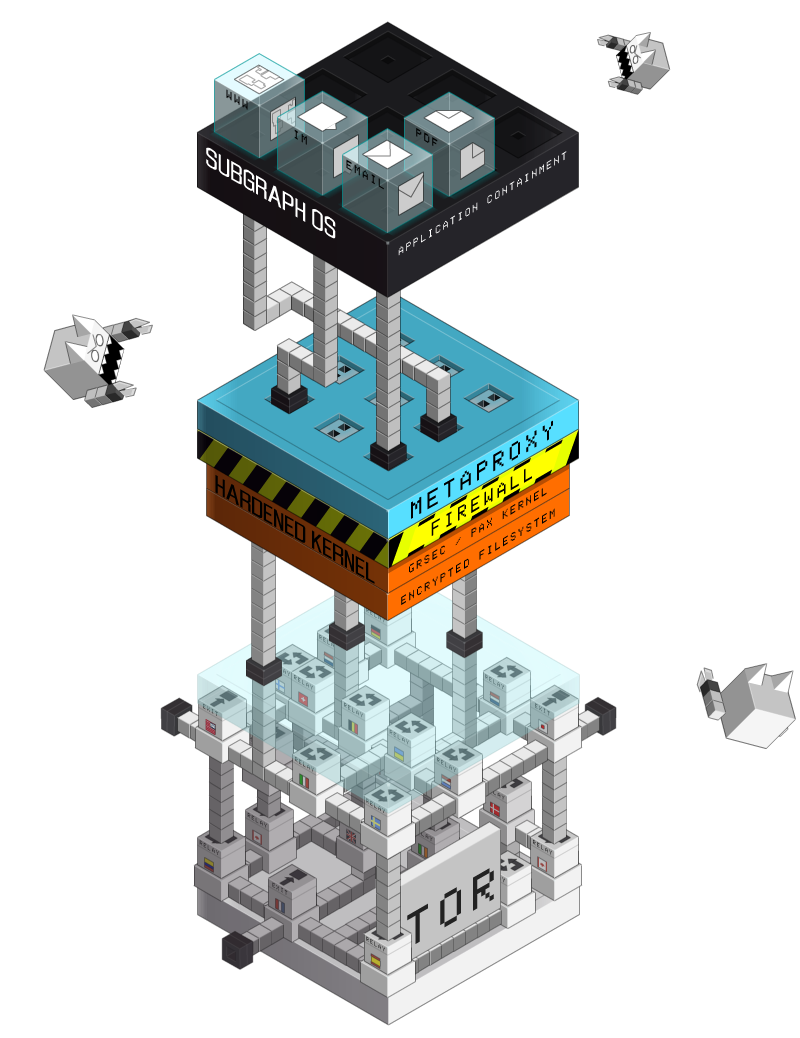
Also what do you think about Subgraph OS[1]? Although I think it is not maintained anymore, or is it?

[1] https://subgraph.com/img/sgos.png (old image which I remembered it by) (https://web.archive.org/web/20241206072718/https://subgraph....)

Post reply on HN