Live data from Hacker News

Entering text in the terminal is complicated

jvns.ca

141–150 of 229 posts

Re: Entering text in the terminal is complicated

#141
post #95

Earlier quoted context omitted.

if you have a problem with gnu/linux (as opposed to android) you can usually find the solution on stack overflow, server fault, or superuser, but the solution you find there is going to be a textual command line, not a gui. gpt-4 can tell you how to solve the problem, but only using a textual command line, not a gui. text is the most powerful, useful, effective communication technology ever, period. always bet on tex…

But that is passionately what I hate about it. In GUI environments there are check boxes, buttons, menus and english labels for everything. With linux it's like you are copying down a sacred language and presenting it at the alter with your fingers crossed. You just changed something. Didn't fix the problem. But the change still happened. Can you undo it? Probably not without way more digging. So now you just cross a…

what would be ideal from my point of view for check boxes, dropdowns, and labels would be if they were a simultaneous alternative view of a command line, or rather a configuration line. an additional simultaneous view would provide a live preview of the result of that line. but you could still type and copy and paste the text

interestingly this is not too far from my usual experience with the command line. i want to compile a target, so i type `make ` and hit tab twice. i see a list of targets and pick one by typing a letter or three and tab, and hit enter. the compiler errors out right away with a c99 construct, so i add `-k` to the command line (^p spc - k ret) to see how widespread the carnage is. it's everywhere, so i add a compiler flag to the options and try again. and in 30 seconds i have a working build. or maybe i need to use a different compiler, or something, but it's easy to return to the fresh unpacked tarball or git checkout

this is close to the opposite extreme from what you describe in

> You just changed something. Didn't fix the problem. But the change still happened. Can you undo it? Probably not without way more digging.

i very rarely do anything in text mode that is in any way hard to undo. shell commands are mostly purely ephemeral: their only effect is some text on your screen, an entry in your history file, and maybe an output file. if i want to change one, i hit ^p and change it before hitting enter. as for configuration changes, i would say that change management is actually the major strength of the text approach: you can copy configuration lines into your notes, comment out old versions in case you want to go back to them, check the whole configuration into git, diff it to see what all has changed, etc. everything can be undone in exactly the same way. everything is a controlled experiment, with the computer itself recording the configuration of each trial automatically and implicitly

admittedly there are occasional exceptions, like when you're reconfiguring the firewall or upgrading debian to a new release. though current configuration-as-code systems like docker and ansible go a long way to making all that stuff just as recoverable. the server went catatonic? too bad, revert the firewall rule change and reinstall it, and 45 seconds later the problem is fixed

by contrast, it's almost never obvious how to undo clicking on a command button or a menu item. even a dropdown selection is hard to undo: you have to remember what was previously selected

but yeah having to read the manual and slowly piece together a working command or configuration file is definitely worse than having every option documented in the place where you choose it
Re: Entering text in the terminal is complicated

#142
post #29

Earlier quoted context omitted.

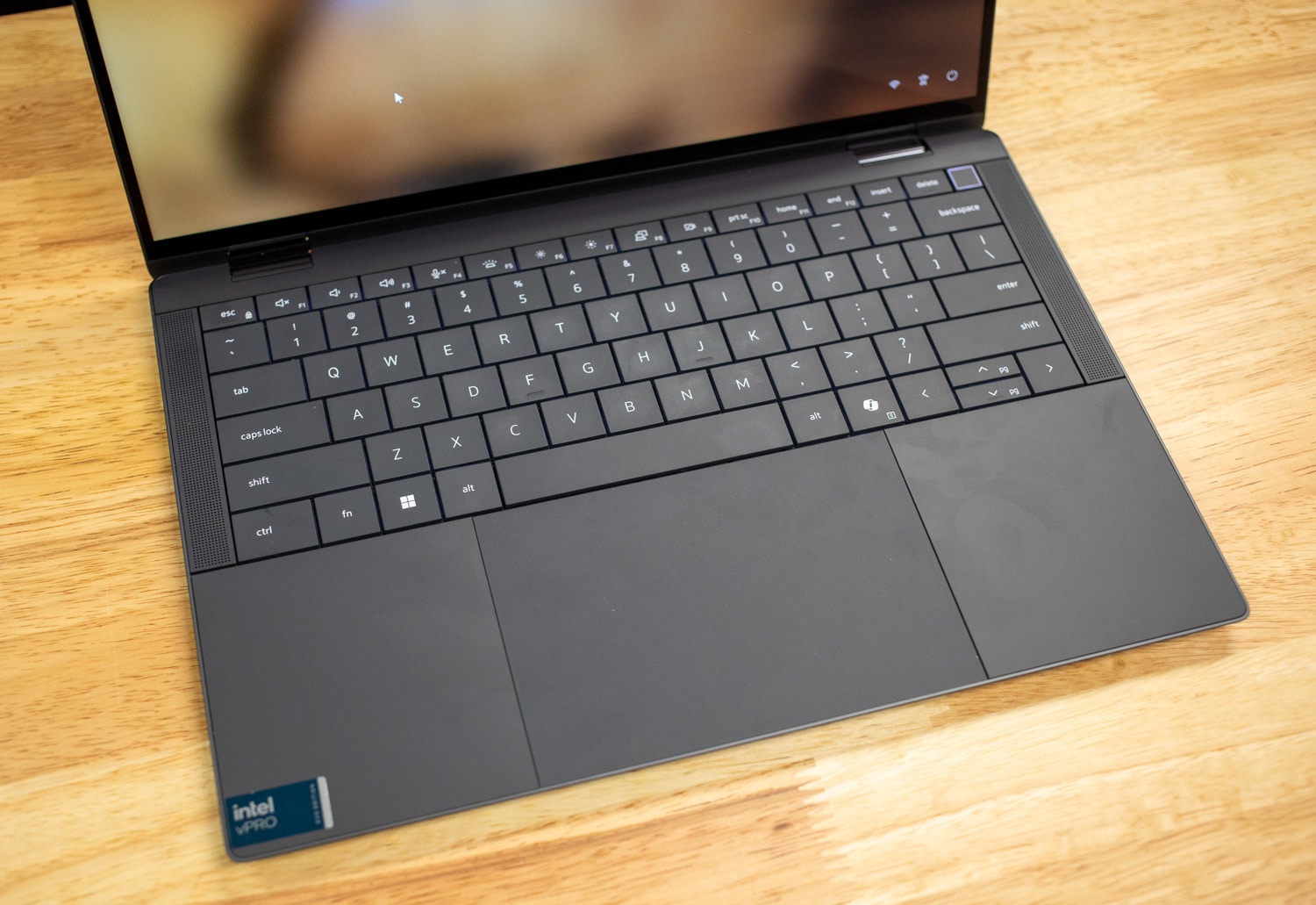
I wonder what terminal that is, because the Home and End keys, which I'm pretty sure are the expected alternatives, work fine in every terminal for me on Linux.

I feel like you're being willfully obtuse here. I can't remember the last time I used a laptop which had Home / End keys. Edit: actually I do remember -- it was an HP ProBook from 2011.

I can't remember the last time I used a laptop without Home/End keys.

Among them are a Dell from 2002, an IBM from 2006, another Dell from 2018, and a Lenovo from 2019.

...and here's one from 2024 that still does: https://www.storagereview.com/wp-content/uploads/2024/04/Sto...

Re: Entering text in the terminal is complicated

#143

Earlier quoted context omitted.

But that is passionately what I hate about it. In GUI environments there are check boxes, buttons, menus and english labels for everything. With linux it's like you are copying down a sacred language and presenting it at the alter with your fingers crossed. You just changed something. Didn't fix the problem. But the change still happened. Can you undo it? Probably not without way more digging. So now you just cross a…

The usual solution is to read the manual. The CLI is not an esoteric language. Software does complex things and you can either go with the GUI-fiction which...does things. Or have every options available to do what the software can do. Take find where the first line is the manual is: find - search for files in a directory hierarchy. Think however you want to find files inside a specific directory and find can do it f…

the cli is just as much of a fiction, just fiction with a different focus

i agree that reading the manual is helpful, but doing stuff you don't understand is necessary to come to understand it, so i don't think it's good advice to avoid it. using the cli for simple things builds the skills you can use for more complex things. the same is true of a gui

(of course there are clis and guis incapable of doing complex things, and those are kind of a dead end)

Re: Entering text in the terminal is complicated

#144
post #18

> took me maybe 15 years of using the terminal every single day to get used to using Ctrl+A to go to the beginning of the line (or Ctrl+E for the end). And the curse of bad defaults strikes again (daily). After the realization that this is a weird default you don't train yourself for 15 years, but change it to your comfortable/common keybinds!

Remaps Capslock to Ctrl and it will make a lot of sense. Other heavily used shortcuts are Alt+d, Alt+Backspace, and Alt+Left|Right.

Re: Entering text in the terminal is complicated

#145

I have great respect for Julia Evans and love her contributions that get shown here. But... > "I’ve always thought that vi mode seems really cool, but for some reason even though I’m a vim user I didn’t really like using it when I tried it." Really, that seems weird to me. I use zsh (btw) and the problem she describes is a non-issue. And I am not a pro. (Sorry, Julia).

I have to agree with the other commenter (drewg123). Been a Vim user for decades but don't use Vi-mode in the terminal.

> the problem she describes is a non-issue. And I am not a pro.

Not sure what you're saying here. Julia didn't describe a problem but a preference ("I didn’t really like using it"). I'm not sure how you can you call someone's preference a non-issue. It's a preference and we're allowed to have those last I checked! :p

Re: Entering text in the terminal is complicated

#146
post #70

This is nice. As always, Julia's articles are always a win. Here's some stuff that's missing: Within shell scripts, you can use `stty` to change a lot of stuff about the terminal, including how it deals with inputs. You can rewire all of these defaults and behaviors. Here's an experiment I did a while ago using sh and stty: https://gist.github.com/alganet/63f1dbc97b8fd35f7bb14ec30f79... It is able to capture and unde…

Thanks!

In maybe similar spirit, another screwy way to explore terminal IO mechanics I came up with when reading the start of Kernighan's UNIX Programming Environment:

Open up three terminal windows:

  1) `man ascii`
  2) `nc -lvp 9001 | xxd -c1`
  3) `stty raw -echo; nc -nv 127.0.0.1 9001`
With the #3 terminal active, try reproducing the whole "Hex" column of the manpage, in order. And, observing that some values have multiple ways to produce them, and also observing the multi-byte payloads of some of the other keys.

I'm not going to pretend to grasp through and through what exactly I'm accomplishing with this but will happily read any commentary.

Re: Entering text in the terminal is complicated

#148
post #42

I think the lowest hanging fruit would be doing something (anything) to improve discovery of commands. I have great grokking abilities but terrible memorization skills, and I end up forgetting how to do what I want to do and maybe even have done before. Browsing man pages for every command is my bane. It's also why I dislike GUI with unlabelled icons, I never remember what each one does.

A note file with the commands written would be your best bet. Then bring the most common ones in your shell as aliases or functions.

Re: Entering text in the terminal is complicated

#149
post #143

Earlier quoted context omitted.

The usual solution is to read the manual. The CLI is not an esoteric language. Software does complex things and you can either go with the GUI-fiction which...does things. Or have every options available to do what the software can do. Take find where the first line is the manual is: find - search for files in a directory hierarchy. Think however you want to find files inside a specific directory and find can do it f…

the cli is just as much of a fiction, just fiction with a different focus i agree that reading the manual is helpful, but doing stuff you don't understand is necessary to come to understand it, so i don't think it's good advice to avoid it. using the cli for simple things builds the skills you can use for more complex things. the same is true of a gui (of course there are clis and guis incapable of doing complex thin…

> but doing stuff you don't understand is necessary to come to understand it

Only if you're doing an experiment and can constrain accidents. Any other type of activities would require to read the manual first. They're terse because they're supposed to be a reference, but you can usually find books that ease the way in. And then there's the domain expertise that is required. You need networking knowledge to interact with software like ip, operating system knowledge to understand what top is showing to you, etc. You can't get around that.

The GUI is a fixed canvas already painted by someone else, the CLI let you write your own poetry.

Re: Entering text in the terminal is complicated

#150
post #143

Earlier quoted context omitted.

the cli is just as much of a fiction, just fiction with a different focus i agree that reading the manual is helpful, but doing stuff you don't understand is necessary to come to understand it, so i don't think it's good advice to avoid it. using the cli for simple things builds the skills you can use for more complex things. the same is true of a gui (of course there are clis and guis incapable of doing complex thin…

> but doing stuff you don't understand is necessary to come to understand it Only if you're doing an experiment and can constrain accidents. Any other type of activities would require to read the manual first. They're terse because they're supposed to be a reference, but you can usually find books that ease the way in. And then there's the domain expertise that is required. You need networking knowledge to interact w…

as i said in my other comment at https://news.ycombinator.com/item?id=40912296, text really helps a lot with constraining accidents

obtaining networking and operating systems knowledge includes as an essential part using software like ip and top (though try htop instead). it's not a strict sequencing but a back-and-forth interplay, synergistic with factors like study and mentorship

as for poetry, there are plenty of clis that aren't very expressive—rt-11, cp/m, grub, ms-dos, and mpv come to mind—and plenty of guis that are very expressive, such as godot, blender, inkscape, labview, solidworks, freecad, and sieuferd. you can write your own poetry as easily in godot as in bash

Post reply on HN