Live data from Hacker News

FLIF – Free Lossless Image Format

flif.info

131–140 of 153 posts

Re: FLIF – Free Lossless Image Format

#131
post #129
post #122

Earlier quoted context omitted.

> However, you can still have a lossy encoder that uses a lossless format as a target I wish "lossy-ness" was always an encoder parameter and never an intrinsic property of the container. The world would be a better place if we made this distinction early on. Instead every time a jpeg is edited and resaved the world gets a little more potatoey.

Maybe I am mistaken, but there's no real solution here: either you open a lossy image, edit it and save as lossless (which you easily can do), gaining in size but keeping the quality as is at this point, or (if you want to get smaller image still even after editing lossy image) you must re-encode it as lossy and make image a little more potatoey. However, as silly as it might seem, I find having a clear distinction b…

No, when the format is implicitly lossless then editing and saving is lossless. Discarding more information to make the file compress better is done separately, with a different tool even.

Re: FLIF – Free Lossless Image Format

#132
post #112

Earlier quoted context omitted.

That's not quite the same: an interlaced GIF loads with gaps and still requires a fair amount of data to be loaded before it can start displaying. JPEG 2000's approach provides successively finer detail so the entire image can be rendered after only a small percentage of the total data has been received and then it just becomes sharper as data continues to stream in. If the rollout hadn't been so unsuccessful, this w…

JPEG 2000's approach provides successively finer detail so the entire image can be rendered after only a small percentage of the total data has been received and then it just becomes sharper as data continues to stream in. If you'd ever watched an interlaced GIF arrive over a slow connection, that's exactly how it looks.

I've watched plenty of GIFs trickle in – over a 1200 bps modem back in the day – and it's not the same. An interlaced GIF displays every other line first, leaving a visible comb pattern between the lines until the rest of the data loads which is visually quite distracting unless the background is transparent or a compatible color with the image content.

Here's what interlacing looks like, with whole areas being empty until the data is received:

https://commons.wikimedia.org/wiki/File:Adam7_passes.gif

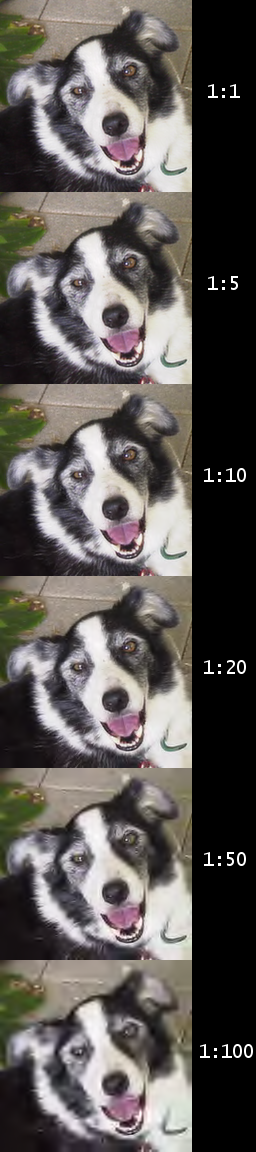
With something like JPEG 2000, you have a completely experience because the image renders immediately with less detail and becomes sharper. Using this example from Wikipedia, it'd basically start with the 1:100 frame on the bottom and rerender as data streams in until hitting the final 1:1 quality at the top:

https://upload.wikimedia.org/wikipedia/commons/7/78/JPEG_200...

Re: FLIF – Free Lossless Image Format

#133
post #80

Everyone loves the "responsive loading" feature, but that's not even the novel thing about the format (JPEG 2000 did it even better — 16 years ago)! The novel feature of this format is better entropy coding. FLIF decoder adds interpolation to make incomplete scans look nicer than in PNG, but that's a feature of the decoder, not the file format, so there's nothing stopping existing PNG decoders from copying that featu…

[deleted]

Re: FLIF – Free Lossless Image Format

#134

Earlier quoted context omitted.

If you're just using it, it isn't restrictive at all is it? You just have to say that you used it. If you modify it, you must provide source code for the version that was distributed. Not the source code for anything else. ... unless I totally misunderstand LGPL

I am not a lawyer, but, yes, the LGPLv3 in particular is in fact quite restrictive relative to what is believed (LGPLv2 much less so). The driving force behind the GPL-series of licenses is to maintain the GNU/Stallman freedoms [1], including "freedom to run the program as you wish, for any purpose" (0) and "to study how the program works, and change it so it does your computing as you wish" (1) It is widely believed…

I had no idea. So iOS devs cannot use LGPL software at all because of this?

Re: FLIF – Free Lossless Image Format

#136
post #118

Earlier quoted context omitted.

> Note that it's generally not desirable to have FLIF used on the Web. A decent-quality JPEG will load at full resolution quicker than it takes FLIF to show a half-resolution preview. On the other hand, this allows browsers on metered-bandwidth connections to control bandwidth more effectively. Rather than disabling images entirely, this would allow loading a low-resolution version and stopping, and letting the user…

Again, this is not new in FLIF, and it isn't a strength of the format. You're describing exactly what can already be done with progressive JPEG better . Look at https://uprootlabs.github.io/poly-flif/ - set truncation to 80-90% and compare to Same Size JPEG. Truncated FLIF looks like a pixelated mess, whereas JPEG at the same byte size is almost like the original (note that the site has encoded JPEG to have few progr…

[deleted]

Re: FLIF – Free Lossless Image Format

#137
post #129
post #122

Earlier quoted context omitted.

> However, you can still have a lossy encoder that uses a lossless format as a target I wish "lossy-ness" was always an encoder parameter and never an intrinsic property of the container. The world would be a better place if we made this distinction early on. Instead every time a jpeg is edited and resaved the world gets a little more potatoey.

Maybe I am mistaken, but there's no real solution here: either you open a lossy image, edit it and save as lossless (which you easily can do), gaining in size but keeping the quality as is at this point, or (if you want to get smaller image still even after editing lossy image) you must re-encode it as lossy and make image a little more potatoey. However, as silly as it might seem, I find having a clear distinction b…

That's one of the reasons why I like the fact that some websites treat them as "gifv" files, even though they are just mp4.

Re: FLIF – Free Lossless Image Format

#138

Earlier quoted context omitted.

I am not a lawyer, but, yes, the LGPLv3 in particular is in fact quite restrictive relative to what is believed (LGPLv2 much less so). The driving force behind the GPL-series of licenses is to maintain the GNU/Stallman freedoms [1], including "freedom to run the program as you wish, for any purpose" (0) and "to study how the program works, and change it so it does your computing as you wish" (1) It is widely believed…

I had no idea. So iOS devs cannot use LGPL software at all because of this?

LGPL v2.0/v2.1 do not have the "tivoization" clause, so it should be safe to use in iOS if you are following the rest of the license provisions.

LGPL v3 does, so it is likely not safe or legal to use that software in iOS or other drm scenarios.

You can find a lot of debate about this, I think mostly because people assume the two versions to be the same and do not specify which they are wanting to use.

Again I have no legal background and I recommend getting real legal advice as the issue is quite complex.

Re: FLIF – Free Lossless Image Format

#139
post #58

Earlier quoted context omitted.

But that's another advantage. Each image would have to be distributed alongside it's javascript decoder. Even if the format is abandoned, the decoder will still be there, and it will still work on that webpage.

Which means you need JavaScript just to look at the file. Does web archive store js along with the content?

If they don't, they should.

Re: FLIF – Free Lossless Image Format

#140

Earlier quoted context omitted.

Kind of. Have you tried running a PNG compressor on a JPEG file? It is smaler than a straight to PNG file but nowhere near the size of the original JPG.

Well of course, JPEG artifacts aren't necessarily going to be easier for png to compress. You need to make modifications designed for png's algorithm. There are some tools that do this: https://pngmini.com/lossypng.html https://pngquant.org/ https://tinypng.com/ The resulting png's are much smaller. Though not necessarily as small as JPEG, it's in the same ballpark.

pngquant is pretty awesome, especially for screenshots. For example a screenshot of my terminal running dd, it reduces the size from 88K to 17Kbytes.
Post reply on HN