Live data from Hacker News

Allow disabling of motion or animation

accessibilityfordevelopers.com

121–130 of 132 posts

Re: Allow disabling of motion or animation

#121
post #2

Why does even the thought of 'disabling' animations have to be cast in the context of an accessibility issue? What about those of us that see no need of user interface elements that flollop about doing some kind of 'me Me ME!' dance, when we just want to get things done? I get it, if you're building a webpage maybe that's your artistic vision, and I'm specifically railing on OS animations, but the question still stan…

> that's your artistic vision > “look at my mad skills” I’m torn about this: there are enough unneeded and horrible animations that I completely understand this point of view of wanted to get rid of all of them. I also see that as throwing the baby with the bath water. There’s also fundamentally useful and informative animations to tell you something changed, what you’re supposed to do with an element or even what ty…

And everytime I was doing a specific action the screen froze with a round arrow. It took me 5 min to understand that page and app transitions where, well, “animations”, and getting rid of them made for a broken experience.

Now you experience the reality of just how slow and bloated a lot of software is; the animations were just an attempt at hiding that.

IMHO there should be very, very little need for a full "loading screen" with all the ocmputing power we have these days.
Re: Allow disabling of motion or animation

#122
post #113

Earlier quoted context omitted.

I'm happy about the scroll-stretching since it's at least something that happens when scrolling reaches the end rather than just abruptly stopping. My mind head would expect the list to keep scrolling but it just wouldn't without any physical metaphor for why it wouldn't. iOS does this much more nicely.

I prefer the old animation with a grey curve from the button, and I dont really see why it needed to change

Yup, an end-of-scroll feedback has always been there and it worked fine.

Re: Allow disabling of motion or animation

#123
post #105

Earlier quoted context omitted.

The over-scroll stretch animation in Android 12 makes me sick so I had to disable animations completely, as there is no option to just disable that. This does have the effect of making Firefox buggy and not showing the content at the top of a page before you scroll down and up again. Which only works on sites you can scroll on.

I'm happy about the scroll-stretching since it's at least something that happens when scrolling reaches the end rather than just abruptly stopping. My mind head would expect the list to keep scrolling but it just wouldn't without any physical metaphor for why it wouldn't. iOS does this much more nicely.

My mind head would expect the list to keep scrolling but it just wouldn't without any physical metaphor for why it wouldn't.

What? If I'm sliding physical objects around, I normally expect them to just stop abruptly if they hit something.

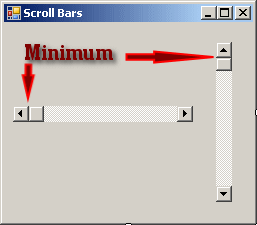
...and indeed, that's what scrolling in UIs also did for a very long time, accompanied by a very clear indication in the scrollbar that you've reached the end:

http://www.functionx.com/vs2010/forms/scrollbar2.gif

The "designers" happened, and all of a sudden scrollbars turned into these horribly thin and imprecise roundish blobs that are far worse for indicating where exactly you are, and in particular, whether you've reached the end.

Re: Allow disabling of motion or animation

#124

Earlier quoted context omitted.

I'm happy about the scroll-stretching since it's at least something that happens when scrolling reaches the end rather than just abruptly stopping. My mind head would expect the list to keep scrolling but it just wouldn't without any physical metaphor for why it wouldn't. iOS does this much more nicely.

My mind head would expect the list to keep scrolling but it just wouldn't without any physical metaphor for why it wouldn't. What? If I'm sliding physical objects around, I normally expect them to just stop abruptly if they hit something. ...and indeed, that's what scrolling in UIs also did for a very long time, accompanied by a very clear indication in the scrollbar that you've reached the end: http://www.functionx.…

I have yet to see something physical that doesn't need to somehow dissipate its energy to come to a halt. If it's rigid and the hurdle is rigid it brakes, bounces back or damages the hurdle. If it's soft it bounces back or squeezes (stretches) and if the hurdle is soft it bounces back or overshoots.

Re: Allow disabling of motion or animation

#125

Earlier quoted context omitted.

My mind head would expect the list to keep scrolling but it just wouldn't without any physical metaphor for why it wouldn't. What? If I'm sliding physical objects around, I normally expect them to just stop abruptly if they hit something. ...and indeed, that's what scrolling in UIs also did for a very long time, accompanied by a very clear indication in the scrollbar that you've reached the end: http://www.functionx.…

I have yet to see something physical that doesn't need to somehow dissipate its energy to come to a halt. If it's rigid and the hurdle is rigid it brakes, bounces back or damages the hurdle. If it's soft it bounces back or squeezes (stretches) and if the hurdle is soft it bounces back or overshoots.

Ever snapped magnets together where one was attached to something much heavier?

and frankly, any personal opinion doesn't matter in this case - it's a non issue. Just give us options to customize it to our preferences, and don't try to force others to follow The One True Way.

Re: Allow disabling of motion or animation

#126

I seriously believe this is one of those issues where the browser should enforce the user's preference over what websites want. Rather than try and get every site worldwide to implement this consistently, having the browser disable animations based on the OS-wide configuration would be an easy win for everyone.

It's almost impossible to reliably distinguish animations required for a web site to work properly from animations and changes that can and should be disabled. For example, try to distinguish (from "definitely should be blocked" to "definitely can't be blocked without breaking things"): - An ad mascot hopping up or down telling you to click it - A loading spinner spinning - A progress bar - Information you're waiting…

Spinners are a total antipattern. If loading is interrupted by an error, the spinner just keeps spinning. And there's no need to display progress every millisecond, 0.1 Hz should be enough.

Re: Allow disabling of motion or animation

#127

Earlier quoted context omitted.

It's almost impossible to reliably distinguish animations required for a web site to work properly from animations and changes that can and should be disabled. For example, try to distinguish (from "definitely should be blocked" to "definitely can't be blocked without breaking things"): - An ad mascot hopping up or down telling you to click it - A loading spinner spinning - A progress bar - Information you're waiting…

Spinners are a total antipattern. If loading is interrupted by an error, the spinner just keeps spinning. And there's no need to display progress every millisecond, 0.1 Hz should be enough.

Or if you disable javascript the spinner remains despite the content being complete under it. Fucking web devs!

Re: Allow disabling of motion or animation

#129

Earlier quoted context omitted.

I have yet to see something physical that doesn't need to somehow dissipate its energy to come to a halt. If it's rigid and the hurdle is rigid it brakes, bounces back or damages the hurdle. If it's soft it bounces back or squeezes (stretches) and if the hurdle is soft it bounces back or overshoots.

Ever snapped magnets together where one was attached to something much heavier? and frankly, any personal opinion doesn't matter in this case - it's a non issue. Just give us options to customize it to our preferences, and don't try to force others to follow The One True Way.

ideal scrolling 'hard brake' physics are copper block magnet drop[1], computed in modern devices on the GPU using the spinach NMR library[2]

1. https://www.youtube.com/watch?v=jbUWpJkhZpI

2. https://spindynamics.org/group/?page_id=12

Re: Allow disabling of motion or animation

#130

I seriously believe this is one of those issues where the browser should enforce the user's preference over what websites want. Rather than try and get every site worldwide to implement this consistently, having the browser disable animations based on the OS-wide configuration would be an easy win for everyone.

It's almost impossible to reliably distinguish animations required for a web site to work properly from animations and changes that can and should be disabled. For example, try to distinguish (from "definitely should be blocked" to "definitely can't be blocked without breaking things"): - An ad mascot hopping up or down telling you to click it - A loading spinner spinning - A progress bar - Information you're waiting…

My principle mobile driver is an e-ink device.

Whilst it's possible to support animation (and in fact does support video playback, at greatly-reduced image quality), at the higher-quality display modes most appropriate for text, all animation at The prevalence of animations and video on the present web (the device supports web browsing, it's an Android tablet with an e-ink display) makes for an exceedingly unpleasant experience.

Post reply on HN