Live data from Hacker News

Using Paper for Everyday Tasks

christine.website

121–130 of 133 posts

Re: Using Paper for Everyday Tasks

#121
post #119

I keep thinking I’ll like paper, but I just don’t. A few years ago I started keeping a daily journal: not so much a diary with today I feel… but a record like changed the van’s oil. Drove the kid to camp. Called Mom. . [0] I was using Drafts on my iPhone as a kind of bullet journal, with an action group I wrote. [1] After a year of this, articles like this one convinced me to switch to a paper journal and to get a ni…

Wow that Drafts action thing looks amazing. I’ve not used Drafts much, how does the action group run: you do it manually somewhere within Drafts? And then once you run it, you archive that day’s notes and start a new one for the next day? I imported it and m currently trying to find where you run custom actions in ios Drafts.
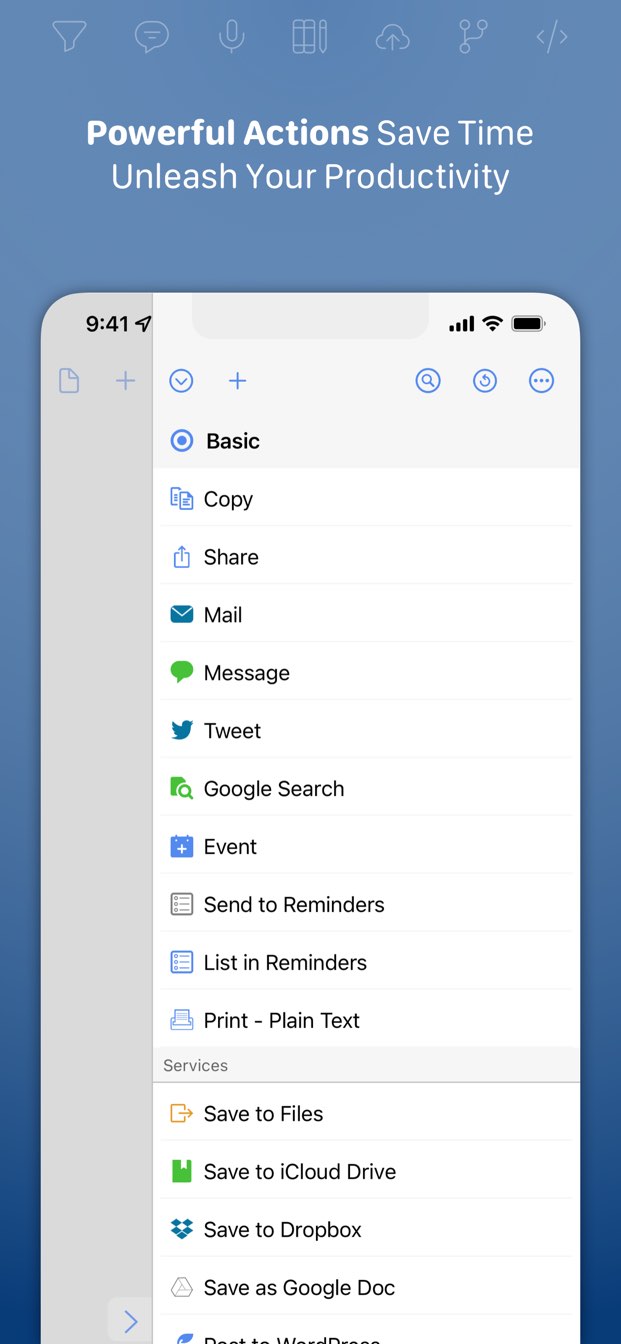
It’s in the action sidebar (like https://getdrafts.com/assets/img/custom/screenshots/ss-03.jp...). You can type some information into a new draft, then run the “Append to Today’s Journal” action. It’ll find (or create) a new draft with a name like “Journal for 2021-06-26” and append the next of your current draft onto it.

At the end of the day, go to today’s “Journal for …” draft (or run the “Go to Today’s Journal” action to jump straight to it). Then run “Process journal actions” and it’ll process each line of today’s journal draft, then archive the draft.

Each of those actions has a keyboard shortcut so you can run them pretty quickly if you have an external keyboard.

Re: Using Paper for Everyday Tasks

#122
post #97

Sounds nice, but I can barely read my own handwriting and my hand starts to hurt after writing like one word.

I have the same problem, I tried so many ways of holding a pen, but nothing works. Like you said, it starts already after writing one sentence or something like that. Made my schooltime really complicated.

How tightly do you hold your pen? That’s a lot of people’s cause of hand strain.

It should be held as lightly as possible. Ideally someone should be able to lean over your shoulder and pluck your pen/pencil straight out of your hand with next to no resistance.

Re: Using Paper for Everyday Tasks

#123
post #119

Earlier quoted context omitted.

Wow that Drafts action thing looks amazing. I’ve not used Drafts much, how does the action group run: you do it manually somewhere within Drafts? And then once you run it, you archive that day’s notes and start a new one for the next day? I imported it and m currently trying to find where you run custom actions in ios Drafts.

It’s in the action sidebar (like https://getdrafts.com/assets/img/custom/screenshots/ss-03.jp... ). You can type some information into a new draft, then run the “Append to Today’s Journal” action. It’ll find (or create) a new draft with a name like “Journal for 2021-06-26” and append the next of your current draft onto it. At the end of the day, go to today’s “Journal for …” draft (or run the “Go to Today’s Journal”…

Edit: Actually your reward also includes a bug report. Go to journal and append to journal work perfectly. However, process isn’t creating any tasks in omnifocus. I’ll test the other actions.

Format is:

* Do laundry

Ok, fantastical worked. Drafts opened fantastical. It did not ask to open omnifocus.

—————-

Oh, got it, thanks! I had to click manage in actions then enable your set, now it shows easily and the actions are straightforward.

It’s very hard to tell whether this will be a thing I fiddle with for a couple days and then set aside, or if it changes everything. But this has definite potential to be one of those things that changes everything. (My notes are a mess of notes and todos and never knew how to process well.)

Thanks for making this and for writing up the comments about it!

As your reward you get a feature request haha. If you’re ever adding to this, I would love Reminders support.

Re: Using Paper for Everyday Tasks

#124
post #123

Earlier quoted context omitted.

It’s in the action sidebar (like https://getdrafts.com/assets/img/custom/screenshots/ss-03.jp... ). You can type some information into a new draft, then run the “Append to Today’s Journal” action. It’ll find (or create) a new draft with a name like “Journal for 2021-06-26” and append the next of your current draft onto it. At the end of the day, go to today’s “Journal for …” draft (or run the “Go to Today’s Journal”…

Edit: Actually your reward also includes a bug report. Go to journal and append to journal work perfectly. However, process isn’t creating any tasks in omnifocus. I’ll test the other actions. Format is: * Do laundry Ok, fantastical worked. Drafts opened fantastical. It did not ask to open omnifocus. —————- Oh, got it, thanks! I had to click manage in actions then enable your set, now it shows easily and the actions a…

Look for a draft called “Quick Journaling settings”. Edit the line “* OmniFocus” to say “* Reminders”. That should make it create reminders instead of OF actions.

I wrote this to mirror my own personal workflow, so I admit that it’s not for everyone. I love how frictionless it made recording everything I needed to record, though. “At the dentist.”, then cmd-opt-A (for “Add”) records that I’m at the dentist. “* Call Joe.”, then cmd-opt-A will remind me to call Joe later.

Oh, if you want to keep (or throw away) the daily journal draft, edit the “Process journal items” action and change the “after success” action.

Edit: After taking a year and a half off from that action group while I scribbled stuff in notebooks, I’m about out of paper and will be resuming development on it very shortly.

Re: Using Paper for Everyday Tasks

#125
post #123

Earlier quoted context omitted.

Edit: Actually your reward also includes a bug report. Go to journal and append to journal work perfectly. However, process isn’t creating any tasks in omnifocus. I’ll test the other actions. Format is: * Do laundry Ok, fantastical worked. Drafts opened fantastical. It did not ask to open omnifocus. —————- Oh, got it, thanks! I had to click manage in actions then enable your set, now it shows easily and the actions a…

Look for a draft called “Quick Journaling settings”. Edit the line “* OmniFocus” to say “* Reminders”. That should make it create reminders instead of OF actions. I wrote this to mirror my own personal workflow, so I admit that it’s not for everyone. I love how frictionless it made recording everything I needed to record, though. “At the dentist.”, then cmd-opt-A (for “Add”) records that I’m at the dentist. “* Call J…

Hmm. Have I done something wrong? I entered this:

% Test

* Test

And these are my journal settings

@ Fantastical

* OmniFocus

- Day One

% Reminders

Omnifocus opens, reminders doesn’t

(Note that they aren’t double spaced. Just did that cause Hn doesn’t like lists)

Re: Using Paper for Everyday Tasks

#126
post #125

Earlier quoted context omitted.

Look for a draft called “Quick Journaling settings”. Edit the line “* OmniFocus” to say “* Reminders”. That should make it create reminders instead of OF actions. I wrote this to mirror my own personal workflow, so I admit that it’s not for everyone. I love how frictionless it made recording everything I needed to record, though. “At the dentist.”, then cmd-opt-A (for “Add”) records that I’m at the dentist. “* Call J…

Hmm. Have I done something wrong? I entered this: % Test * Test And these are my journal settings @ Fantastical * OmniFocus - Day One % Reminders Omnifocus opens, reminders doesn’t (Note that they aren’t double spaced. Just did that cause Hn doesn’t like lists)

Reminders doesn’t open for me when Drafts sends things to it. If you open Reminders, to you have a Journal list with a new reminder in it?

Re: Using Paper for Everyday Tasks

#127

What a lovely piece of writing. It’s good advice. Index / record cards and a binder clip work wonders for me. I used to write in a notebook but the anxiety of losing it is real, especially when reaching the end of a notebook filled with precious knowledge. 80% of read-usage was for either the current day or the previous day. Deeper history is very useful but often done at my desk. You can keep a rolling N day history…

I second the ScanSnap. I have mine scan directly into DEVONthink, and have been in the “scan and shred” camp for a long time now. If paper comes into my hands I think I may possible want keep, I scan it in. Then, everything that I don’t specifically need to keep original copies of gets shredded.

It's the only way to fly.

Re: Using Paper for Everyday Tasks

#128
post #125

Earlier quoted context omitted.

Hmm. Have I done something wrong? I entered this: % Test * Test And these are my journal settings @ Fantastical * OmniFocus - Day One % Reminders Omnifocus opens, reminders doesn’t (Note that they aren’t double spaced. Just did that cause Hn doesn’t like lists)

Reminders doesn’t open for me when Drafts sends things to it. If you open Reminders, to you have a Journal list with a new reminder in it?

No, I don’t. I tried making a Journal list too, but nothing went.

However, I tried GoodTask and that worked. And GoodTask syncs with Reminders. So actually, I guess this works perfectly for my use case.

Still not sure what’s wrong with my code for Reminders though

Re: Using Paper for Everyday Tasks

#129
post #57

I use 8 pieces of A4 folded in half and stapled. You need a long-necked stapler, (or cotton and thread I suppose) and you're done. It always lies flat. A4 is super cheap. You can print covers or different types of page if you're interested in that kind of thing.

Author of the post here, I looked into that but my handwriting is so bad that I needed to have lines on the paper. It was cheaper to use crappy premade notebooks from Amazon.

Yeah, my note books can look quite messy. I enjoyed your post.

Re: Using Paper for Everyday Tasks

#130

Nothing about shorthand. Not that this blog post specifically should have, but it seems conspicuously absent in all blog posts about paper, handwriting, note taking, etc. It's an established idea and demonstrably allows people to take dictation and court reporting at much faster speeds than handwriting - print or cursive. Why is it such a non-thing, even in productivity/efficiency circles and alternate/quirky circles…

I read a tiny bit about shorthand and invented my own using some of the principles other systems were designed on during a long weekend. Great investment, lots of fun. I specifically designed notation that could be common across digital and handwritten, and that paid off big.

Have you written anything about that (in longhand!) - what was in the design for digital/handwriting crossover?
Post reply on HN