Live data from Hacker News

The Workman Keyboard Layout Philosophy (2010)

workmanlayout.org

121–130 of 165 posts

Re: The Workman Keyboard Layout Philosophy (2010)

#121
My biggest issue with traditional keyboards is using non-alpha keys like the arrow keys, modifier keys, punctuation, numbers, escape, and function keys. I (sorta) solved this issue by getting an Ergodox and designing a qwerty layout[1] that made the modifier keys thumb accessible and other non-alpha keys close to the home row through layers:

- navigation layer: arrow keys and tab navigation on the home row.

- number and symbol layer: numbers on the home row, function keys one row above and punctuation one row below.

Its still a work in progress but I think it has helped me.

[1] https://configure.ergodox-ez.com/keyboard_layouts/zjdlgd/edi...

Re: The Workman Keyboard Layout Philosophy (2010)

#122
post #16

He uses the wrong test. Testing on "The Adventures of Sherlock Holmes" is meaningless for developpers: tests should be performed using real usages like "source code of linux kernel" or "mailing list of linux kernel" to have a better balance between code and text.

There's another issue as well. His mapping of difficulty reaching a key isn't really the whole picture. On a conventional QWERTY layout, neither the E nor the C keys are especially hard to reach, but if you had to frequently type them successively, that would be terrible. What matters is not just where a key is in relation to your hands, but also where two keys are in relation to one other.

In grad school, I did a lot of work on the Quadratic Assignment Problem (https://en.wikipedia.org/wiki/Quadratic_assignment_problem). If you model that "key reachability" metric as two-key sequence difficulty instead, you actually get a QAP instance to solve. I built a little toy project that would look at the source text of my dissertation in LaTeX as well as the accompanying C++ source code for bigram frequencies, and I mapped out a flow matrix manually in a similar way to the author here, but including that successive keypress difficulty, and ran my multiobjective QAP solver to generate a range of keyboards optimized for my specific dissertation work.

I did this as a fun little gimmick as part of a sort of "ignobels" within my department, so the results weren't really a thing you could use. To generate a usable keyboard layout, you need to also include a ton of heuristics for things like "put all the number keys together" and the idea that you can treat "a" and "A" as the same letter, but "2" and "@" may make sense to separate, none of which I really properly handled. But I think with some work one could actually formalize the problem of finding a real layout for normal people to use.

Re: The Workman Keyboard Layout Philosophy (2010)

#123

Earlier quoted context omitted.

If you have keyboards with physically different layouts—e.g. one ergonomic, one typical laptop, one swipey touchscreen—and use them all at least occasionally, you’ll be able to develop independent muscle memories for each. Go ahead and learn a different layout on a fancy keyboard, while keeping a stock standard layout (not even remapping Caps Lock to anything!) on a laptop keyboard, and I understand you’ll have littl…

I can confirm that having physically different keyboards makes it much easier to switch back and forth. Many years ago, I worked for a company that had a mess of old Sun hardware in the lab with the old Sun-layout[0] keyboards. After about a week of using them, I was pretty comfortable using them, and had no trouble switching back and forth the the customary layout keyboard at my desk. One day, I discovered the one S…

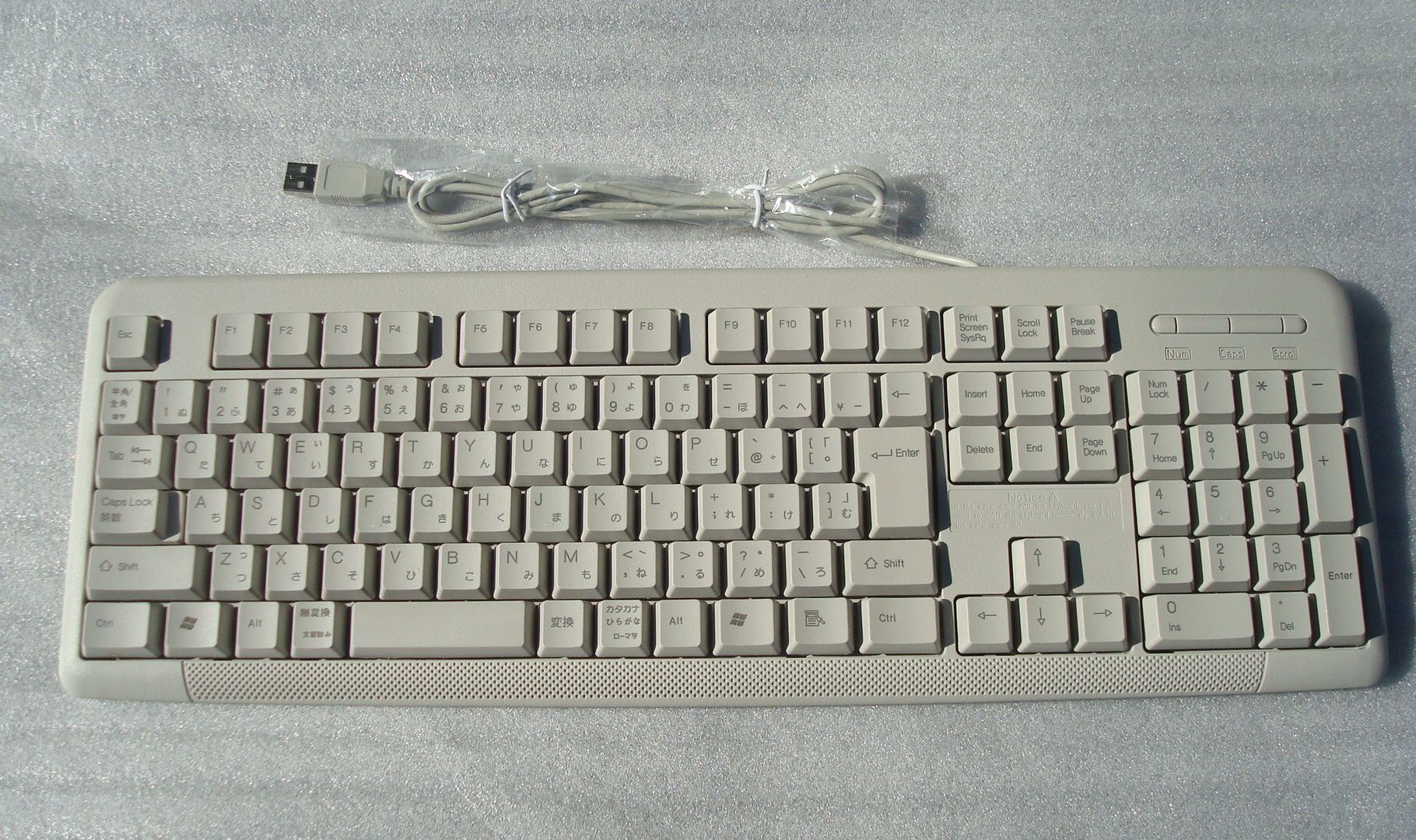
For a keyboard with separate single-width E13 and E14 (like the old 84-key PC/AT keyboard and the Sun Type 5) instead of a single double-width key spanning both, you want the JIS 109-key Windows keyboard or the Korean 106-key Windows keyboard.

* http://www2d.biglobe.ne.jp/~msyk/keyboard/layout/usbkeycode....

* https://commons.wikimedia.org/wiki/File:Korean_106-key_keybo...

* http://www.ps-aoki.com/~ace/ebay/pc/keyboard/5W_1.jpg

The 104-key Windows keyboard moves the old PC/AT E13 key to D13, and the 105/107-key Windows keyboards move it further to C12. The 106-key Windows keyboard has it back at E13. The JIS keyboard actually has that key at C12, though. Its E13 key is another key with a different PS/2 scancode and USB HID usage. This is important to know when remapping the keys.

(I have the JIS E13 mapped to the FEP/IM toggle, a.k.a. Zenkaku/Henkaku/Kanji, in my U.K. International and U.S. International maps, with the E00 "Grave" key retaining its usual mappings.)

Re: The Workman Keyboard Layout Philosophy (2010)

#124

I feel Carpalx has a less arbitrary, more rigorous solution to this [1]. I've been using its QFMLWY for years. It is hugely better than QWERTY. Though as a programmer, I'm still not fully happy with the Ctrl and Shift keys being in their standard location, and thus at the weakest (pinky) finger. If anyone would like to give QFMLWY a go, let me know. I have scripts to install it on Win, Mac and Ubuntu. [1] http://mkwe…

I'm glad to see carpalx was posted! I've been typing in Dvorak for a while, but if I were to try a new layout, this would be the first. If you look into his model parameters, he takes rolling and hand alternation into account [1]. Definitely more rigorous.

One of the disadvantages of the Dvorak layout are the placement of the commonly used ZXCV keys, and he has a layout called QGMLWY where ZXCV are in the same place as QWERTY. I've gotten around the Dvorak issues using mice with several buttons, but it occasionally bugs out, so I'd recommend trying to keep ZXCV in the same place.

[1] http://mkweb.bcgsc.ca/carpalx/?typing_effort

Re: The Workman Keyboard Layout Philosophy (2010)

#125
post #78

Earlier quoted context omitted.

But this brings up that some Vim hotkeys are more positional than mnemonic (J-down, K-up), while others are more mnemonic than positional (I-insert, X-exterminate(?)). Food for thought.

This is why I believe that qwerty is the best layout. All applications have designed all shortcuts to be sensible on it. Any other layout is just going to be a disaster and negate any benefits and more during actual use . You can of course use whatever layout you like and then while ctrl/alt/meta is pressed it switches to qwerty, doesn't save vim users though (or other applications where shortcuts don't need to be pr…

Hjkl turn into something strange with colemak but they are still vaguely directional and I have not rebound any vim hotkeys.

Re: The Workman Keyboard Layout Philosophy (2010)

#126
post #94
post #81

Earlier quoted context omitted.

I can imagine typing a wordy contract with this body and hand position, but not programming. He doesn’t use ctrl/shift much, and when he does, it seems not like a quick thing. He also will bottom out as hell even on non-horrible keyboard. (Mac kbd is far from horrible when compared to other membranes, btw.) I’m not a homerow-guy even, but try to {foo:(x,y)=>(x[y]+1)} and I bet this method will feel the struggle.

I don't understand the problem...? Here's a quick demo of me typing some special characters with my natural typing position: https://streamable.com/tavn6 For something like $ or # I’ll use my right pinky for shift and the left hand, which I can’t really demo with one hand holding camera. The right side is easily reachable if you don’t glue your wrist—try it. EDIT: Here’a the full thing with spaces: https://streamable…

Just tried your way and have mixed feelings about it. On one hand, it isn’t much different from how I do (bases on erf, kop/jio and sliding around). On the other, side moving is much easier due to no friction; also much ‘slippery’ if not controlled. Probably should give it a week to see how is it to hold a big right angle for a long time. Thanks for sharing!

Re: The Workman Keyboard Layout Philosophy (2010)

#127
post #8

This looks interesting but the symbol still look very qwerty-ish. I type on Neo-2 ( https://en.wikipedia.org/wiki/Keyboard_layout#Neo ), which uses ISO keyboards and primarily targets German, even though the majority of my typing is in English. Its entire third layer is for symbols that are common in programming. Layer 3 is activated via either caps-lock or the key above Right Shift, and has \/{}* ?()-:@ as the home…

German users might also be interested in the AdNW layout ( http://www.adnw.de/ ). They started out with Neo’s excellent and logical arrangement of the non-alphabetical layers, but replaced the alphabetic layers with a layout created by running an optimization algorithm on a text corpus of 50% English and 50% German text (whereas in Neo the key arrangement was created manually, based on intuition). The metrics they us…

Have to check that out thanks

Re: The Workman Keyboard Layout Philosophy (2010)

#128
post #126
post #94

Earlier quoted context omitted.

I don't understand the problem...? Here's a quick demo of me typing some special characters with my natural typing position: https://streamable.com/tavn6 For something like $ or # I’ll use my right pinky for shift and the left hand, which I can’t really demo with one hand holding camera. The right side is easily reachable if you don’t glue your wrist—try it. EDIT: Here’a the full thing with spaces: https://streamable…

Just tried your way and have mixed feelings about it. On one hand, it isn’t much different from how I do (bases on erf, kop/jio and sliding around). On the other, side moving is much easier due to no friction; also much ‘slippery’ if not controlled. Probably should give it a week to see how is it to hold a big right angle for a long time. Thanks for sharing!

You need a slightly different mental map of your keyboard. I think I use the edges/shifts as a reference (Model F doesn’t have the bumps at J/F at all), but that’s just a guess.

Re: The Workman Keyboard Layout Philosophy (2010)

#129
post #100
post #78

Earlier quoted context omitted.

This is why I believe that qwerty is the best layout. All applications have designed all shortcuts to be sensible on it. Any other layout is just going to be a disaster and negate any benefits and more during actual use . You can of course use whatever layout you like and then while ctrl/alt/meta is pressed it switches to qwerty, doesn't save vim users though (or other applications where shortcuts don't need to be pr…

I've been using dvorak for more than a decade now. Yes, shortcuts are sometimes a bit annoying, but qwerty is so bad, that dvorak is still worth it.

I've been using Dvorak for ~15 years now and the keyboard shortcuts don't bother me. For example, when Dvorak Ctrl+X/C/V is translated to QWERTY, they are in the positions Ctrl+B/I/(period). For shortcuts like Ctrl+C in Dvorak (Ctrl+I in QWERTY), I put my left thumb on Right Ctrl and my left pinky on the letter key.

Two minor problems, though: In Dvorak, V is immediately beside W. Ctrl+V means paste, but Ctrl+W means close window, so care is needed. And, any keyboard that lack Right Ctrl (e.g. the Microsoft Surface series) is an abomination.

Re: The Workman Keyboard Layout Philosophy (2010)

#130
post #103
post #5

A keyboard layout for programmers, which allowed the use of special characters on the home row, perhaps by using a mixed corpus of source code rather than just novels, would be interesting to see. Recently, I ordered the Ultimate Hacker’s Keyboard because I think typing is quite important for a programmer, especially if you consider health as the author of this article does. I’m a little bit weary of not using QWERTY…

"which allowed the use of special characters on the home row" Unless you're programming in something very symbol-heavy, even by programming language standards, I suspect you'll find that it's hard for any symbol (other than space) to break into the top-10 non-space symbols; not impossible, but hard. I just did a 200KB perl file here, and the top 12 symbols are space, e, a, r, s, i, t, o, n, newline, l, and d. The fir…

There's also the difference between what's in the code and what you type. My code is full of colons and commas between named arguments, but those are all inserted by autocomplete in my IDE.
Post reply on HN