Live data from Hacker News

Yserver: A modern X11 server written in Rust

github.com

111–120 of 131 posts

Re: Yserver: A modern X11 server written in Rust

#111

Earlier quoted context omitted.

I really miss the tear-off-into-their-own-window menus. They were so handy. I have to wonder if the fact that Wayland either never had or has only very recently gotten support for applications that need to place their windows at application-commanded locations on the screen meant that those lovely tear-off menus had to die.

The gtk3 docs give the following reason for the deprecation: Menus are not meant to be torn around. Yeah, they are meant to be implemented with web technologies and look like shit. BTW, this tear-off style is probably quite old. Long ago, I used an early version of ANSYS (for Windows) which apparently was still close to its Unix original, and it had its menus pop up like real windows, with close buttons! They were ni…

> BTW, this tear-off style is probably quite old.

Yeah, I agree with that. I was using some ancient X11 program that had tear-off menus, but I'll be fucked if I can remember which one it is.

> Yeah, they are meant to be implemented with web technologies and look like shit.

Yuuuuuup. If you always take the "yes" side, you'll come out quite a bit ahead of your fellow gamblers for the "Will GNOME make things worse for sophisticated users and call it 'simplicity'?" wager.

Re: Yserver: A modern X11 server written in Rust

#112

Earlier quoted context omitted.

Xorg does per-monitor DPI and per-monitor refresh rate. Debian probably never shipped a version that does, but it works fine on Gentoo Linux. I've tested per-monitor DPI before, and [0] mentions one way to do it. I tested per-monitor refresh just now. Using the xrandr CLI to set the refresh rate to 24.0 on my primary monitor and 60.0 on my secondary results in "cinematic" visuals on the primary monitor and "soap oper…

Maybe it's possible now. It wasn't back when I last used X. Now that Wayland is the default on most distros and works on nvidia now I don't see any reason to go back.

Good for you? But mixed-monitor DPI and mixed-monitor refresh rate haven't been key selling points of Wayland for like eight to ten years, at least.

It has been nearly eighteen years since the Wayland project started, and they are still not at feature parity with the major windowing systems. [0] It's nuts how long it's taking them. [1]

[0] As one example, apparently the Wayland policy for clients that stop responding for a few seconds and fill up their event mailbox is still to terminate the stuck client. If memory serves, Windows 9x handled stuck clients better than that.

[1] I'm sure it's good enough for what you're doing and you never run into any rough edges or misfeatures, so don't bother chipping in with that retort. ;)

Re: Yserver: A modern X11 server written in Rust

#113

Earlier quoted context omitted.

On general principle, I think 22 years of inactivity is perfectly reasonable for considering any software project perfectly dead.

That's why I wrote "existed" (simple past).

The “be aware” is the problematic text; nobody cares that a two decade old dead project has the same name.

Re: Yserver: A modern X11 server written in Rust

#114
post #76

Earlier quoted context omitted.

It's possible it has been fixed in the last couple years but for a while it was the case.

Were you -perhaps- using GNOME and the GNOME-provided GUIs to change monitor refresh rate? Given GNOME's history of legendarily user-hostile decisions made in the name of "simplicity", it would surprise me not even a little bit that the GNOME folks decided to pretend that the active monitor with the lowest refresh rate dictated the fastest you could drive any monitor.

This is basically a built in limit of X. The only exception is that monitors that support variable refresh rates may be able to offer this feature in multiple monitor configuration subject to software and hardware options.

I'm personally very dubious of the claim. This has basically never been supported because x treats all screens as one big screen unless you run multiple X screens which disallows moving Windows between screens which is a pretty big barrier to normal usage

Re: Yserver: A modern X11 server written in Rust

#115
post #12

I really wish people gave a damn about the “gui over the network” problem x11 solves. Wayland drops this use case entirely so we’re pretty much universally stuck with vnc. Microsoft rdp is a great solution for this in windows land.

They drop this use-case, but still use sockets for IPC, so I still have to pretend I'm doing network programming, serialize my messages over the "network" and "flush the stream" (insanity) but don't actually get any of the benefits of this model. I genuinely wonder if they stopped to think why X11 has sockets or just blindly copied it over. Or are they unaware other forms of IPC exist, that don't require you to go th…

A fundamental part of the Wayland protocol is passing file descriptors through the sockets so this doesn't generalize to network sockets. It also can't be done with shared memory.

Re: Yserver: A modern X11 server written in Rust

#116
post #18

Earlier quoted context omitted.

What would you rather they use to communicate with the server? Message passing via shared memory? UNIX sockets are perfectly fine for IPC with small amounts of data, and is how everything in UNIX has always done it, network transparency or not. They provide a simple, efficient and reliable communication channel between two processes.

Yes, command buffers over shared memory are the correct way to do this. 1. You don't need to convert your discrete messages into a stream with size metadata, only for them to immediately be converted to a message on the other side. 2. You don't need to jump into the kernel to copy over 20 bytes, only for the other side to jump into the kernel to copy it back. 3. You don't need to deal with the "oh but what if my read…

> command buffers over shared memory are the correct way to do this

Sounds like a security nightmare.

Re: Yserver: A modern X11 server written in Rust

#117
post #3
post #2

This is pretty cool - especially that it's at the point where it can be used with a real window manager. I'm curious why multiple screens is considered legacy baggage and thus out of scope, given how common multiple monitor setups are these days. I also have zero familiarity with X internals, so don't know if multiple monitor support is a horror show that'd be miserable to support.

X screens are legacy. It used to be you could connect to a particular screen by number to open windows on that screen but the modern way to do it is to have one big virtual screen. X screens were like having a separate X server for each monitor, but with a single shared cursor and shared VRAM. You can see why that's an obsolete model.

Please do not see any malice in this naive question, but why is that an obsolete model? Back in the days I had very different displays that I could use to display various windows of a flight simulator (some dedicated to some instruments, the big one for the front view, for instance) and it was quite nice. It sounds like that would not be easy to replicate with a single shared frame buffer, but maybe I'm wrong (I've been using nothing but a small laptop screen for decades)

Re: Yserver: A modern X11 server written in Rust

#118
post #27
post #11

Earlier quoted context omitted.

I suspect(with out reading the source to find out) that screens are the traditional X11 screens as opposed to the modern xrandr combined screen. Traditionally each screen in an X11 setup was it's own separate thing with it's own separate frame buffer. While technically applications could move between screens, this depended on the application caring enough to do so. It had to maintain two(or more) mirrored windows(one…

The downside is your refresh rate is locked to the slowest monitor.

Not true, see my comment a little deeper down this thread

Re: Yserver: A modern X11 server written in Rust

#119

Earlier quoted context omitted.

Were you -perhaps- using GNOME and the GNOME-provided GUIs to change monitor refresh rate? Given GNOME's history of legendarily user-hostile decisions made in the name of "simplicity", it would surprise me not even a little bit that the GNOME folks decided to pretend that the active monitor with the lowest refresh rate dictated the fastest you could drive any monitor.

This is basically a built in limit of X. The only exception is that monitors that support variable refresh rates may be able to offer this feature in multiple monitor configuration subject to software and hardware options. I'm personally very dubious of the claim. This has basically never been supported because x treats all screens as one big screen unless you run multiple X screens which disallows moving Windows bet…

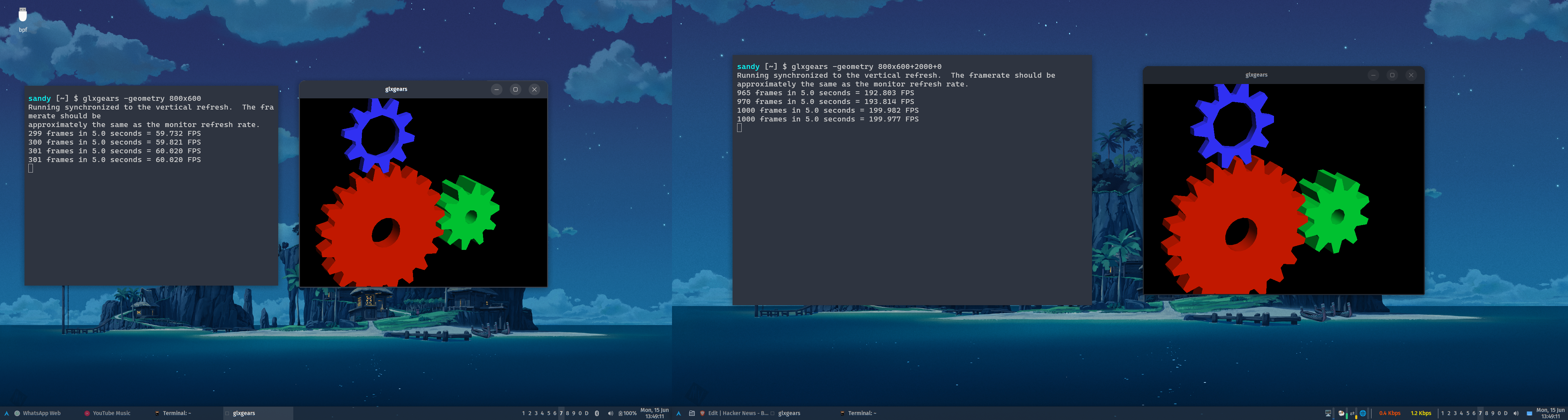
Here:

amdgpu + x11 + xfwm4

  $ xrandr | grep -A1 ' connected' | sed 's/^/  /'
  eDP connected 1920x1200+0+240 (normal left inverted right x axis y axis) 286mm x 178mm
     1920x1200     60.03*+  40.02  
  --
  DisplayPort-0 connected primary 2560x1440+1920+0 (normal left inverted right x axis y axis) 597mm x 336mm
     2560x1440     59.95 + 200.00*  179.96   144.01   120.00  
https://u.cubeupload.com/porridgewithraisins/img.png

https://u.cubeupload.com/porridgewithraisins/img3.png

Re: Yserver: A modern X11 server written in Rust

#120
post #29

Earlier quoted context omitted.

How about making the standard client library's API the interface, and have it hide whatever the system is actually using? A long time ago when I looked at designing a X11 replacement, that was my approach. AFAIK, only special X utilities used anything but Xlib anyway. And later I think this is what early revisions of Canonical's Mir did.

So .. still using sockets, but not documenting how the messages on the socket look? Why?

It also allows implementing a different display interface. For example Haiku OS has a compatibility layer: https://discuss.haiku-os.org/t/xlibe-an-xlib-x11-compatibili...
Post reply on HN