Live data from Hacker News

A beginner's guide to split keyboards

justinmklam.com

101–110 of 260 posts

Re: A beginner's guide to split keyboards

#101
post #75

I'm not sure why nobody mentions this, but for windows and linux, you can fiddle with a "split keyboard" by using two keyboards. You can put your right hand over the right part of the right keyboard, the left and over the left part of left keyboard, and ... type away. It just works, and usually it is free, almost everyone I know has a pile of keyboards somewhere. Irritatingly, this doesn't work by default on the mac…

I actually want to try that just to see the looks on people's faces when I'm typing on two keyboards. It's the opposite of this: https://www.youtube.com/watch?v=u8qgehH3kEQ
Re: A beginner's guide to split keyboards

#102

I do not buy the whole ergonomic portion for most split keyboards. It feels like a justification after the fact. That said I used to use a lily58 and for me it was great. I have a lot of papers, notes and books on my desk. A small easily movable keyboard meant that i could have something between the keyboard halves, writing and reading without issue

I have RSI issues with my wrists. It really helps to have split ortholinear keyboards, if only because I have trained on them specifically to type without moving my wrists whatsoever (using a miryoku layout), while old habits persist on a standard QWERTY TKL. Of course, it also helps to put on really soft-springed keys (like kailh silver) — it's self evident that softer keys are easier to press.

I had initially thought that it'd be hard to use both kinds of keyboards at once, but my muscle memory for either seems unaffected when I use the other one.

Re: A beginner's guide to split keyboards

#103
post #80
post #14

The issue with kinesis and all those nice small symmetrical keyboards is that not every alphabet is as short as English. Russian, for example, has 33 letters. So if you’re someone like that, you really want that ordinary macbook-like number of keys = larger non-symmetrical right half. — As for the ortholinear keyboards, I spent a few months with the latest kinesis but sold it eventually: not that comfortable. Just cl…

Dvorak works really well for me. (Though you might want to pick Colemak or Neo2 these days.) I use Dvorak on both my Kinesis Advantage and on 'normal' keyboards like on a laptop. It's not so much about speed, as about comfort.

My personal experience after switching to Colemak is mostly neutral. Speed is about the same after some training, around 70 WPM. Comfort, maybe improved a bit, but no life changing.

Some people claim that they went from 60 WPM on Qwerty to over 100 WPM on some other newly designed layout, but my experience is clear: if you do it for the speed you will be disappointed.

Re: A beginner's guide to split keyboards

#104

I do not buy the whole ergonomic portion for most split keyboards. It feels like a justification after the fact. That said I used to use a lily58 and for me it was great. I have a lot of papers, notes and books on my desk. A small easily movable keyboard meant that i could have something between the keyboard halves, writing and reading without issue

Conversely, I'm totally sold on it. The shoulder-hunching thing is so real.

The thing I thought was ergonomic BS was the benefits of columnar/ortho layouts; everyone talked about how your fingers just moved vertically and it was so much better for them, and I rolled my eyes. But dang if it hasn't proved to be meaningfully true for me, too -- when I have to type on a legacy keyboard, I can clearly feel the pain in my fingers. (The disclaimer here is that my fingers are totally screwed up; if you don't feel pain normally, this probably matters less.)

Re: A beginner's guide to split keyboards

#105
post #99

The only learning curve is if you don't type correctly to start with. :) When I switched to a split keyboard 20 years ago, I realized that I used my right hand to type T and B. But it was a pretty quick transition when I kept slamming my index finger into the gap!

That's true for the "Path 1" keyboards this article talks about. The other ones definitely take some time.

Re: A beginner's guide to split keyboards

#106
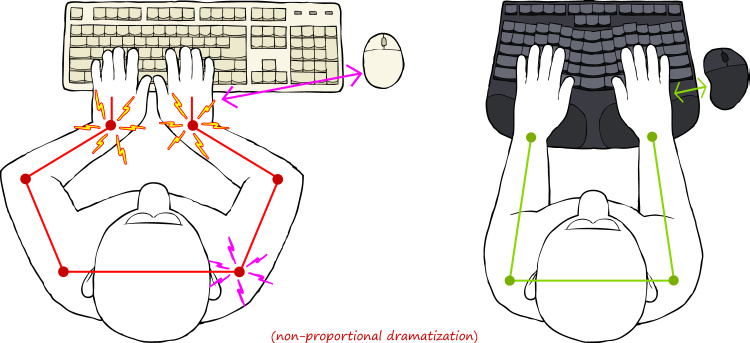
Whenever split keyboards come up, ulnar deviation is mentioned, and non-split keyboard users are depicted to be using the keyboard like this (image from the post):

https://www.justinmklam.com/posts/2026/02/beginners-guide-sp...

I don't know if it's just me, but I don't use the keyboard like that. I know the illustration is said to be exaggerated, but still. There is no need to squeeze your hands in front of the keyboard. Just naturally bring your hands in front of chest, the same as when you are reading a book or writing notes with a pen. No twisted wrists. No ulnar deviation. The idea that you can't do something with your hand in front of the center of your chest without hurting the wrists seem like a strange supposition.

Admittedly, I've never looked at a significant number of people typing on a non-split keyboard, so I don't have the data to refute the need of this invention. I just feel like the natural posture already doesn't have the problem of ulnar deviation.

Re: A beginner's guide to split keyboards

#107
post #88

Surprised Ergodox is not mentioned, that's the keyboard that started the movement. Very safe pick since firmware is open source and it can be both self-assembled and bought. It has too many keys in thumb clusters and bottom row, but you can easily remove them.

I feel like the Ergodox was traditionally a lot of people's first wacky split keyboard -- but for those that stuck around, it was rarely their last. These days, there are so many better options that it's hard to recommend Ergodox despite its historic importance.

Re: A beginner's guide to split keyboards

#109
post #14

The issue with kinesis and all those nice small symmetrical keyboards is that not every alphabet is as short as English. Russian, for example, has 33 letters. So if you’re someone like that, you really want that ordinary macbook-like number of keys = larger non-symmetrical right half. — As for the ortholinear keyboards, I spent a few months with the latest kinesis but sold it eventually: not that comfortable. Just cl…

My caps lock key is swapped with the left control key as God intended.

Re: A beginner's guide to split keyboards

#110

Whenever split keyboards come up, ulnar deviation is mentioned, and non-split keyboard users are depicted to be using the keyboard like this (image from the post): https://www.justinmklam.com/posts/2026/02/beginners-guide-sp... I don't know if it's just me, but I don't use the keyboard like that. I know the illustration is said to be exaggerated, but still. There is no need to squeeze your hands in front of the keybo…

Yes. I'd swear that people that unfortunately fall into RSI also fall into a negative cycle of moving less and favoring a static position at all levels - fingers, wrists, shoulders.

Our bodies love movement and it's often a recipe for solving all sorts of issues.

Post reply on HN