Live data from Hacker News

macOS Sonoma Boot Failures

github.com

101–110 of 290 posts

Re: macOS Sonoma Boot Failures

#101

Earlier quoted context omitted.

The messiness of resolutions during boot always annoyed me on PCs. It was understandable back in the days of BIOS, but ith the advent of UEFI it seems like it should be possible to run EFI config screens and the like at monitor native rez (or at minimum, native aspect ratio) but I’ve never seen this… it’s always 1024x768 or somesuch stretched to fit a 16:9 monitor which looks awful.

EFI config screens should be text mode only, full-stop. So they can easily be used over serial console redirection. Ran into one recently that was high-rez graphical. It needed a USB mouse to change critical settings because the tab order for the onscreen widgets didn't work. Anyone responsible for creating graphical EFI config screens should stop writing software for the good of humanity.

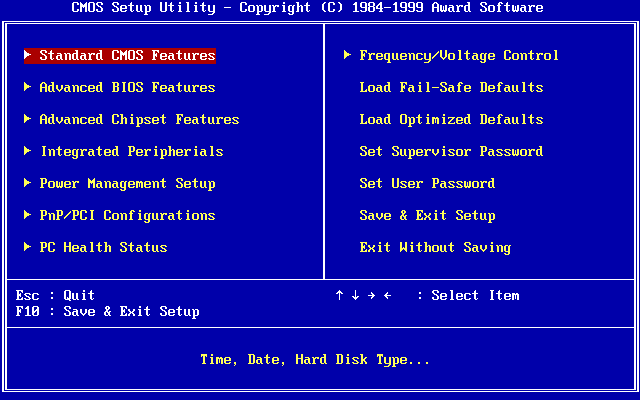
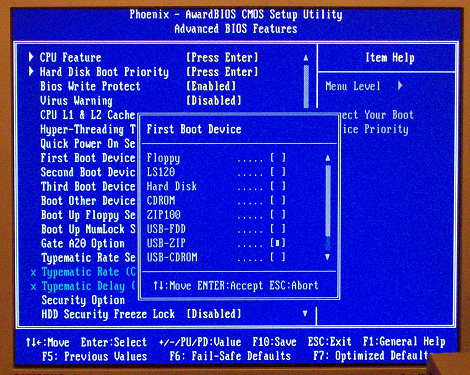
Text-only BIOS setup was the norm for a long time before the stupidly bloated EFI graphical stuff became common. Even then, there were the better full-featured TUIs:

https://upload.wikimedia.org/wikipedia/commons/0/05/Award_BI...
https://liveusb.files.wordpress.com/2010/05/awardbios-firstb...
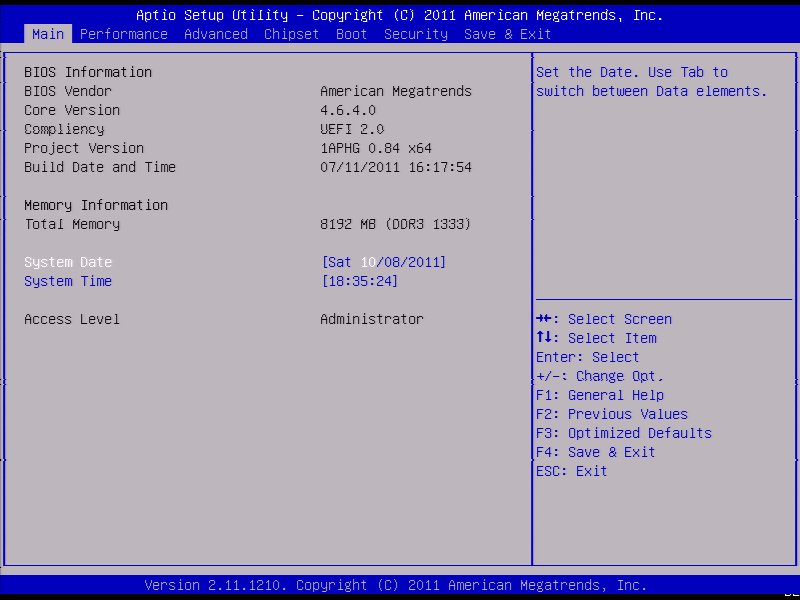
And the simplified crap with tabs that often came with prebuilt PCs but later seems to have spread to others too:

https://cdn.staticneo.com/a/Intel_Sandy_Bridge_Z68_P67/S%20B...
Re: macOS Sonoma Boot Failures

#103
post #5

See also his twitter for some speculation as to how on earth simply changing refresh rate would cause boot corruption: https://social.treehouse.systems/@marcan/111329614147717090 >Why? I can tell you why: because Apple hates display modeset flicker, and switching modes between ProMotion on/off causes a modeset flicker, so of course they made it so that is stored in nvram somewhere and applied when the screen is turne…

The messiness of resolutions during boot always annoyed me on PCs. It was understandable back in the days of BIOS, but ith the advent of UEFI it seems like it should be possible to run EFI config screens and the like at monitor native rez (or at minimum, native aspect ratio) but I’ve never seen this… it’s always 1024x768 or somesuch stretched to fit a 16:9 monitor which looks awful.

At least it works. I find low-res bios screens reassuring... something I can depend on.

Re: macOS Sonoma Boot Failures

#105

Earlier quoted context omitted.

> I wonder why anyone would turn ProMotion off considering that 120Hz massively improves responsiveness. The first reason that comes to mind is battery life. That's probably the most broadly applicable use case. But also, if I was still doing e.g. frontend web development, I would want to confirm that my css animations looked nice at 60 hz. Edit: My first use case is likely wrong, thank you to replies for reminding m…

macOS is very good at adaptively reducing refresh rate when nothing is happening on screen, with the panel reportedly supporting the full range of 1-120hz so barring badly engineered apps that are permanently pinned at max refresh, the battery impact of keeping ProMotion on is minimal for most use cases.

Which raises the question even more why the refresh rate matters during early bootup - surely you could just start with an apple logo and a 1 Hz refresh rate, and then up the rate later during boot when it's time to do some animation...

Re: macOS Sonoma Boot Failures

#106
post #11

> Do not let them charge you any money for it. This is a problem Apple caused, and purely a software issue. If the technicians claim there is hardware damage, they are wrong. Good luck with that.

The Apple Store is usually great with this stuff. If there's a documented problem that affects your hardware model and the given software versions, they're extremely unlikely to try to charge you for anything.

Documented by whom? Are you going to show a marcan post to them and claim it’s an Apple issue?

Re: macOS Sonoma Boot Failures

#107

Not sure if related, but my 2020 M1 macbook air bricked a week or so after upgrading to Sonoma. I was suspicious if this was related to the update. Luckily the logic board was replaced for free under warranty laws here, though it put me off switching to iphone which I was a day away from doing.

FWIW I have been using iPhones for 10+ years and not once has an update ever failed or had any issues.

But my Google Pixel phone used to brick itself all the time, I think twice in the two years I had it.

Re: macOS Sonoma Boot Failures

#108

I’m an apple fanboy and let me be the first to say their SDLC since the pandemic has been AWFUL. I have never had so many bugs with apple devices. And I’m not talking about giant catastrophic bugs you would expect with windows or Linux. I mean little things, like random phone reboots, overheating, my mac restarting when I wake up from sleep, internet issues, etc. They need a shake up and to stop focusing on all these…

I agree, I started buying some Macbooks for work and was horrified when the Launchpad just wouldn't open on a brand new Mac.

Like, you press Launchpad, and it just ... doesn't open. sometimes. This kind of rancid stuff you would expect on Windows (i.e. after upgrade to Windows 11, half our laptops can't right click on the desktop sometimes) but it never used to happen on OS X.

Re: macOS Sonoma Boot Failures

#109

Earlier quoted context omitted.

The messiness of resolutions during boot always annoyed me on PCs. It was understandable back in the days of BIOS, but ith the advent of UEFI it seems like it should be possible to run EFI config screens and the like at monitor native rez (or at minimum, native aspect ratio) but I’ve never seen this… it’s always 1024x768 or somesuch stretched to fit a 16:9 monitor which looks awful.

My old AM3+ motherboard has an option for full screen boot logo, and it starts in full HD, continuing with systemd boot, all in 1080p. I thought this wasn't really a problem anymore.

Ha, back in the day when I was a student assistant in a campus computer lab, we flashed the BIOS boot screen with a full screen image of Darth Maul. The staff person who oversaw us was not amused. (This was in the Pentium 3 era IIRC)

Re: macOS Sonoma Boot Failures

#110

Interestingly I ran into this exact problem with my work MacBook Pro M1 upgrading to Ventura 13.6 and assumed it was a totally isolated incident. I don't have a dual-boot setup either, just a single macOS install. The computer was connected to a Thunderbolt Display during the update which I assume had the same effect of changing the refresh rate to something other-than-ProMotion that the linked article mentions. I ha…

Exact same thing happened to me.

What kind of HW?
Post reply on HN