Live data from Hacker News

TV backlight compensation (2020)

lofibucket.com

101–110 of 127 posts

Re: TV backlight compensation (2020)

#101

Earlier quoted context omitted.

Funny how recent developments in AI have warped our comprehension of what is easy to ask to a computer vs what is hard. Obligatory related XKCD: https://xkcd.com/1425

Besides the fact that GPS already exists, it seems like it would take longer (~20 years) than the 5 years claimed to detect birds. > The GPS project was started by the U.S. Department of Defense in 1973. The first prototype spacecraft was launched in 1978 and the full constellation of 24 satellites became operational in 1993 https://en.wikipedia.org/wiki/Global_Positioning_System

Never forget to read the alt-text joke on an XCKD comic. The punchline on this one is based in some truth.

> In the 60s, Marvin Minsky assigned a couple of undergrads to spend the summer programming a computer to use a camera to identify objects in a scene. He figured they'd have the problem solved by the end of the summer. Half a century later, we're still working on it.

https://dspace.mit.edu/bitstream/handle/1721.1/6125/AIM-100....

Re: TV backlight compensation (2020)

#102

Earlier quoted context omitted.

My XDR has been pretty flawless, and on the less exorbitantly priced end, I've had good experiences with a few business oriented IPS models (most recently the Samsung UR55). My main gripe is gaming monitors seem to be consistently the worst panels they can get their hands on. It seems like they realize gamers will put up with a lot of garbage in exchange for raw "power" and take full advantage of the fact. I'm 99% su…

Gamers hit up blurbusters to see how the motion is and it either looks okay or you get a headache. The OEMs optimize for that (hence the focus on g2g and adaptive sync) and then just jack up the saturation slider to compensate for everything else. And hey, those wasabis and catleaps got you a 1440p IPS panel that did 90% of what you want for 50% of the price at a time when 1440p and IPS was still kind of rare to own.…

You're misunderstanding the comment: the point is Wasabi Mango and co were good because they were charging significantly less for the lower grade panels.

Now manufacturers are possibly prioritizing the highest grade panels for non-gaming use and using extremely expensive gaming monitors as a dumping ground for everything else.

For example, the 28" UR55 has few complaints about backlight bleed and in my experience with having bought several is a reliable choice. Meanwhile the oddly similar 28" Odyssey G8 is known as a "buy and return until you get one that's ok" type of monitor, as are many other gaming monitors these days.

Gamers seem conditioned to just accept inferior panel quality as long as the other specs work, while business and casual customers would probably just buy another monitor if they saw weird issues. They might not know the term backlight bleed, so they'll still see it just fine.

Re: TV backlight compensation (2020)

#103
post #73

Earlier quoted context omitted.

I noticed the screen only died when playing videos and always died at the same point if I rewatched a video. Notably, greyscale videos never caused the issue. Then I went through a video frame by frame to get to the frame it died on. Then I erased parts of the frame to find which part caused it. Eventually I found that if the red or blue pixel in the 481st column and the green pixel in the 482nd column have a differe…

What's the odds that such an obscure problem happens to someone with the patience and wherewithal to figure it out *and* fix it? Pretty impressive.

It’s probably not all that obscure. There’s an awful lot of ewaste.

Re: TV backlight compensation (2020)

#104
I wonder if something similar could be used to keep my TV from ratcheting up the overall brightness/backlighting whenever a subtitle is on screen.

The constant ramping of brightness is rather distracting.

Re: TV backlight compensation (2020)

#105
post #56

Earlier quoted context omitted.

If you fill your entire screen with nothing but a single solid color (try #FF6400) does it show up correctly? That is, without any gradient or areas of the screen where the color appears darker or lighter (especially around the edges or in the corners?). I've yet to find a modern monitor that doesn't have a problem with that basic test, which is pretty disappointing considering accurately representing a single color…

Most people will tell you that their monitor is flawless, then you do simple tests like that one and the monitor shows that it has severe issues and they respond "uh I never noticed, well I don't care". Which is precisely why manufacturers can get away with the shit that they sell.

I've owned pretty much every "notable" monitor in the formats I care about in the last few years, I'm sure I'm pickier than you.

The fact is you can pay for a good enough monitor to truly be flawless, it just costs more than people are envisioning. For example, my late revision 5K Ultrafine nearly as flawless as the XDR. I didn't list it because people who don't know better latch onto the wifi teething issues the first revisions had, but the panel is approaching the limit of little backlight bleed as the technology allows (and the limits are not as poor as people are making out).

-

Honestly I've seen the opposite though, people who don't realize that any piece of screen large enough, photographed with exposure cranked way below normal will show _some_ sort of pattern and confuse _that_ with "terrible backlight bleed".

But that's the panel equivalent of people who only watch Star Wars space sequences with brightness cranked to 11 in a pitch black room to judge HDR bloom...

Re: TV backlight compensation (2020)

#106
post #91
post #85

I damaged my laptop's screen by leaving it running at 100% CPU with the lid closed for too long(not my intent - that was "sleep mode"). The adhesive keeping the LCD layers came off, creating a diagonal striped clouding pattern. I was meaning to do something similar to the author[0], but couldn't make time and just used this opportunity to buy an external screen. I'm glad someone put in the work so that now I may be a…

"The adhesive keeping the LCD layers came off, creating a diagonal striped clouding pattern." Oh, is THAT what that is. I have an ancient laptop where the screen is failing that way. Was trying to figure out what on Earth could produce perfectly diagonal streaks in an LCD! Though I'm still not quite sure how that connects; is the tape oriented diagonally?

> Oh, is THAT what that is.

That is at least the explanation I got on some obscure forum where someone else had a similar problem and it was caused by heat.

> is the tape oriented diagonally?

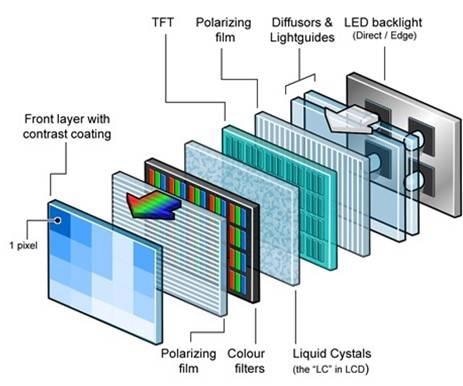
Worse - it's a multi layer sandwich of filters etc. which need to be perfectly aligned for a clear image:

https://www.azom.com/images/Article_Images/ImageForArticle_2...

Funny thing is in my case the hottest part actually remained ok - it's the surroundings that got, for lack of a better word, ruffled.

I've seen videos of Indian repair men disassembling a panel and putting it together to fix such issues, but IIRC only the back light ever came off.

Re: TV backlight compensation (2020)

#107
post #72

If only my screen had issues with the picture. Instead, its internal clock lags behind the source, causing audio to be ever more delayed. It resets after a standby/wake-up cycle, though. It's annoying to restart TV after about 3 hours, though.

I have a similar issue when using my raspberry pi as a Steam Link client for gaming. After a while the sound starts to get choppy, and this problem gets worse and worse until sound breaks entirely. But video still works. If I kill the game and re-start the steam link client the issue resets. Feels like some kind of clock drift, but in this case it seems to be affecting the ability to decode a digital stream. It’s a very strange issue!

Re: TV backlight compensation (2020)

#108
post #104

I wonder if something similar could be used to keep my TV from ratcheting up the overall brightness/backlighting whenever a subtitle is on screen. The constant ramping of brightness is rather distracting.

There should be an option to disable automatic brightness.

Re: TV backlight compensation (2020)

#109
post #104

I wonder if something similar could be used to keep my TV from ratcheting up the overall brightness/backlighting whenever a subtitle is on screen. The constant ramping of brightness is rather distracting.

There should be an option to disable automatic brightness.

I swear I've dug through the menus time and again! I guess I'll have a look again tonight.

Re: TV backlight compensation (2020)

#110
I have over a decade of experience in the design and manufacturing of advanced display systems and ran into precisely this problem around twenty years ago. At that time we experimented with and developed pretty much exactly this type of compensation; implemented on custom FPGA-based real time image processing boards.

Just looking at the pictures, this does not look like a backlight problem but rather degradation of the liquid crystal layer. Yes, sure, there's interaction between the two. The purple shift, however, is very much something that was happening twenty years ago with some liquid crystal chemistries. Back then you could definitely tell which panels were not using high quality LC fluid.

Apple had this issue with their second generation HD Cinema Display product (the first aluminum enclosure, 24 in, 1920 x 1200 model). Some percentage of them would turn purple. I don't have Apple's stats on this. From my own experience the number fluctuated between 15% to as much of 50% of the panels in a batch going bad after moderate burn-in.

Having said all that, this type of compensation or fix might be OK for a TV at home or the computer monitor on the desk of a doctor or even a coder. Not good --at all-- for someone doing critical color work, such as a graphic artist. The reason is that you introduce spatial nonlinearities and differential errors.

The simplest way to put it is that you no-longer have the full 256 (or 1024) steps per R, G, B channel between 0 and 100%. Hypothetically, you might have 256 for green and, say, 200 for red and 175 for blue. This means that the path from black to white is no longer monotonic. You can have serious color rendering errors through the color space. For example, it might be impossible to make an accurate 50% gray because you just don't have the RGB values needed to accomplish that. Worse yet, everything between 47% and 53% gray might look exactly the same.

You can also introduce serious gamma distortion. If, on top of that, you add a temporal element (video), well, it can be a real mess.

The real solution (for critical workflows) is to replace the panel.

BTW, this can apply to RGB OLED as well.
Post reply on HN