Live data from Hacker News

Use Spreadsheets Everywhere

simplethread.com

101–110 of 123 posts

Re: Use Spreadsheets Everywhere

#101

I agree with a lot of the points raised here. I think many of the problems with spreadsheets are due to the software rather than the users. As mentioned in the article, its hard to slowly iterate from a small manageable spreadsheet to an larger software solution. For example, Excel would be a lot more usable and maintainable for me if there was a way to make a special "data sheet" in which data types are forced to be…

Tables are probably the most overlooked feature of Excel. Why use tables? * Each column is uniquely named - no more wondering if you are referencing the right cell, no more thinking about "to $ or not to $" * The table's rows and columns are reliably discovered by pivot tables - no more wondering if the entire dataset is referenced by the pivot * New columns that are formulas are automatically applied to every row *…

This, combined with judicious use of named ranges makes for much more pleasant formulas. Seeing `tax_rate` in the formula instead of `A$7$` is well worth the extra clicks.

I usually end up assigning names to nearly everything, single-cell constants, user input fields, computed lists, etc, etc

Re: Use Spreadsheets Everywhere

#102

I agree with a lot of the points raised here. I think many of the problems with spreadsheets are due to the software rather than the users. As mentioned in the article, its hard to slowly iterate from a small manageable spreadsheet to an larger software solution. For example, Excel would be a lot more usable and maintainable for me if there was a way to make a special "data sheet" in which data types are forced to be…

Tables are probably the most overlooked feature of Excel. Why use tables? * Each column is uniquely named - no more wondering if you are referencing the right cell, no more thinking about "to $ or not to $" * The table's rows and columns are reliably discovered by pivot tables - no more wondering if the entire dataset is referenced by the pivot * New columns that are formulas are automatically applied to every row *…

Apple's Numbers is table-oriented by design and I love it for that reason.

Re: Use Spreadsheets Everywhere

#103
Plain sortable tables are underused. Markdown tables are horrendous for example (CSV blocks would be better). Having formulas as well would be amazing, but let's not ask for the world.

Re: Use Spreadsheets Everywhere

#104
post #68

Earlier quoted context omitted.

Tables are probably the most overlooked feature of Excel. Why use tables? * Each column is uniquely named - no more wondering if you are referencing the right cell, no more thinking about "to $ or not to $" * The table's rows and columns are reliably discovered by pivot tables - no more wondering if the entire dataset is referenced by the pivot * New columns that are formulas are automatically applied to every row *…

About tables, do they work when you automate the data entry part? For example, copy from a speadsheet into your spreadsheet with the first macro, and then transform the data with a second? That's 90% of my use case for Excel. (I know that doing this in Python/whatever would be "better" but I have to distribute this to users, and the only thing they have on their computer is Excel, and they're gonna manipulate the dat…

I think Libreoffice Calc supports python integration. Maybe that way one could have the best of both worlds. Unfortunately I suppose most users are stuck in the MS garden.

Re: Use Spreadsheets Everywhere

#105

I agree with a lot of the points raised here. I think many of the problems with spreadsheets are due to the software rather than the users. As mentioned in the article, its hard to slowly iterate from a small manageable spreadsheet to an larger software solution. For example, Excel would be a lot more usable and maintainable for me if there was a way to make a special "data sheet" in which data types are forced to be…

Tables are probably the most overlooked feature of Excel. Why use tables? * Each column is uniquely named - no more wondering if you are referencing the right cell, no more thinking about "to $ or not to $" * The table's rows and columns are reliably discovered by pivot tables - no more wondering if the entire dataset is referenced by the pivot * New columns that are formulas are automatically applied to every row *…

I've been using Excel on and off for years and had no idea that tables were a thing. I just assumed the entire sheet was a "table".

Re: Use Spreadsheets Everywhere

#106

Earlier quoted context omitted.

isn't excel limited to just over a million rows?

Excel 2013 and later has a columnar database capable of handling millions of rows, but not through the standard sheets interface so it loses a lot of the utility people are used to.

How? Through what interface, or by what feature name to Google?

Re: Use Spreadsheets Everywhere

#107
post #74
post #8

Spreadsheets versus programmers is a war that can be much more peaceful. In my work, I have found that, especially in data science, the spreadsheet user and the programmers are often trying to accomplish similar tasks, but the “language barrier” between them leads to much more fragmented workflows. I also think this article does a good job of identifying spreadsheets as a low-code programming language — spreadsheets…

What is especially ironic is that excel is not so straighforward to use in my experience. If you want to do something in excel that you don't know how to do, you are best off finding a search engine and looking for a 5 minute article that explains everything. Now, programming is seen as toohard for some reason, but if you were to look for how to do that exact same merge or join or barplot or whatever in, say, python…

> "why use excel at all when the learning curve isn't any easier than learning a few functions in python or R?"

It has a GUI.

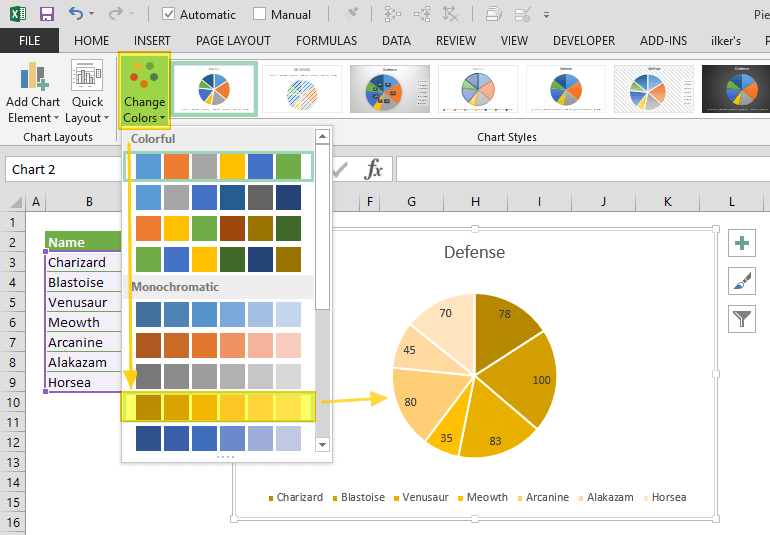
Click on a picture of a pie chart[1] is enormously easier than[2]:

    from matplotlib import pyplot as plt    
        
    # Pie chart, where the slices will be ordered and plotted counter-clockwise:    
    Aus_Players = 'Smith', 'Finch', 'Warner', 'Lumberchane'    
    Runs = [42, 32, 18, 24]    
    explode = (0.1, 0, 0, 0)  # it "explode" the 1st slice     
        
    fig1, ax1 = plt.subplots()    
    ax1.pie(Runs, explode=explode, labels=Aus_Players, autopct='%1.1f%%',    
            shadow=True, startangle=90)    
    ax1.axis('equal')  # Equal aspect ratio ensures that pie is drawn as a circle.    
        
    plt.show()
And (clicking a couple of times) includes: no strings, no integers, no method calls, no named parameters, no numeric formating domain-specific-languages, no libraries, no imports, no tuples, no lists, no braces, no parens, no case-sensitivity, no symbols, no text, no writing, no syntax errors, no saving and running cycle, no having to hold the cell order and positions in your head and count through them to get to Runs[2], no trying to get the image out of the show() popup.

And includes: previews of the available charts, recommended charts, all the styles of chart work through the same UX without having to care how they are named, they popup Wizard dialogs so you don't have to read in advance what parameters are required and what they mean, in-line editing by clicking and dragging to move and resize the whole thing or almost any part of it, change the chart style without having to rewrite code differently, rewrite e.g. axis labels without having to save/run, choosing colours and styles from visual dropdowns, having the chart redraw dynamically as you change the data in the source cells, works in Excel online, works with multiple people having the spreadsheet open, chart is inline with your data in the same worksheet saved with it.

[1] https://www.spreadsheetweb.com/wp-content/uploads/2019/04/pi...

[2] https://www.javatpoint.com/how-to-plot-a-graph-in-python
Re: Use Spreadsheets Everywhere

#108
We are getting pretty crazy with our use of Excel documents these days. With a little bit of OpenXML magic, you can read/write these things from code. I'm not talking about CSV either. I am talking about full-blown XLSX files, where you can control font/color/size/worksheets/et.al. with a few lines of logic.

Once you are able to read & write excel documents with a piece of software, you can do some pretty fucking incredible things.

Imagine being able to click a single button and download a total configuration output for a customer's environment (maybe 20-30 worksheets auto-generated in seconds). You can then email this human readable document to the customer for modifications. You then feed this back into the system to load their adjusted values (there is a diff/check-in report to confirm first).

The reason we and our customers like this approach is because there is a lot of configuration where we need to compare lists of things and slice parts of one thing into another. It makes replicating success absolutely trivial. Being able to style the document is a much bigger benefit than you would probably think at first. CSV is trivial to employ, but it is very constrained on this front. For a developer who is familiar, color & layout doesn't move the needle much. For a customer who has no clue how the back-end works, these things make all the difference in the universe. Things you can't edit are grey background, things you can are green, etc.

Re: Use Spreadsheets Everywhere

#109
At Stacker (YC S20) we do something kind of in between, hoping to catch usecases where people need an actual app just as they are outgrowing the spreadsheet, by allowing you to build an app... from your spreadsheet!

It should be interesting for anyone who's done a lot of thinking* about the relationship between spreadsheets, no code, and custom software. Check us out: https://stackerhq.com

* if this is you, and you're really interested, we're hiring. Email in my profile :-)

Re: Use Spreadsheets Everywhere

#110

I agree with a lot of the points raised here. I think many of the problems with spreadsheets are due to the software rather than the users. As mentioned in the article, its hard to slowly iterate from a small manageable spreadsheet to an larger software solution. For example, Excel would be a lot more usable and maintainable for me if there was a way to make a special "data sheet" in which data types are forced to be…

Tables are probably the most overlooked feature of Excel. Why use tables? * Each column is uniquely named - no more wondering if you are referencing the right cell, no more thinking about "to $ or not to $" * The table's rows and columns are reliably discovered by pivot tables - no more wondering if the entire dataset is referenced by the pivot * New columns that are formulas are automatically applied to every row *…

Tables have that all-too-common symptom of something that makes easy things even easier, but hard things way harder. Try making a table with a formula that involves more than the single row in which it's placed. What about tables with multi-row headers (e.g. title and units)? Section breaks in them? Merged parent data? I find I either want standard Excel layout, or a database. Tables don't really sit "between" those two; they're just their own extremely over-simplified universe that doesn't play nicely with anything else.

But hey, to each their own. Good on ya if Excel tables are what you need.

Post reply on HN