Live data from Hacker News

React Table is a “headless” UI library

github.com

101–110 of 115 posts

Re: React Table is a “headless” UI library

#101

I spent a ridiculous amount of time working on optimized table rendering in the early years of my company, and I came to a simple conclusion: if you want to display full-screen tables, with dense data, and scroll around fast, the only option is canvas. "Virtualized" HTML tables are always an order-of-magnitude slower, no matter how much effort you put into optimization. The fundamental reason why you end up back at c…

You're aware we have IntersectionObserver now?
Re: React Table is a “headless” UI library

#102
post #91

I was actually building this exact thing many years ago. In hindsight I probably should have made it into React Table. https://github.com/divmgl/tabled.js

From skimming through, the library looks good! It's "generic" in the best sense of the term, agnostic of React, Vue, etc.

Re: React Table is a “headless” UI library

#103
post #8

Every few months I look at the state of table libraries on the web. Of course, it's great to have pagination, sorting, searching - these are the basics. I have been impressed with jQuery DataTables. jQuery DataTables has a lot of features, including export to Excel. jQuery DataTables works with Vue without any issues so long as you never mutate the table data. Mutating table data in Vue can be accommodated, but requi…

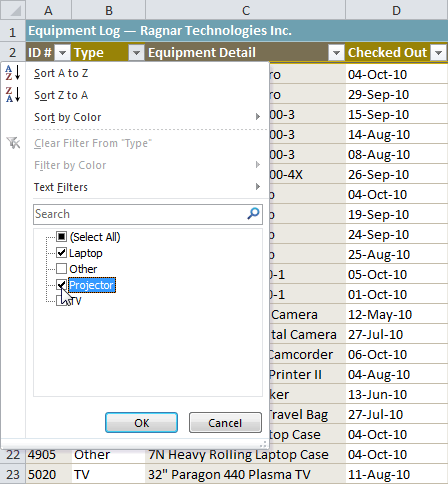
The problem with JS datatables is, as a user, I'm expecting something like Excel tables. Being able to easily pin column or row as headers and having access to a filter / order by options in each of those header cell.

This little widget : https://media.gcflearnfree.org/ctassets/topics/175/filtering...

Re: React Table is a “headless” UI library

#104

Earlier quoted context omitted.

Well of course not, you have to implement it yourself - just as everything else when drawing a table into a canvas.

Right, which makes it a deal-breaker for almost all use cases. Plus, I'd guess that it's almost always less effort to optimize the DOM-based approach than to (poorly) reimplement all of that browser functionality in canvas.

> it's almost always less effort to optimize the DOM-based approach

I remember browsers starting to not love dynamic tables with just some thousands of rows.

Re: React Table is a “headless” UI library

#105

If you like React Table, you might like AG Grid: https://www.ag-grid.com/

I would actually say that if you like React-Table, you likely wouldn't want to use Ag-Grid for the very reasons that React Table exists. Had someone asked if there were similar tables libraries, I would have expected this response and welcomed it. Ag-Grid is a great library and their free-tier is very robust, but I don't see how the above comment is anything more than a drop-in marketing attempt.

For those that want a UI along with a table, AG-Grid has a neat solution and is a viable alternative.

Re: React Table is a “headless” UI library

#106

Earlier quoted context omitted.

Well of course not, you have to implement it yourself - just as everything else when drawing a table into a canvas.

Right, which makes it a deal-breaker for almost all use cases. Plus, I'd guess that it's almost always less effort to optimize the DOM-based approach than to (poorly) reimplement all of that browser functionality in canvas.

Also if accessibility is a requirement, you'll have to implement a fallback in DOM, although you're probably no longer optimizing for raw speed in that case.

Re: React Table is a “headless” UI library

#107

Earlier quoted context omitted.

If you are impressed by datatables, you should check out Ag-Grid. It is much, much more powerful than datatables. The only negative thing about ag-grid is its price, otherwise it is a pleasure to work with. I am not affiliated with them, just a very happy customer

Holy crap, just checked out their pricing and it is $750 per developer (for enterprise edition)! That is more expensive than JetBrains all products, $649.

Yes, it is expensive. Not just 750, you also have to pay another 750 for deployment license per production environment. And it is 1200 if your devs are working on more than one project.

That said, I'd argue it is still worth it, assuming you can afford it. It will save you tons of developer time down the road. Their documentation is top notch too.

For example, it has graphs built in! I have never seen any grid library do that.

Again, not affiliated with them in any shape or form, just a happy customer (trying to get a discount from them though, ha!)

Re: React Table is a “headless” UI library

#108
post #8

Every few months I look at the state of table libraries on the web. Of course, it's great to have pagination, sorting, searching - these are the basics. I have been impressed with jQuery DataTables. jQuery DataTables has a lot of features, including export to Excel. jQuery DataTables works with Vue without any issues so long as you never mutate the table data. Mutating table data in Vue can be accommodated, but requi…

- Exporting to excel is simple. You are provided the final data model after all processing/filtering/sorting/etc is done, and you are free to use whatever means you want to provide that data to your users, eg. The 'xlsx' npm package could do this easily. - Searching/Filter is quite advanced. You can search/filter on any derived model of the data regardless of the display or format of that data. - Sorting can also be…

For the export to Excel part, I created a library that works in the browser to make it easy:

https://github.com/jmaister/excellentexport/

Re: React Table is a “headless” UI library

#109
post #100

Earlier quoted context omitted.

Right, which makes it a deal-breaker for almost all use cases. Plus, I'd guess that it's almost always less effort to optimize the DOM-based approach than to (poorly) reimplement all of that browser functionality in canvas.

Google Sheets is based on canvas. Works pretty good for me.

Google Sheets is not a table, which is what the discussion is about.

Edit: It also is not exactly the poster child of good UX and accessibility (or even performance, for that matter), so I'm not sure it's the best example.

Re: React Table is a “headless” UI library

#110

Earlier quoted context omitted.

Right, which makes it a deal-breaker for almost all use cases. Plus, I'd guess that it's almost always less effort to optimize the DOM-based approach than to (poorly) reimplement all of that browser functionality in canvas.

I don't have a horse in this race - I don't use React Table or render tables in canvas. I still felt compelled to comment because it's not clear you realize that you're being closed-minded and ignoring what littlecranky67 is trying to explain. Sometimes, no amount of optimization will achieve your performance objectives with the "obvious" path and you quickly find yourself deep in diminishing returns. Sometimes, you…

Sure, and I guess it depends on your performance requirements. As someone who has built a virtual table implementation in the past, I would much rather deal with the performance issues and nitty gritty micro-optimizations than go anywhere near canvas or WebGL for table rendering. But then again, I don't think my standard for acceptable performance was as high as OP's; I wasn't shooting for a buttery smooth 60fps with no jank, but simply trying to get something usable that wasn't frustratingly slow. If you really do need the performance, sure, I concede that maybe canvas/WebGL is the only way to go, but you'd better be damn sure that you really need the performance before you enter that mess.
Post reply on HN