gm convert $1 -channel red -normalize -channel green -normalize -channel blue -normalize normalized/$1GraphicsMagick – a Swiss army knife of image processing
11–20 of 20 posts
Re: GraphicsMagick – a Swiss army knife of image processing
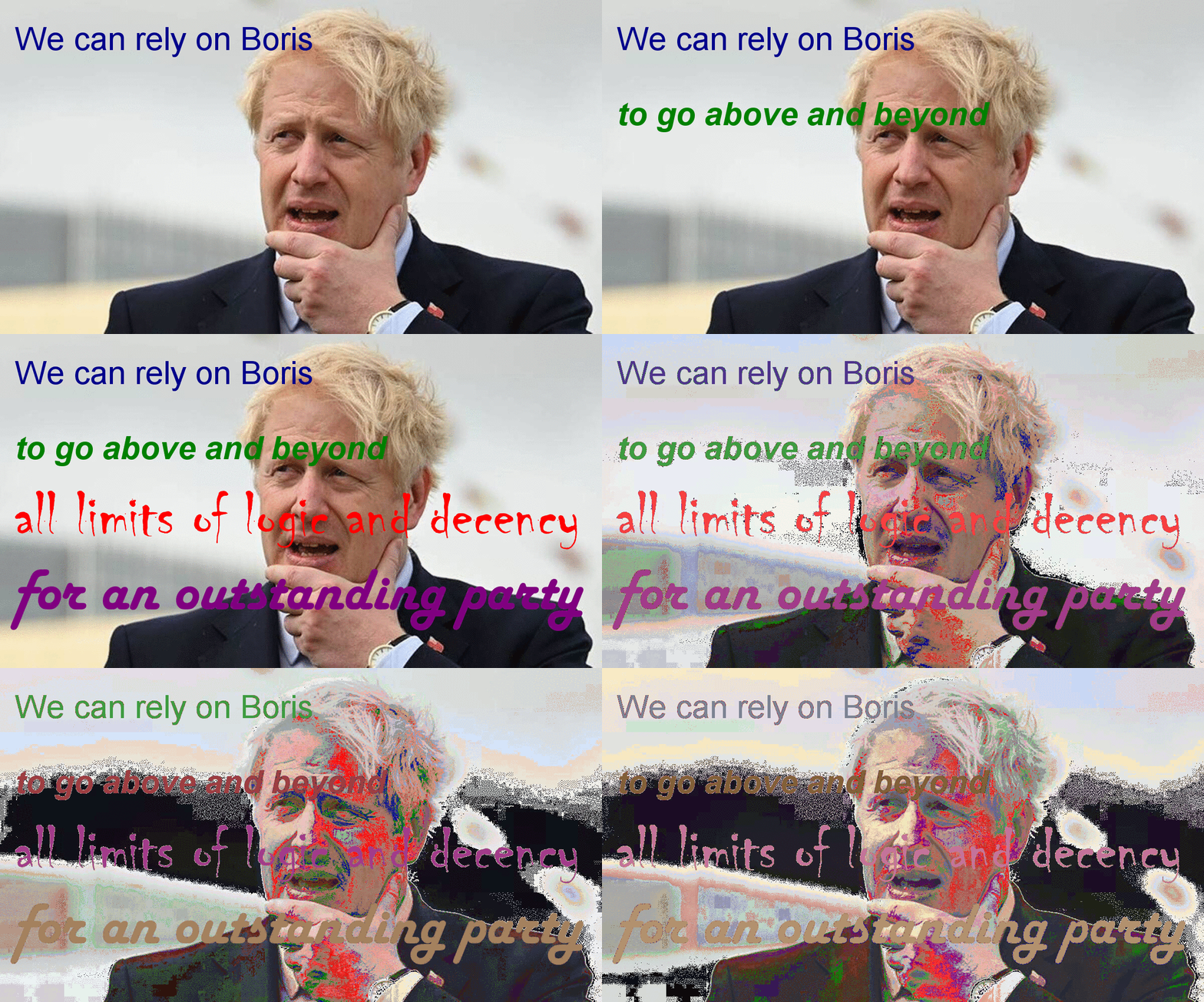
#12Normalize each color channel individually. You will be astonished how well this works. gm convert $1 -channel red -normalize -channel green -normalize -channel blue -normalize normalized/$1
Re: GraphicsMagick – a Swiss army knife of image processing
#13I never understood the benefits. My only positive was in the past the good compilation experience under Mingw.
My personal take on this is: "ImageMagick is Sendmail/Bind/OpenSSL class of software - unlimited, constant and guaranted chain of CVE's and other kind of bugs with proven history of that (year by year, often each month of the year) since the dawn of times and most likely with forever continuation of that track record. And no plans of changing trajectory." If GraphicsMagick is better than that, then it is clearly a be…
Re: GraphicsMagick – a Swiss army knife of image processing
#14I never understood the benefits. My only positive was in the past the good compilation experience under Mingw.
Re: GraphicsMagick – a Swiss army knife of image processing
#15For most things you would use this for, or ImageMagick for that matter, you are almost certainly better of using libvips[0] 0. https://github.com/libvips/libvips
I can't recommend libvips enough. I recently switched to it from ImageMagick+tificc in a flatbed scanner appliance and am seeing a minimum of a 2x performance increase with minimal memory usage. libvips makes it easy to setup a pipeline of transformations and utilizes all CPU cores by default.
Even outside of using via pyvips, I've noticed similar performance gains over ImageMagick by using the CLI of libvips. https://www.libvips.org/API/current/using-cli.html
Re: GraphicsMagick – a Swiss army knife of image processing
#16I never understood the benefits. My only positive was in the past the good compilation experience under Mingw.
My personal take on this is: "ImageMagick is Sendmail/Bind/OpenSSL class of software - unlimited, constant and guaranted chain of CVE's and other kind of bugs with proven history of that (year by year, often each month of the year) since the dawn of times and most likely with forever continuation of that track record. And no plans of changing trajectory." If GraphicsMagick is better than that, then it is clearly a be…
Re: GraphicsMagick – a Swiss army knife of image processing
#17Here's an example that was topical back then: https://cmacleod.me.uk/tcl/magick/boris.gif .
Re: GraphicsMagick – a Swiss army knife of image processing
#18I never understood the benefits. My only positive was in the past the good compilation experience under Mingw.
Minor win over ImageMagick is that the commands are namespaced under “gm”. Some of the IM binaries are incredibly generic names.
Re: GraphicsMagick – a Swiss army knife of image processing
#19For most things you would use this for, or ImageMagick for that matter, you are almost certainly better of using libvips[0] 0. https://github.com/libvips/libvips
Thanks, @Thev00d00, I hadn't herd of this! I've amazed folks in the past with things I've built to do fairly heavy duty image processing using only shell (incl. Unix text utilities and awk) and ImageMagick, even though I am not a programmer! I almost didn't click through to read about libvips, since I only want to use these tools from a CLI/shell interface, but - would you look at that - it's got command line binding…
https://github.com/libvips/pyvips
The idea is that complex CLIs like imagemagick's are almost complete programming languages, and need a lot of learning. It's much better (imo) (and less work) to have a good binding, and to lean on python for the programming side.
libvips is mostly self-binding. It has good introspection support, so the core of pyvips is just 200 lines of code, and automatically updates itself for new libvips versions.
Re: GraphicsMagick – a Swiss army knife of image processing
#20Normalize each color channel individually. You will be astonished how well this works. gm convert $1 -channel red -normalize -channel green -normalize -channel blue -normalize normalized/$1
It is called normalize-like-hunt. Famous Kite Aerial Photographer Alan Hunt suggested doing it manually in Paint Shop Pro. Winter scenes were particularly problematic, as early digital cameras invented crazy colors for snow.