Live data from Hacker News

Language models on the command line

simonwillison.net

11–20 of 46 posts

Re: Language models on the command line

#11
post #5

This was a workshop I gave in my https://llm.datasette.io/ CLI tool. What other CLI tools are people using to work with LLMs in the terminal? There one comment here about https://github.com/paul-gauthier/aider and Ollama is probably the most widely used CLI tool at the moment: https://github.com/ollama/ollama/blob/main/README.md#quickst...

openai's python client includes a cli actually - im not sure if its really documented anywhere.

  $ openai api chat.completions.create -g 'user' 'say hello' -m 'gpt-3.5-turbo'

  $ Hello! How can I assist you today?
Re: Language models on the command line

#12
I wrote one to help with creating command line commands. It just hits openai api with a prompt asking for just a code block to run on bash + whatever is passed in, and then it prints the command out. I wrote it because I can never remember all the weird command args for all the tools.

$ bashy find large files over 10 gb

find / -type f -size +10G

Re: Language models on the command line

#13
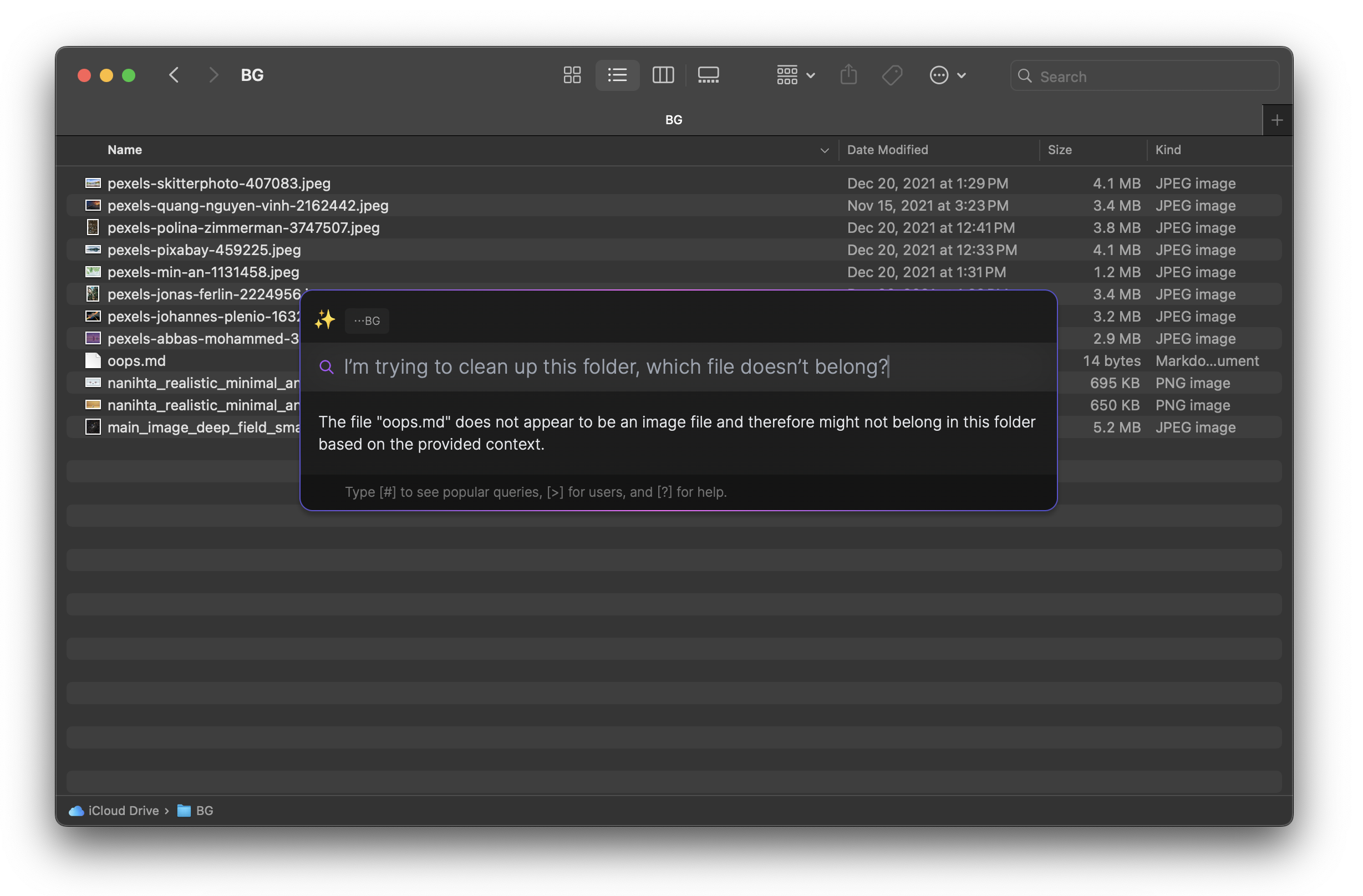
Fantastic work here! I'm working on a local tool, affectionately called Descartes, which does something similar—but with a spotlight-like UX for the non-hackers out there.

I do think that LLMs have the potential to fundamentally change the way we interact with our computers. There's a lot of edge cases (especially when combining it with the inaccurate science of screen readers) but it's pretty mind-blowing when it works. I'm working on a blog post, but here's my little proof of concept working on both Windows in a web browser[1] and MacOS in the Finder [2].

[1] https://vimeo.com/931907811

[2] https://dvt.name/wp-content/uploads/2024/04/image-11.png

Re: Language models on the command line

#14
post #12

I wrote one to help with creating command line commands. It just hits openai api with a prompt asking for just a code block to run on bash + whatever is passed in, and then it prints the command out. I wrote it because I can never remember all the weird command args for all the tools. $ bashy find large files over 10 gb find / -type f -size +10G

Do you have a followup command to execute the suggested command?

Re: Language models on the command line

#15
post #12

I wrote one to help with creating command line commands. It just hits openai api with a prompt asking for just a code block to run on bash + whatever is passed in, and then it prints the command out. I wrote it because I can never remember all the weird command args for all the tools. $ bashy find large files over 10 gb find / -type f -size +10G

Do you have a followup command to execute the suggested command?

$ bashy evaluate the previous command output

Re: Language models on the command line

#16
post #12

I wrote one to help with creating command line commands. It just hits openai api with a prompt asking for just a code block to run on bash + whatever is passed in, and then it prints the command out. I wrote it because I can never remember all the weird command args for all the tools. $ bashy find large files over 10 gb find / -type f -size +10G

Do you have a followup command to execute the suggested command?

No, I want to review or tweak them, just in case it's trying to do something bad. It's usually pretty good though.

Re: Language models on the command line

#17
post #5

This was a workshop I gave in my https://llm.datasette.io/ CLI tool. What other CLI tools are people using to work with LLMs in the terminal? There one comment here about https://github.com/paul-gauthier/aider and Ollama is probably the most widely used CLI tool at the moment: https://github.com/ollama/ollama/blob/main/README.md#quickst...

I am using a hacky one I wrote myself.

I looked at llm but it doesn't appear to have a mechanism for multi-shot prompting, where you provide both prompts and responses within your query. (Ref https://platform.openai.com/docs/guides/prompt-engineering/t... .) Maybe take this as a feature request?

It feels like the 'template' system in llm might be able to encompass this but the docs don't appear to provide a reference for the yaml format, only examples. I guess that is another feature request, sorry!

(BTW if you haven't seen https://docs.divio.com/documentation-system/ it really changed how I think about documentation)

Re: Language models on the command line

#18
post #17
post #5

This was a workshop I gave in my https://llm.datasette.io/ CLI tool. What other CLI tools are people using to work with LLMs in the terminal? There one comment here about https://github.com/paul-gauthier/aider and Ollama is probably the most widely used CLI tool at the moment: https://github.com/ollama/ollama/blob/main/README.md#quickst...

I am using a hacky one I wrote myself. I looked at llm but it doesn't appear to have a mechanism for multi-shot prompting, where you provide both prompts and responses within your query. (Ref https://platform.openai.com/docs/guides/prompt-engineering/t... .) Maybe take this as a feature request? It feels like the 'template' system in llm might be able to encompass this but the docs don't appear to provide a reference…

Yeah, I've been thinking a bit about the multi shot thing. I've had great results from Claude by "faking" the previous conversation to include example question/answer pairs.

With LLM you can do that using the undocumented Python Conversation API, but it's undocumented for a reason (I don't think it's good enough yet). You could also fake a previous conversation through the CLI tool but that is VERY undocumented - you would have to write fake rows into the SQLite database!

I also want to support the Claude thing where you can prefill the start of the response - amazing for things like forcing HTML by refilling an HTML doctype.

Re: Language models on the command line

#19
post #6
post #4

Earlier quoted context omitted.

Which plugins are you using? Did you install via pipx or Homebrew or something else?

I used pipx and used AnthropicAI's plugin to use Claude. After 2 weeks of perfectly working, suddenly I got the "this model is invalid" error. PS: I appreciate the work put into llm tho, it's a neat program I used with my Automator scripts to bring LLMs to macOS before Apple Intelligence was announced. I just wish the stability was not a concern.

That's weird. Were you using llm-claude or llm-claude-3?

Re: Language models on the command line

#20
post #5

This was a workshop I gave in my https://llm.datasette.io/ CLI tool. What other CLI tools are people using to work with LLMs in the terminal? There one comment here about https://github.com/paul-gauthier/aider and Ollama is probably the most widely used CLI tool at the moment: https://github.com/ollama/ollama/blob/main/README.md#quickst...

I've appreciated https://github.com/cthulahoops/chatcli which is simple and straightforward.
Post reply on HN