Is there a reason bash is still the de facto shell scripting language other than sheer momentum of legacy? I'm able to get what I need done in it, but it's clunky and the syntax is horrid. I guess it forces you to move to a proper language once scripts grow to a certain size/complexity, so perhaps it's by design?
Bash Debugging
11–20 of 78 posts
Re: Bash Debugging
#12Good stuff! I use set-x frequently and have used a similar thing to die (but Julia’s version is nicer). I’ll consider using the debugger thing but stepping through a bash script line by line sounds a bit tedious. Perhaps less so than having to reread a log and rerun the script a bunch.
I often add a fail-unless function: fail-unless() { local result "$@" result=$? if ((result != 0)); then echo >2&1 "Failed ${result} with command '$*'." exit ${result} fi } That way, I know exactly what failed in the script.
Re: Bash Debugging
#13 # die: print error message to stderr, then exit with error code.
# example: die 69 "Service unavailable."
die() {
n="$1" ; shift ; >&2 printf %s\\n "$*" ; exit "$n"
}
Many more shell script exit codes and helper functions:https://github.com/SixArm/unix-shell-script-kit/blob/main/un...
Re: Bash Debugging
#14Re: Bash Debugging
#15It's actually possible to produce a stack trace of sorts, if you use a lot of bash functions. One possible implementation is: https://github.com/TritonDataCenter/sdc-headnode/blob/master...
some-command || fail "message"
to produce a stack trace and exit the shell in case of non-zero exit status from some-command, or write some-command || softfail "message" || return $?
in case you want to produce a stack trace and return from the function.Re: Bash Debugging
#16Is there a reason bash is still the de facto shell scripting language other than sheer momentum of legacy? I'm able to get what I need done in it, but it's clunky and the syntax is horrid. I guess it forces you to move to a proper language once scripts grow to a certain size/complexity, so perhaps it's by design?
I think bash/sh’s key feature is that they are anti-entropy, there’s no development or evolution so there’s no chance you need to mess with dependencies or new features, the stuff that worked 20 years ago will continue to be the “bread and butter”. By design, this results in a system that’s averse to change and incentivizes people to reach outside of its limits when they are met.
Re: Bash Debugging
#17Hitting ctrl-t on our main menu will, when booting with debug logging enabled, show a screen like this: https://i.imgur.com/Ge75zkP.png
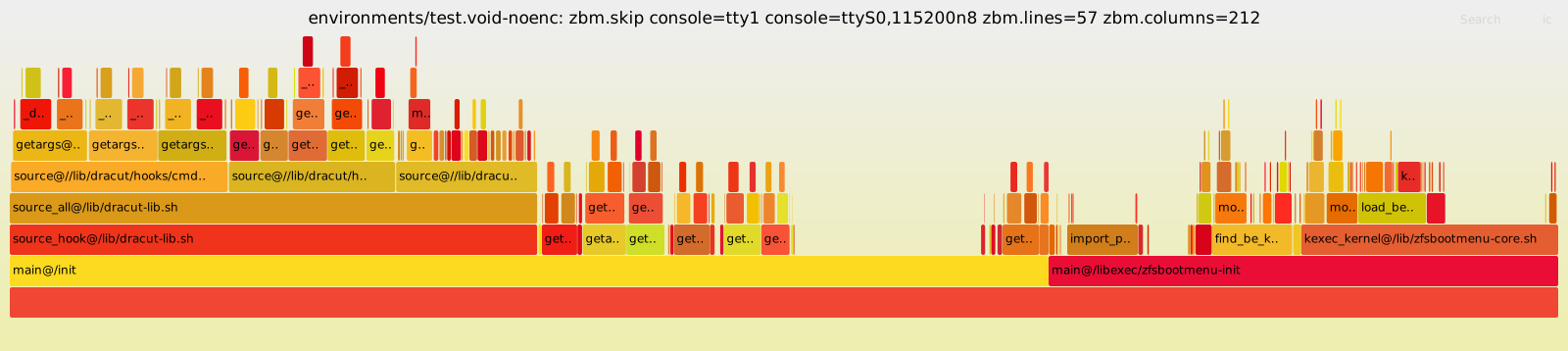
We also have a flamegraph profiling mechanism that can be enabled with https://github.com/zbm-dev/zfsbootmenu/blob/master/zfsbootme... . That will dump data to a serial port, which when re-assembled, can be used to produce a graph like https://raw.githubusercontent.com/zbm-dev/zfsbootmenu/master...
Bash is suprisingly flexible.
Re: Bash Debugging
#18 #!/bin/bash
die() { echo "$1" >&2; exit 1; }
cat myfile | while read line; do
if [[ "$line" =~ "information" ]]; then
die "Found match"
fi
done
echo "I don't want this line"
..."I don't want this line" will be printed.You can often avoid subshells (and in this specific example, shellcheck is absolutely right to complain about UUOC, and fixing that will also fix the die-from-a-subshell problem).
But, sometimes you can't, or avoiding a subshell really complicates the script. For those occasions, you can grab the script's PID at the top of the script and then use that to kill it dead:
#!/bin/bash
MYPID=$$
die() { echo "$1" >&2; kill -9 $MYPID; exit 1; }
cat myfile | while read line; do
if [[ "$line" =~ "information" ]]; then
die "Found match"
fi
done
echo "I don't want this line"
...but, of course, there are tradeoffs here too; killing it this way is a little bit brutal, and I've found that (for reasons I don't understand) it's not entirely reliable either.Re: Bash Debugging
#19Re: Bash Debugging
#20If I ever have to debug anything in bash. I stop using bash hah.
And, unfortunately shell has become the norm in CI/CD environments, pipelines etc. Can be convenient at times but can also be inconvenient and confusing as these scripts don't run in interactive shells.