Live data from Hacker News

macOS CLI tool to configure multi-display resolutions and arrangements

github.com

11–20 of 88 posts

Re: macOS CLI tool to configure multi-display resolutions and arrangements

#11
Great timing. Today I discovered that the iMac 24" screen can't be rotated. I have it on a VESA mount, so I can rotate it physically, but screen rotation settings are inaccessible (even with the Option key) via system settings. When I attempt rotation via displayplacer (tool in OP), it just complains that it "could not find res". There's a surprising lack of good search results on this. Seems to be related to the iMac overheating, but that's information coming from a random forum post that I found, not from Apple.

Edit: found Display Rotation Menu via DisplayPlacer Github issues, which is so far the only tool that worked for me.
Re: macOS CLI tool to configure multi-display resolutions and arrangements

#12

I was stoked to see this, unfortunately, this has gone 4 years without a release (last released in 2019) The issue log has several issues where Ventura users mention it not working at all, on M1 architectures. Can anyone on an M1 or M2 confirm this works for them? I'm still on Intel.

The version installable with Homebrew is working for me on Ventura / M1.

I have an occasional issue where one of my external displays switches from 60 Hz to 40 Hz, and I use displayplacer to toggle the refresh rate to reset the monitor back to 60: https://github.com/jacobwgillespie/dotfiles/blob/main/bin/fi...

Re: macOS CLI tool to configure multi-display resolutions and arrangements

#15
post #11

Great timing. Today I discovered that the iMac 24" screen can't be rotated. I have it on a VESA mount, so I can rotate it physically, but screen rotation settings are inaccessible (even with the Option key) via system settings. When I attempt rotation via displayplacer (tool in OP), it just complains that it "could not find res". There's a surprising lack of good search results on this. Seems to be related to the iMa…

I published a CLI for doing rotation for any display here: https://github.com/alin23/mac-utils/blob/main/bin/RotateDisp...

Source code in the same repo: https://github.com/alin23/mac-utils/blob/main/RotateDisplay....

As long as the system reports `true` for `canChangeOrientation`, then the CLI should work.

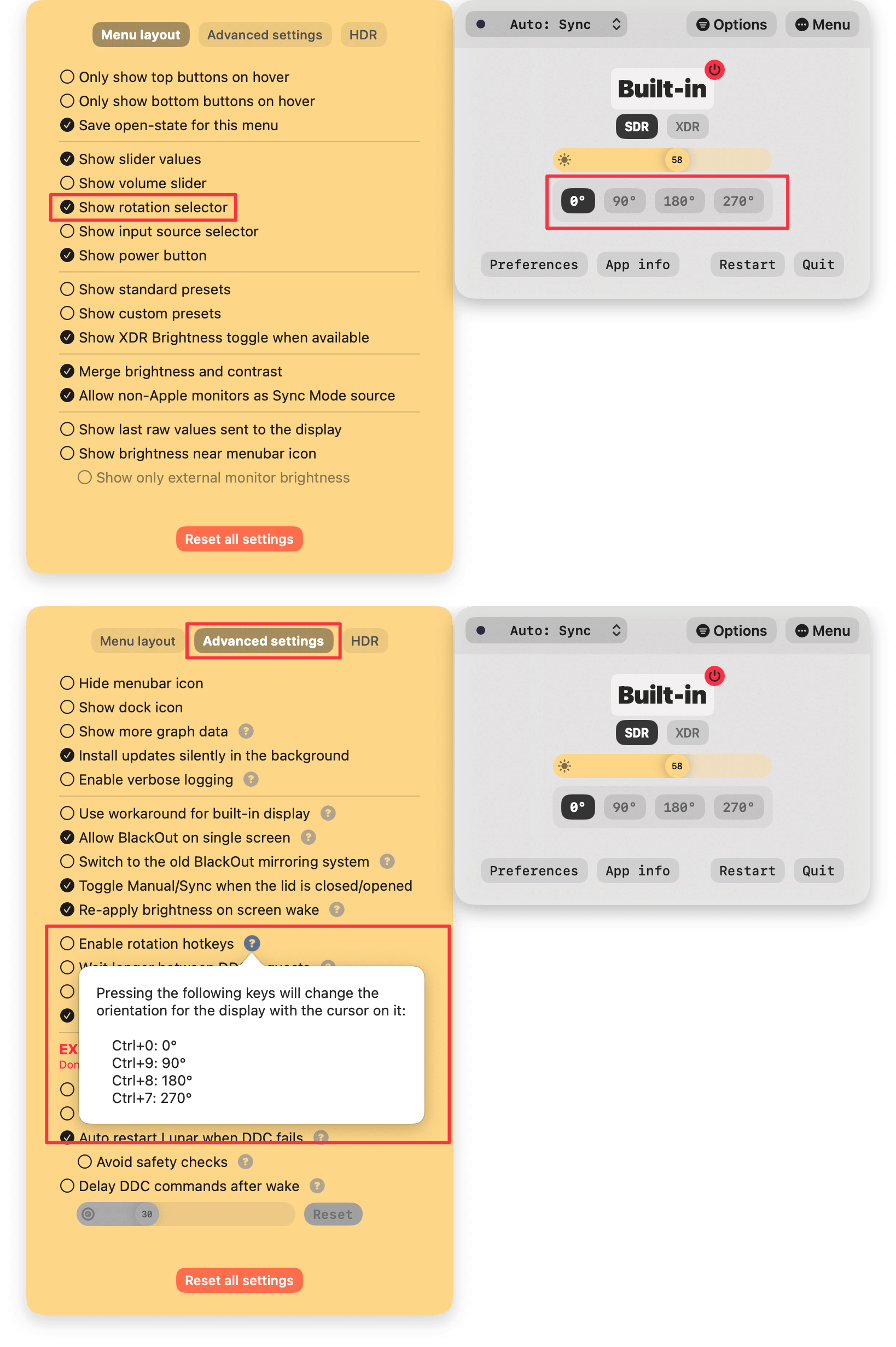
Lunar (https://lunar.fyi/) can also do that and provides some useful hotkeys if you happen to rotate displays often: https://files.alinpanaitiu.com/2106f2eac02df0c3eec379ef19965...

Re: macOS CLI tool to configure multi-display resolutions and arrangements

#16

Would love if these tools also had the ability to save application window settings too.

Ivan Sapozhnik (https://twitter.com/iSapozhnik) is working on adding this to his Lasso app (https://thelasso.app/). It's not an easy problem to solve as there's no API that can just save and restore windows, a lot of inventive solutions have been tried and failed.

But I see Ivan very determined to solve this.

Re: macOS CLI tool to configure multi-display resolutions and arrangements

#17
post #3

There was a two-three year period where macOS would incessantly forget my display arrangement and orientation. An Alfred action to run the displayplacer command and then after a second to activate my 'default' Moom window layout made for a great workaround.

Can you elaborate? I have this problem every day.. macOS just seems incapable of remembering my display arrangement.

I never managed to actually fix it. Maybe the links in the sibling comment can be of help there. But I feel like it became less of a nuisance after Monterey. Nowadays, it seems to move my app windows between displays after sleep, but that is resolved by applying the window layout snapshot from Moom.

My exact script seems to be gone — goes to show that I've not needed it for a while now — but the gist of my workaround was:

• I set up my display arrangement the way I wanted,

• followed the instructions in the displayplacer repo to work out a command to reproduce the desired arrangement,

• put the displayplacer command and the AppleSript call to Moom in the same shell script, with a short sleep between the two,

• and created an Alfred action to make it a tiny bit more convenient for myself.

The display arrangement would get out of sorts, but getting it back to my liking was just an Alfred action away.

You don't have to use Alfred or Moom specifically, those are just the convenience utilities I prefer.

Re: macOS CLI tool to configure multi-display resolutions and arrangements

#18
post #16

Would love if these tools also had the ability to save application window settings too.

Ivan Sapozhnik ( https://twitter.com/iSapozhnik ) is working on adding this to his Lasso app ( https://thelasso.app/ ). It's not an easy problem to solve as there's no API that can just save and restore windows, a lot of inventive solutions have been tried and failed. But I see Ivan very determined to solve this.

Do you know of any specific writeups? I couldn't find any obvious results, but I'm curious where the difficulties lay. Tbh, I'd be happy with just "windows with this parent process go here" list - I wonder how far off that is.

Re: macOS CLI tool to configure multi-display resolutions and arrangements

#19
post #16

Earlier quoted context omitted.

Ivan Sapozhnik ( https://twitter.com/iSapozhnik ) is working on adding this to his Lasso app ( https://thelasso.app/ ). It's not an easy problem to solve as there's no API that can just save and restore windows, a lot of inventive solutions have been tried and failed. But I see Ivan very determined to solve this.

Do you know of any specific writeups? I couldn't find any obvious results, but I'm curious where the difficulties lay. Tbh, I'd be happy with just "windows with this parent process go here" list - I wonder how far off that is.

I don't have any link on hand right now for a writeup, but I've followed yabai's (https://github.com/koekeishiya/yabai) development closely ever since it was called kwm and saw the limitations of macOS's public API to managing windows.

The windows with this parent process go here thing can be solved easily, and can even be done as a one-liner with yabai. Example of moving all the windows of Sublime Text to display 2:

    yabai -m query --windows | jq '.[] | select(.app == "Sublime Text") | .id' | xargs -I '{}' -- yabai -m window '{}' --display 2
It can even be automated by adding a rule in ~/.yabairc (although that might be undesirable as it will always be enforced even if you want to move the window manually):

    yabai -m rule --add app="Sublime Text" label="sublime-display-2" display=2
Yabai can also resize the window to whatever size you want, or move it to a specific space, and it can even do that based on the window title.

It has this much power because it uses macOS's private APIs from SkyLight.framework (the macOS window and display manager): https://github.com/koekeishiya/yabai/blob/master/src/misc/ex...

Re: macOS CLI tool to configure multi-display resolutions and arrangements

#20
post #15
post #11

Great timing. Today I discovered that the iMac 24" screen can't be rotated. I have it on a VESA mount, so I can rotate it physically, but screen rotation settings are inaccessible (even with the Option key) via system settings. When I attempt rotation via displayplacer (tool in OP), it just complains that it "could not find res". There's a surprising lack of good search results on this. Seems to be related to the iMa…

I published a CLI for doing rotation for any display here: https://github.com/alin23/mac-utils/blob/main/bin/RotateDisp... Source code in the same repo: https://github.com/alin23/mac-utils/blob/main/RotateDisplay.... As long as the system reports `true` for `canChangeOrientation`, then the CLI should work. Lunar ( https://lunar.fyi/ ) can also do that and provides some useful hotkeys if you happen to rotate displays…

Do any of these methods work to rotate a Sidecar display? Right now I’m using BetterDisplay to creat a dummy and then rotate and stream that dummy to the Sidecar display, but it’s a bit unwieldy and sometimes unreliable (due to an Apple bug apparently).
Post reply on HN