Live data from Hacker News

ASCII art for semantic code commenting

asciiflow.com

11–20 of 82 posts

Re: ASCII art for semantic code commenting

#11

I've seen this a few times. The key limit is that once drawn the characters are set, you can't move the drawn objects around. What I'd like is something like drawio for ASCII/Unicode. I've been thinking of writing my own for years, but that'll probably never happen so I'll just keep mentioning the idea when similar apps come up in the hope I inspire someone else!

Perhaps I'm misunderstanding you but this tool expressly has a select and move tool.

It does, but that selects and moves the cells not the objects and then redraws the cells? Actually, going back to have a play I see that it does allow some modification of existing objects but it isn't terribly flexible.

I've just done a quick search and found one that I've not spotted before, which is a bit closer to what I want in that one respect, but not nearly complete overall (and not seen a check-in in 8 years): https://textik.com/ - that might illustrate the key difference that I see missing in asciiflow.
Re: ASCII art for semantic code commenting

#12
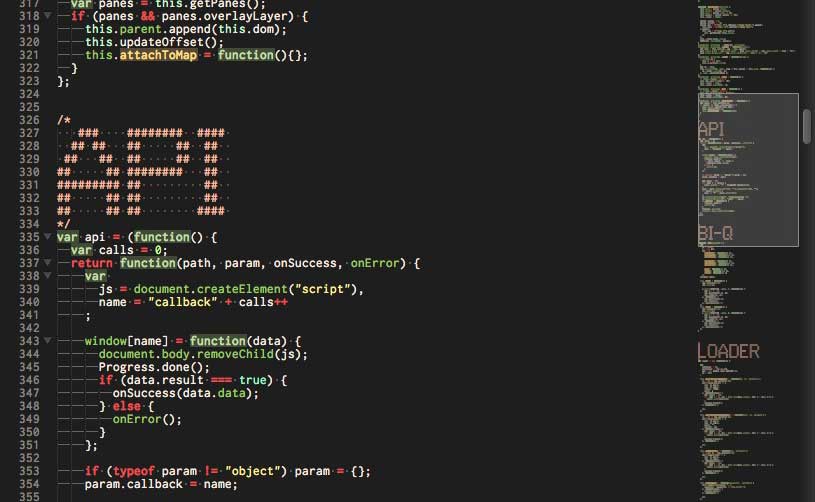
For longer CSS files I use ASCII text to mark and visually separate the breakpoints. An advantage of this is the ability to see the breakpoints in the minimap. Something like this: https://css-tricks.com/wp-content/uploads/2015/09/mini-map.j...

There's even a Sublime Text plugin to generate this text.

Re: ASCII art for semantic code commenting

#13

I've seen this a few times. The key limit is that once drawn the characters are set, you can't move the drawn objects around. What I'd like is something like drawio for ASCII/Unicode. I've been thinking of writing my own for years, but that'll probably never happen so I'll just keep mentioning the idea when similar apps come up in the hope I inspire someone else!

Perhaps I'm misunderstanding you but this tool expressly has a select and move tool.

You can drag edges, but it doesn't seem to have a concept of a "square" beyond the tool itself. So after you've placed it, you can't move individual shapes around. The select works more like a text-editor's highlighter than something like the lasso tool in draw.io

Re: ASCII art for semantic code commenting

#16

Earlier quoted context omitted.

Perhaps I'm misunderstanding you but this tool expressly has a select and move tool.

It does, but that selects and moves the cells not the objects and then redraws the cells? Actually, going back to have a play I see that it does allow some modification of existing objects but it isn't terribly flexible. I've just done a quick search and found one that I've not spotted before, which is a bit closer to what I want in that one respect, but not nearly complete overall (and not seen a check-in in 8 years…

If i understand you, the Mac-only Monodraw handles this fine. It lets you draw objects, point to objects (say like a diagram), and then move them around with the pointers auto adjusting to remain correct.

It's a shame that it's mac only.

Re: ASCII art for semantic code commenting

#18
post #3

EDIT: Deleted before I get even more downvotes.

On a general note, I think it's time to call things "text" instead of "ascii".

Every time someone utters the word "ascii", they just mean text. Saying “I'm using ASCII” doesn't mean anything anymore, because nobody uses EBCDIC anymore – you are, no matter what, effectively using a superset of ASCII, by default UTF-8. The real question is which one.

Re: ASCII art for semantic code commenting

#19
A few years back I wrote a tool that would convert Ascii flow diagrams in source code comments to equivalent source code declarations that implemented the flow. The idea being that the comments didn't just describe the flow visually, but actually defined it.

Tools like this helped greatly with that. Plain old text files don't lend themselves well to such 2D visual descriptions.

Re: ASCII art for semantic code commenting

#20

Earlier quoted context omitted.

It does, but that selects and moves the cells not the objects and then redraws the cells? Actually, going back to have a play I see that it does allow some modification of existing objects but it isn't terribly flexible. I've just done a quick search and found one that I've not spotted before, which is a bit closer to what I want in that one respect, but not nearly complete overall (and not seen a check-in in 8 years…

If i understand you, the Mac-only Monodraw handles this fine. It lets you draw objects, point to objects (say like a diagram), and then move them around with the pointers auto adjusting to remain correct. It's a shame that it's mac only.

> It's a shame that it's mac only.

Yeah, that looks to fit the bill nicely but is no use to me with my current mix of operating systems.

Post reply on HN