I always remap Caps Lock to Control on every system I use.
Same here. Unfortunately iOS does not have that functionality, so I am still looking for a decent BT keyboard with programmable keyboard.
11–20 of 144 posts
I always remap Caps Lock to Control on every system I use.
I always remap Caps Lock to Control on every system I use.
Same here. Unfortunately iOS does not have that functionality, so I am still looking for a decent BT keyboard with programmable keyboard.
The "Lite" version of the keyboard doesn't have the Topre switches, so it throws the main reason to get the HHKB in the first place out of the window.
> The ~ and \ have moved to the usual location of the Backspace. Working exclusively on UNIX systems now, I don't mind the \ being harder to reach. I could understand a Windows user finding this irritating. This guy has clearly never used LaTeX. I mapped my \ to a more accessible location and it improved my typing speed by factor 2 or so.
Also as a vim user I would like the esc instead of the control here but that is non Unix standard as far as I know. I also use Windows quite a lot so having the \ somewhere close is nice to have. Though I really dislike the meta key next to the space-bar but that is just me not being old enough to have used non IBM compatible keyboards. As you might have noticed, everybody's preference is different.
Earlier quoted context omitted.
Also as a vim user I would like the esc instead of the control here but that is non Unix standard as far as I know. I also use Windows quite a lot so having the \ somewhere close is nice to have. Though I really dislike the meta key next to the space-bar but that is just me not being old enough to have used non IBM compatible keyboards. As you might have noticed, everybody's preference is different.
There are many ways to rebind caps lock to be escape on press and control when used in combination with another key. Karbiner elements on macos and xcape on Linux come to mind immediately. But some keyboard firmwares are programmable enough to do it themselves too. However. What I found best as a vim user was to use ^[ as escape. It has the added bonus of actually being faster to process by vim too.
In context: https://github.com/majewsky/system-configuration/blob/6c4478...
Control in Caps Lock is only a small improvement for emacs users. The best option is to put a little pad in the control keys and use your palms to hit it: https://www.reddit.com/r/emacs/comments/7zvw2b/my_weapon_aga...
I no longer live in Emacs like I did for the first half of my previous job, but so far (touch wood!) I have avoided RSI by just remapping Caps Lock to Ctrl.
> The ~ and \ have moved to the usual location of the Backspace. Working exclusively on UNIX systems now, I don't mind the \ being harder to reach. I could understand a Windows user finding this irritating. This guy has clearly never used LaTeX. I mapped my \ to a more accessible location and it improved my typing speed by factor 2 or so.
The UK layout has an advantage, it's to the left of the Z and is easy to type.
The UK layout has a whole extra key which also makes # easier to type because it does not require a shift.
The "Lite" version of the keyboard doesn't have the Topre switches, so it throws the main reason to get the HHKB in the first place out of the window.
But it does have the arrows, which are useful for many applications. It would be ideal if there was a "pro" HHKB with arrows.
(Not affiliated with Unicomp, I'm just a fan of the Sun keyboard layout)
> The ~ and \ have moved to the usual location of the Backspace. Working exclusively on UNIX systems now, I don't mind the \ being harder to reach. I could understand a Windows user finding this irritating. This guy has clearly never used LaTeX. I mapped my \ to a more accessible location and it improved my typing speed by factor 2 or so.
I was wondering why there was any need to move the \ character but then I looked up where it is in the US layout and it seems bizarre. The UK layout has an advantage, it's to the left of the Z and is easy to type. The UK layout has a whole extra key which also makes # easier to type because it does not require a shift.
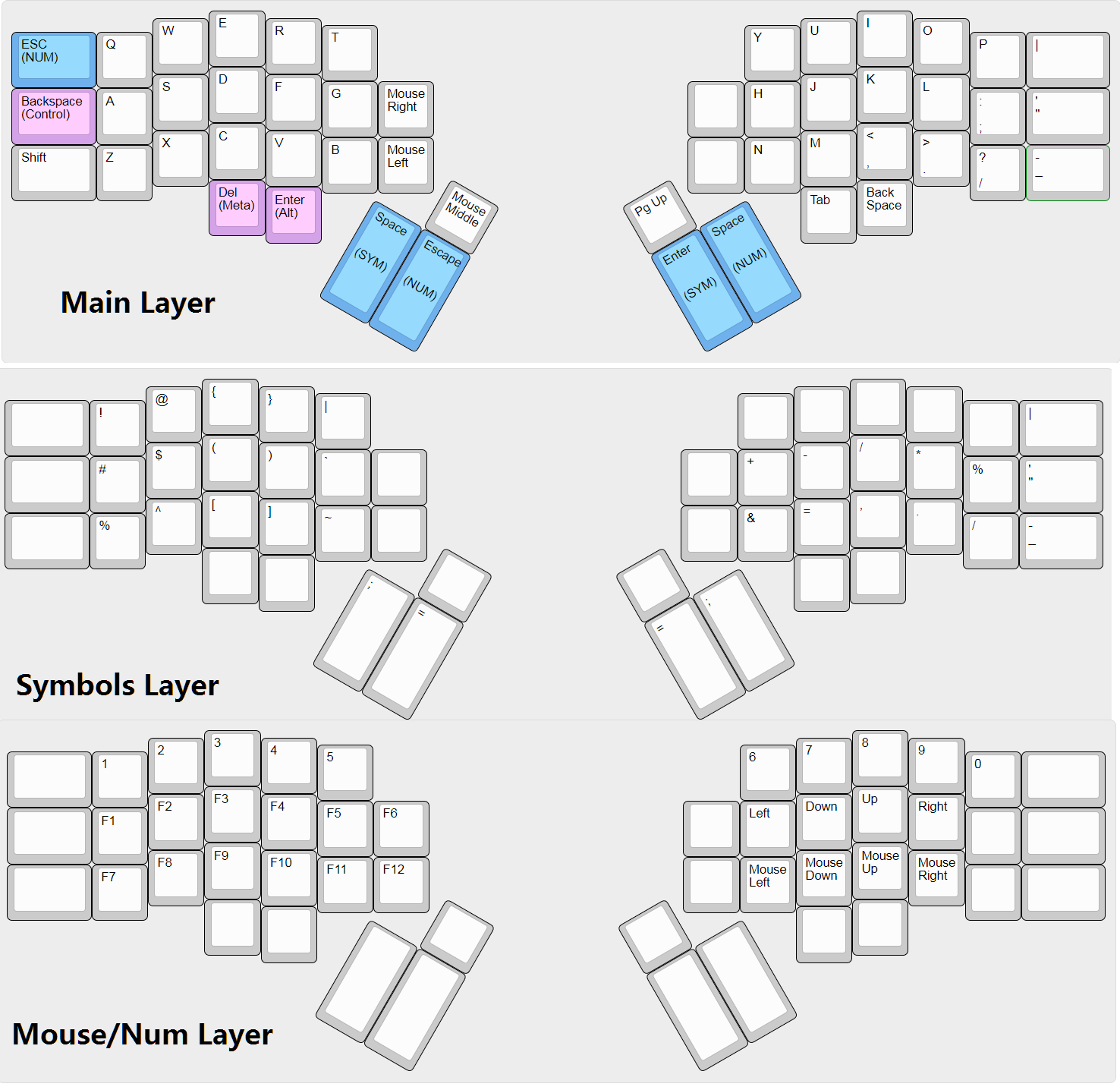
Although it's a bit of a rabbit hole. You start by moving around your control keys, maybe add a thumb backspace, a few months later you end up with a programming optimized symbols layer [3] and then maybe even adding in chorded stuff [4]. It's a bit of a trip and ruins 'traditional' keyboards.
[2] http://xahlee.info/kbd/hyper_7_keyboard.html
[3] https://qmk.fm/keyboards/gergo/keymap.png
[4] https://github.com/germ/qmk_firmware/blob/gboards-update/key...