Programming by Voice: Staying Productive Without Harming Yourself
1–10 of 78 posts
Re: Programming by Voice: Staying Productive Without Harming Yourself
#2Thanks for posting this. I've had a long standing tendency to get eyestrain headaches from the computer screen, and when I was writing my dissertation, my wrists hurt so bad that I couldn't finish my figures. Fortunately, an old draftsman helped me out using pen and ink.
Today, as a musician, I'm quite conscious of the health of my hands and wrists. When I hear musicians complain about wrist pain, I always tell them to evaluate their computer use.
Re: Programming by Voice: Staying Productive Without Harming Yourself
#3I'm currently trying to solve my RSI problems by going farther than the normal progression of ergonomic peripherals. If that doesn't work, I'll have to give up and go to voice control.
I've designed and built my own chording keyboard, which should be 10x less stressful to type on than a normal keyboard. I also have an eye tracker that I'm going to program to use to replace most mouse tasks.
I don't like the idea of inaccurate input that makes noise (me speaking) that could disturb others in an office. I have a feeling that being too noisy for an open-concept office might limit my career options in the future. But I would still rather live with that than live with RSIs.
I do really like the idea of running Windows in a VM and proxying the commands to linux. That was previously one of my qualms with voice control: that I'd have to switch to Windows.
My other idea is to switch to a mass-motor gesture and eye-tracking based system using an Oculus Rift with an IR camera mounted in an eye socket. That might be an interesting and fun way of programming even if it wasn't to solve an RSI problem.
Re: Programming by Voice: Staying Productive Without Harming Yourself
#4This was a pretty interesting read. One thing I can recommend for those with RSI are Cherry MX Blue switch keyboards.
As someone with fairly severe RSI, making the change from my normal rubber-dome keyboard over to the Blue Cherry MX switches about 2 years ago has made things significantly better. The pain and discomfort is largely gone-- its still there, of course, but its hardly noticeable.
Re: Programming by Voice: Staying Productive Without Harming Yourself
#5This was a pretty interesting read. One thing I can recommend for those with RSI are Cherry MX Blue switch keyboards. As someone with fairly severe RSI, making the change from my normal rubber-dome keyboard over to the Blue Cherry MX switches about 2 years ago has made things significantly better. The pain and discomfort is largely gone-- its still there, of course, but its hardly noticeable.
I'm beginning to have some carpal tunnel pain brought on by heavy keyboard/phone use and my weight lifting regimen. What is it about the Cherry MX blue switch keyboards (http://www.newegg.com/Product/Product.aspx?Item=N82E16823201...) that helps with RSI? Just looking at it, it appears like it would be even harder on my wrists.
Re: Programming by Voice: Staying Productive Without Harming Yourself
#6Has anyone tried to add gestures, with a Leap Motion for example, to their development process? A handful of subtle motions could be used to automate some repetitive tasks.
Re: Programming by Voice: Staying Productive Without Harming Yourself
#7This was a pretty interesting read. One thing I can recommend for those with RSI are Cherry MX Blue switch keyboards. As someone with fairly severe RSI, making the change from my normal rubber-dome keyboard over to the Blue Cherry MX switches about 2 years ago has made things significantly better. The pain and discomfort is largely gone-- its still there, of course, but its hardly noticeable.
I'm beginning to have some carpal tunnel pain brought on by heavy keyboard/phone use and my weight lifting regimen. What is it about the Cherry MX blue switch keyboards ( http://www.newegg.com/Product/Product.aspx?Item=N82E16823201... ) that helps with RSI? Just looking at it, it appears like it would be even harder on my wrists.
A "rubber dome" or membrane keyboard requires the typer to press the dome all the way down to trigger the key press. On a mechanical keyboard, it is a mechanical switch to trigger the keypress. On Cherry MX blacks greens and reds, there is no feedback when you have pressed the key. However on a blue or a brown there is a tactile "bump" when the press is registered. Critically this happens before the key "bottoms out" or hits the bottom of the switch groove, so you can release the key before that second strike occurs on your fingertip. With the blues, the "activation point" as it's called makes a loud click as well as the tactile bump, so as you get used to typing on them, you'll release right after the click.
I'm not sure of the effects of mechanical keyboards with regard to RSI, but if you're a hard typer, they might help train your hands to not bottom out the keys.
http://www.daskeyboard.com/blog/wp-content/uploads/2011/08/C...
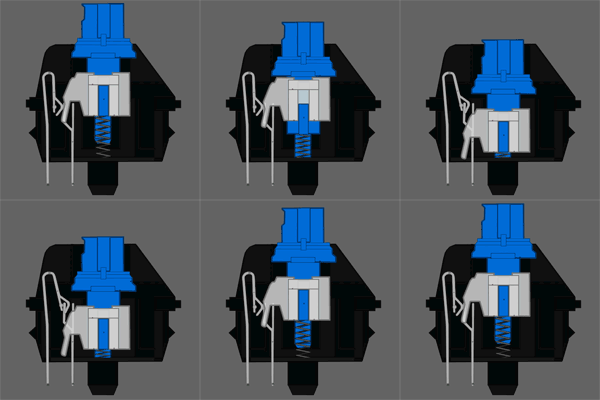
http://www.daskeyboard.com/blog/wp-content/uploads/2011/08/C...
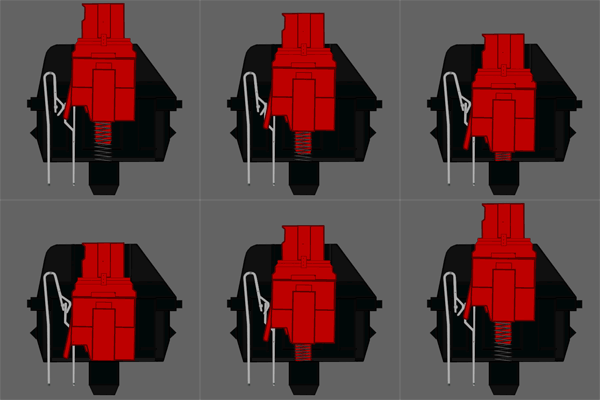
http://www.daskeyboard.com/blog/wp-content/uploads/2011/08/C...
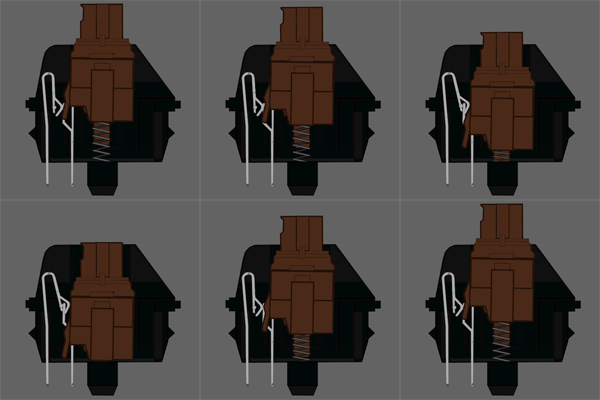
Re: Programming by Voice: Staying Productive Without Harming Yourself
#8Has anyone tried to add gestures, with a Leap Motion for example, to their development process? A handful of subtle motions could be used to automate some repetitive tasks.
Leap Motion isn't nearly as accurate as they show in their videos. I have one and it's completely useless for anything more than a simple "swipe left" gesture.
Re: Programming by Voice: Staying Productive Without Harming Yourself
#9Earlier quoted context omitted.
I'm beginning to have some carpal tunnel pain brought on by heavy keyboard/phone use and my weight lifting regimen. What is it about the Cherry MX blue switch keyboards ( http://www.newegg.com/Product/Product.aspx?Item=N82E16823201... ) that helps with RSI? Just looking at it, it appears like it would be even harder on my wrists.
A "rubber dome" or membrane keyboard requires the typer to press the dome all the way down to trigger the key press. On a mechanical keyboard, it is a mechanical switch to trigger the keypress. On Cherry MX blacks greens and reds, there is no feedback when you have pressed the key. However on a blue or a brown there is a tactile "bump" when the press is registered. Critically this happens before the key "bottoms out"…
MX blue and brown keys also require slightly less force to press than a rubber dome key.
Re: Programming by Voice: Staying Productive Without Harming Yourself
#10This was a pretty interesting read. One thing I can recommend for those with RSI are Cherry MX Blue switch keyboards. As someone with fairly severe RSI, making the change from my normal rubber-dome keyboard over to the Blue Cherry MX switches about 2 years ago has made things significantly better. The pain and discomfort is largely gone-- its still there, of course, but its hardly noticeable.
I'm beginning to have some carpal tunnel pain brought on by heavy keyboard/phone use and my weight lifting regimen. What is it about the Cherry MX blue switch keyboards ( http://www.newegg.com/Product/Product.aspx?Item=N82E16823201... ) that helps with RSI? Just looking at it, it appears like it would be even harder on my wrists.
The pressure curve and click placement on Cherry MX blues are generally conducive to learning to not bottom out on the keys and apply the proper amount of pressure to the key.
Bottoming out on the keys and using excessive force because of a lack of tactile feedback on the keypress are leading causes of injuries, because they provide a sudden jolt (when the key stops moving, but your finger doesn't) and unnecessary strain (to generate the extra force). Bottoming out in particular is bad, because you end up momentarily pressing against the keyboard frame with the full force you pressed down on the key, doing nothing but straining your wrist, while if you stop the downstroking on a spring loaded key before bottoming out, you'll end up stopping your motion in a cushioned manner (and the key assists a little bit in retraction).