My DIY ergonomic travel workstation with aluminum and magnets
1–10 of 90 posts
Re: My DIY ergonomic travel workstation with aluminum and magnets
#2A hairy yet stylish keyboard.
https://thume.ca/assets/postassets/travelwork/case-open.jpeg
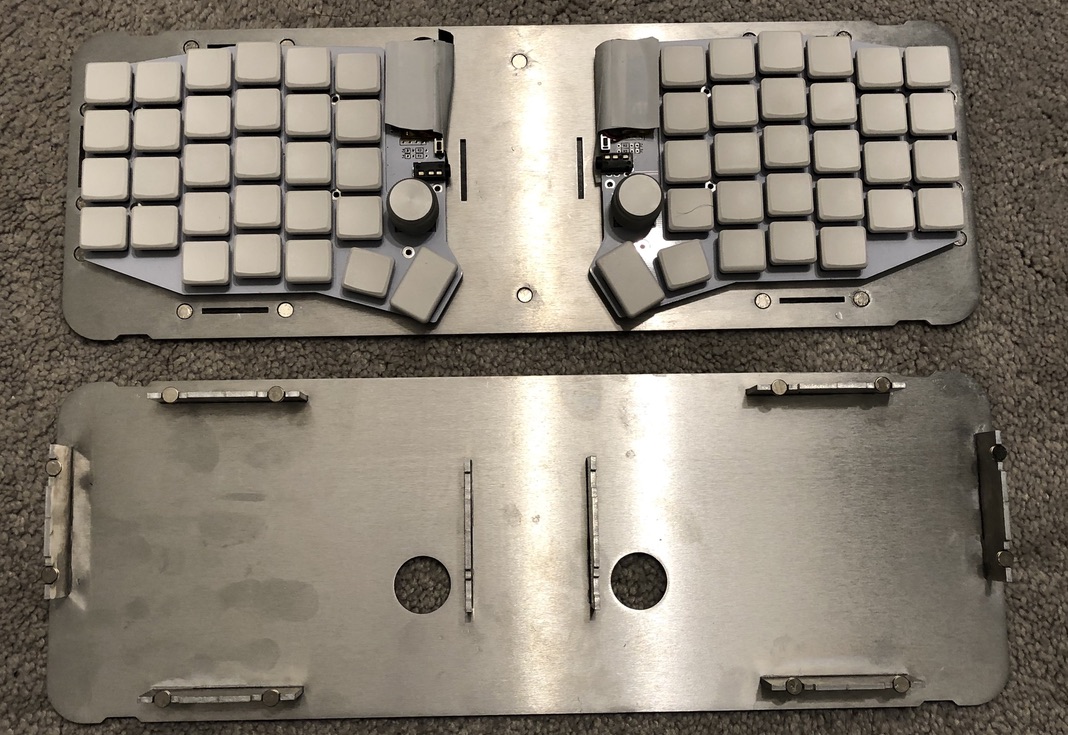
Didn't Eminem sing a song about the affliction of hairy palms?
Re: My DIY ergonomic travel workstation with aluminum and magnets
#3Omg thank you. Having some massive pain in my shoulder (when externally rotating my arm), and I think it’s due to moving my arm out to get the trackpad/mouse.
I’m going to try this keyboard setup deal with the track pad in the center.
Re: My DIY ergonomic travel workstation with aluminum and magnets
#4magnets are the best.
Re: My DIY ergonomic travel workstation with aluminum and magnets
#5I built a Mobile workstation out of an old dslr tripod after I saw one on Amazon (0). Game changer for me.
I can use it sitting down like a traditional desk, or standing up. Occasionally I bring it all the way down and squat in front of it. Surprisingly challenging.
It packs rather slim but it’s not as fancy as the Amazon version
0 https://www.amazon.com/TRIPODSY-Portable-Standing-Adjustable...
Re: My DIY ergonomic travel workstation with aluminum and magnets
#6Whoa, great job! Your setup looks amazing.
Re: My DIY ergonomic travel workstation with aluminum and magnets
#7magnets are the best.
And underrated, imho. I’m always delighted when I get something that uses magnets in a unique way: keeping a lid closed, providing alignment when attaching things, as a method of mounting unrelated things to each other, and even just to fidget with. Magnets are awesome.
Re: My DIY ergonomic travel workstation with aluminum and magnets
#8Omg thank you. Having some massive pain in my shoulder (when externally rotating my arm), and I think it’s due to moving my arm out to get the trackpad/mouse. I’m going to try this keyboard setup deal with the track pad in the center.
It is not necessarily better, since it probably requires you to bend your wrist. So you solve shoulder pain and get wrist pain in exchange. Also, you probably want to tent a keyboard to avoid forearm pronation [1] and then your trackpad hides between the keyboard halves unless you raise it.
(I am not sure there is a good solution outside avoiding the mouse by using a mouse layer or something like Shortcat on the Mac.)
[1] See e.g. https://www.ncbi.nlm.nih.gov/books/NBK72285/
Re: My DIY ergonomic travel workstation with aluminum and magnets
#9FYI, I curate setups like these on https://reddit.com/r/ergomobilecomputers
Re: My DIY ergonomic travel workstation with aluminum and magnets
#10Omg thank you. Having some massive pain in my shoulder (when externally rotating my arm), and I think it’s due to moving my arm out to get the trackpad/mouse. I’m going to try this keyboard setup deal with the track pad in the center.
It is not necessarily better, since it probably requires you to bend your wrist. So you solve shoulder pain and get wrist pain in exchange. Also, you probably want to tent a keyboard to avoid forearm pronation [1] and then your trackpad hides between the keyboard halves unless you raise it. (I am not sure there is a good solution outside avoiding the mouse by using a mouse layer or something like Shortcat on the Mac.…
I'm sure it's not for everyone, but I solved this in a unique way. I have a steeply tented split keyboard, and a trackpad on its own angled mount. The trackpad sits just past the number row on my right keyboard half.