Pitivi, a free and open source video editor for Linux
1–10 of 108 posts
Re: Pitivi, a free and open source video editor for Linux
#2Nothing made with GTK is beautiful or intuitive.
Re: Pitivi, a free and open source video editor for Linux
#3Nothing made with GTK is beautiful or intuitive.
Incredible useless comment.
Re: Pitivi, a free and open source video editor for Linux
#4Re: Pitivi, a free and open source video editor for Linux
#5I used Pitivi, it's okay! Not 100% stable, but that was many years ago, so it's probably better now.
The news on the frontpage make it look like the last release was almost two years ago; but actually there was a release in 2021 and development is ongoing.
Re: Pitivi, a free and open source video editor for Linux
#6Muvee is much simpler and quick to produce usable videos - https://www.muvee.com
(disclosure: I used to work for muvee over a decade ago)
Re: Pitivi, a free and open source video editor for Linux
#7I used Pitivi, it's okay! Not 100% stable, but that was many years ago, so it's probably better now. The news on the frontpage make it look like the last release was almost two years ago; but actually there was a release in 2021 and development is ongoing. https://www.pitivi.org/download/ https://gitlab.gnome.org/GNOME/pitivi/-/milestones/9
[deleted]
Re: Pitivi, a free and open source video editor for Linux
#8See also Kdenlive (https://kdenlive.org/en/).
I generally stick with the GTK/GNOME ecosystem but for my (admittedly quite limited) video editing needs I've found Kdenlive to be easier to figure out.
Re: Pitivi, a free and open source video editor for Linux
#9Nothing made with GTK is beautiful or intuitive.
Incredible useless comment.
"nothing" may be too much.
But if very basic components like file choose and file save dialog are incredibly painful to be used with buttons scattered through all window corners (fitts law anyone?) then "nothing" starts resounding in your mind.
https://python-gtk-3-tutorial.readthedocs.io/en/latest/_imag...
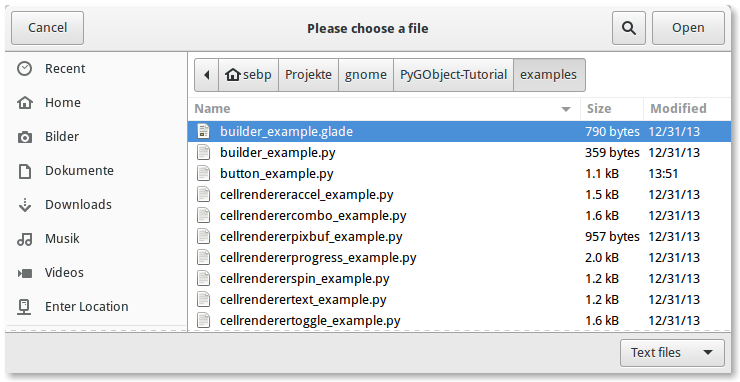
You can find another control at bottom left to choose file codification or whatever.
Font select dialog:
https://docs.gtk.org/gtk3/fontchooser.png
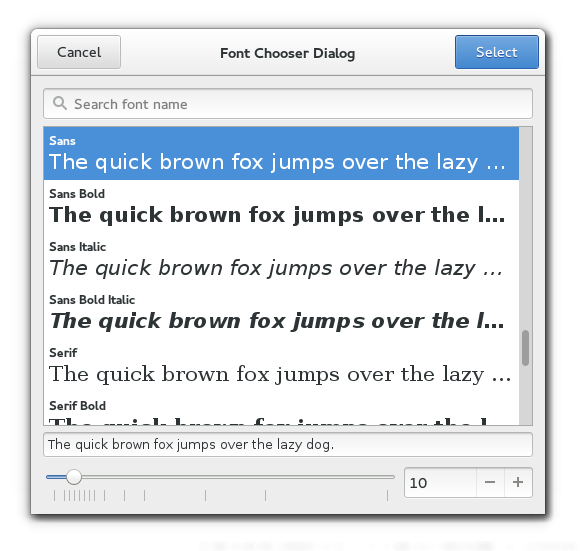
Will gtk4 be any better?
https://docs.gtk.org/gtk4/fontchooser.png
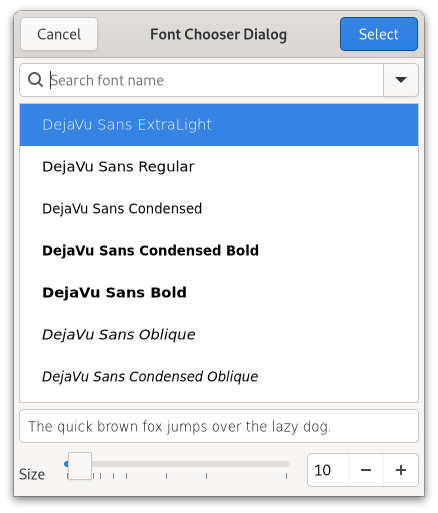
No, there is an extra settings button before select which looks to me totally secondary not to be present by the primary button. Primary actions should be together: - Choose letter - Choose size - Click select ...In a row or L movement
We will get this extra UI darkening: now is not evident you can type font size numbers cause all controls are flat.
In gtk3 at least inputs look like inputs and buttons look like buttons.
Re: Pitivi, a free and open source video editor for Linux
#10Nothing made with GTK is beautiful or intuitive.
You chose the worst possible way to express a concept many of us could agree about; let me attempt to expand it a bit.
GTK choice of putting everything, including buttons, on the windows title bar kills intuitiveness and slows down the workflow. When a window/dialog/whatever opens, I look at the title, then if necessary I move it to another place by grabbing that same title bar, which is immediate because that is where I was already looking to, then start reading its contents downwards. When finished I'd expect to see choice buttons just below the contents of that frame, I'm looking just there so that it would come very easy, but no, now I have to go back upwards and find the title bar to push a choice button. To me, this is against any interface writing logic; it trades usability for a dubious more modern appearance, and I would very much welcome a patch to correct it.