Live data from Hacker News

Ask HN: What is your (AI) dev tech stack / workflow?

news.ycombinator.com

81–90 of 187 posts

Re: Ask HN: What is your (AI) dev tech stack / workflow?

#81
post #29

I'm a bit of a fanboy, but exe.dev + their Shelley web agent is pretty great

Why do you like exe.dev over other providers? Just curious, I haven't tried any yet but I am interested.

Up to 50 VMs with your shared resource pool for $20/mo, just all their unique features like http integrations and Shelley of course is just native, their exeuntu image has everything you need. Build with Shelley, no need to deploy it's already on the VM (tell Shelley to setup systemd to "productionize" it) with a my-vm.exe.xyz url with auto-https via exe's https proxy where you can keep it private to your exe login or make it public (no auth through the exe https proxy).

I'd say try it out you won't be disappointed.

Re: Ask HN: What is your (AI) dev tech stack / workflow?

#82

Don't want to jeopardize this awesome chat about tools but for AI workshops I think these visual cards I came across could be an amazing way to handout. They cover all LLM concepts and explained visually. Found very useful to revise LLM concepts before AI research scientist/AI engineer interviews. https://github.com/llmsresearch/llm-flashcards

"these visual cards I came across"

You came across them in your own repo and company that sells them?

Re: Ask HN: What is your (AI) dev tech stack / workflow?

#83
1) OpenCode. Despite its many shortcomings and constant bugs, it's good enough for basic work. Use the web interface so you can switch around sessions easily, keep it running in the background (on a VPS for example). Add to it MCP servers for other systems you use, like AWS Docs MCP, Atlassian MCP, Linear MCP, SearXNG MCP, Playwright MCP, etc, which basically multiplies the AI's usefulness. Tune config to block all use of /tmp/ because the AGENTS.md instructions to not use that dir are always ignored. Set API tokens in env vars for most services and modern AI models will figure out how to use them (cli, api, etc).

2) OpenCode Go subscription, backstopped by Chutes Plus subscription, OpenRouter with $10 in credit (for very rare use of SOTA models), and various free providers (options: https://codeberg.org/mutablecc/calculate-ai-cost/src/branch/...). I almost never run out of the OpenCode Go subscription so I'm not a heavy user. Use Kimi K2.6 or GLM 5.1 to develop plans or do complex work, DeepSeek V4 Pro for simpler planning or less complex work, DeepSeek V4 Flash for implementing plans or doing simple tasks.

3) Some kind of 'ticketing' system for the AI. At work we use Linear, at home I tried Beads but I didn't like how bloated it got, so I made my own (https://codeberg.org/mutablecc/dingles). Important to have a way to plan work, persist the plan, and work on each item til they're done. In general you're going to use your AI coding agent's Plan Mode to first build a plan around anything you do, and tell it to ask you questions to align on the solution and use question-asking tools for convenience. Then when the plan is correct, have it make all the tickets. If your context window is nearing halfway full, start a new session to begin working on the tickets, and have it commit and close them as it goes.

4) Craft an AGENTS.md (or find somebody else's) that explicitly uses TDD to craft tests. You write the test first, and verify it looks like it will actually check for the expected results; do not continue until your tests look valid to you, the human. Commit them when they look good. Then have the agent write the code to make the tests pass. If you don't do this, it will churn out tests that pass but don't actually identify when things break. You also need end-to-end tests to actually run the app and verify it works, via Playwright, screenshots, running CLIs in Docker containers, etc. This is much harder to do correctly than just generate seemingly-working code.

5) OpenCode does a decent job at balance between not asking you for permissions, and gating things outside the repo. But it's not really "safe". Your best bet is to run a VM (colima) with Docker container (Ubuntu) and run all your AI stuff in the container. This way you can use "yolo mode" to have the AI churn without you and the only thing it can destroy is the Git repos you volume-mount into the VM & Docker container. (I have some of that setup in code here: https://codeberg.org/mutablecc/ai-agent-coding)

6) If you start letting the AI do remote things (like manage remote Git repo, push, make PRs, etc) it is more likely it will do something destructive (like force-push Git repos with destructive changes, create/destroy cloud resources, SSH into boxes and destroy those boxes, etc). So be very careful not to instruct the AI to do anything remote, unless you have set up read-only credentials for the AI, and it can't somehow gain access to the read-write credentials. This is another reason VMs/Docker are good, you can make sure to only volume-mount the credentials you want it to have access to.

7) There is a full walkthrough of AI coding here that is very thorough and battle-tested (https://www.youtube.com/watch?v=-QFHIoCo-Ko). Watch the whole thing (yes it's long) to save yourself a lot of trial-and-error later.
Re: Ask HN: What is your (AI) dev tech stack / workflow?

#84
> Setup a Blog / Static site generator (Pelican), create a simple but stylish theme

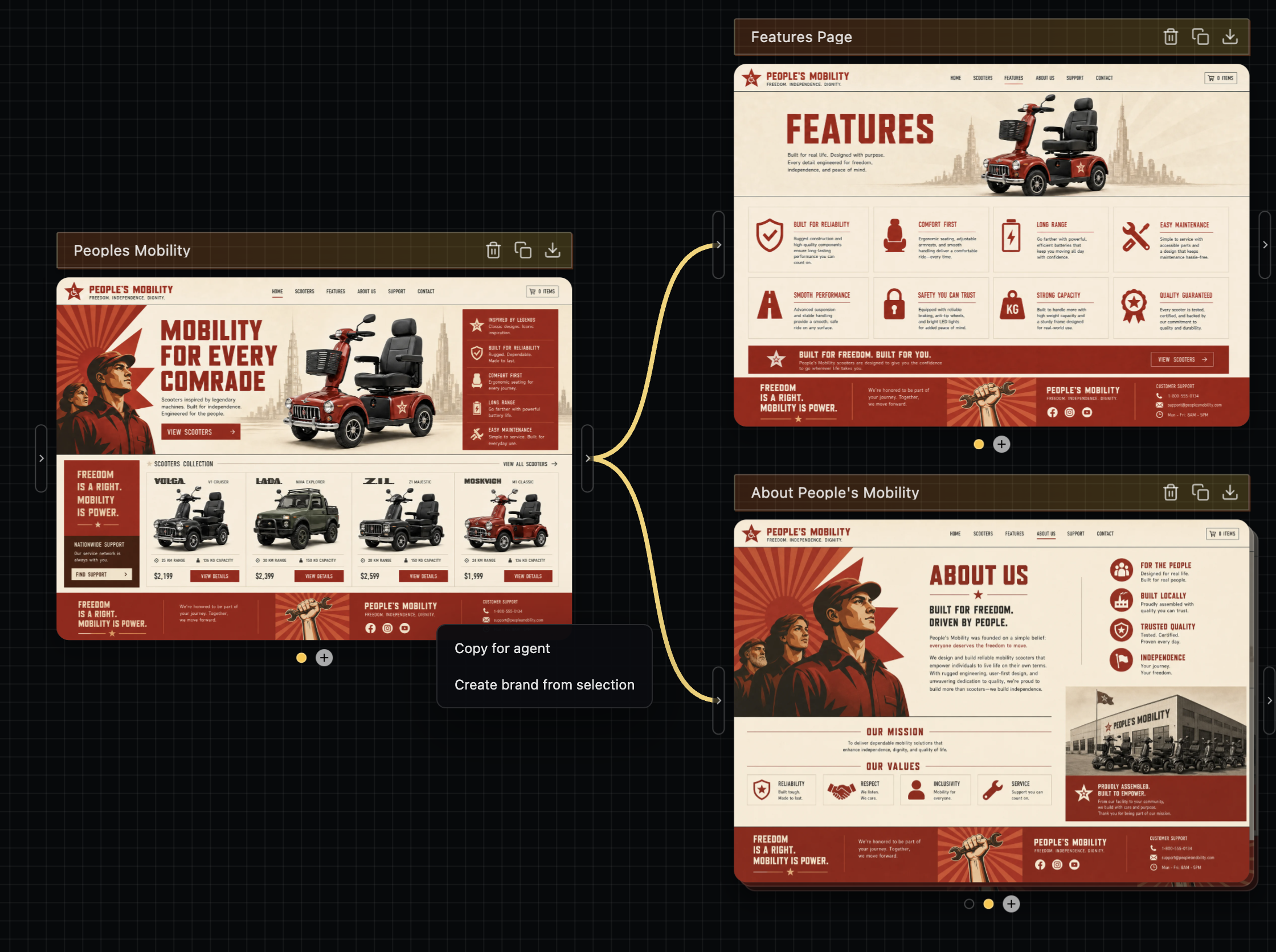
RE this one, I highly recommend doing image->code as the flow here. Codex's sites feature is doing this under the hood - it's rendering an image first with gpt-image-2, then building from it as a reference.

You can use gpt-image-2 directly for this, though if I can plug my own stuff diffui.ai it's exactly what I made this for. It'll make it easier to do multi-page flows with the same style easily, then you can hand off the designs to your agent, ie https://image.non.io/6e1f98ad-4c79-4735-9932-b0d5cca9be98.we...

Re: Ask HN: What is your (AI) dev tech stack / workflow?

#85
For teaching beginners, I’d keep it “boring” at first: VSCode or terminal + Claude Code / Codex on a normal paid plan.

The fancy multi-agent / worktree setups are useful later, but I’d start with a really small loop so they understand the basics first. Ask for one change, read the diff, run it, understand it.

If you jump straight into multi-agent stuff, n8n-style nodes, etc., a lot of beginners will just get paralysis by analysis.

Re: Ask HN: What is your (AI) dev tech stack / workflow?

#86
I'm using VSCode with Github Copilot (Business) in Agent, and Ask mode with varying LLMs, depending on the complexity of the task. For a specific task, i create a markdown file with the requirements in tandem with the Agent, manually edit it where convenient. And then i let the Agent implement one feature or work unit after another, while micro managing it and making sure that i understand what it has written (not for really trivial stuff, where i don't care). This gives me a huge productivity boost, while the level of being in the loop is still bearable for me.

TBH, i'm wondering why i'm the only one saying he's using VSCode with GH Copilot. Isn't this the most frictionless tooling for an 'agentic engineer'? I get state-of-the-art LLMs while it's fully integrated into my IDE.

I still don't fully get what Claude Code or GH Copilot CLI would bring beyond that, since the Copilot plugin does also have CLI access.

Re: Ask HN: What is your (AI) dev tech stack / workflow?

#87
I would not try to mix newbies in with experienced software developers.

Pick one audience at a time and approach it that way.

For a newbie, something like Replit free tier might be the way as there is little cognitive overhead to getting setup.

For a experienced developer, having them get a $20 sub and work on one of the popular agent harness.

Re: Ask HN: What is your (AI) dev tech stack / workflow?

#89

I'm using VSCode with Github Copilot (Business) in Agent, and Ask mode with varying LLMs, depending on the complexity of the task. For a specific task, i create a markdown file with the requirements in tandem with the Agent, manually edit it where convenient. And then i let the Agent implement one feature or work unit after another, while micro managing it and making sure that i understand what it has written (not fo…

You aren't the only one. There are many people using Github Copilot.

Github Copilot CLI is for automation. For example, in a Rust project, I use it to audit for security, documentation gaps, and test issues crate by crate. This can take an hour and I look at the suggested stories it writes afterwards to triage for implementation.

Post reply on HN