I found these after years, although it's been years since I found it. Preview is pretty good for merging PDFs, deleting pages from PDFs, and adding annotations. Whenever I have to do these things on a windows machine, I struggle to find software to do it. Most importantly, preview can add your signature via trackpad, or by holding up your signature to a webcam.
Ask HN: What feature did you find after years of using macOS?
361–370 of 540 posts
Re: Ask HN: What feature did you find after years of using macOS?
#362Using the space bar to quickly look into the contents of any file: pdf, images, txt files.
And this works also within other apps like spark where I can use the space bar to quickly verify what attachements are present.
Don’t think windows does this.
Re: Ask HN: What feature did you find after years of using macOS?
#363I have long used Shift-Command-4 to take screenshots, but I only recently discovered Shift-Command-5, which provides finer control (and it's much easier to use when I'm working at my treadmill desk). Also, Command-K to clear out a terminal window (also often works in similar places, such as the MAMP error log viewer).
The various screenshot features are good, and also one of the best uses of the touchbar I've seen. Use any of the variations on taking a screenshot, and you will get a menu to take a screenshot of an area, window, full desktop, etc.
Re: Ask HN: What feature did you find after years of using macOS?
#364my favourite feature is how the title bar icon in any app that’s editing a file (textmate/ word etc) is a pointer to the actual file unlike windows. - you can drag that file anywhere to move it. - CMD click it to see a breadcrumb menu showing where it is and navigate to the folder on a similar vein, dragging a file into an open file modal box makes it browse to the containing folder. In windows, dragging a file would…
> my favourite feature is how the title bar icon in any app that’s editing a file (textmate/ word etc) is a pointer to the actual file unlike windows. you can drag that file anywhere to move it.
I knew about this feature but it took me about a year or two of using macOS every day and the feature only working about 50% of the time before I understood how to get it to work reliably.
For those, like me, who were having problems: You have to click and hold the mouse button over the window, then hold the mouse there for a short period of time (e.g. half a second), then drag. If you drag too quickly it'll move the window instead.
Re: Ask HN: What feature did you find after years of using macOS?
#365Earlier quoted context omitted.
I remember watching a speech from Steve Jobs where he specifically said he learned about calligraphy or typefacing (I don’t remember the specific terms) to implement proper font rendering on macs. This was also before OSX came out. It was interesting because I realized how subtly difficult font rendering is. Unless you’re using a monospaced font all of the characters have different widths, you have to figure out how…
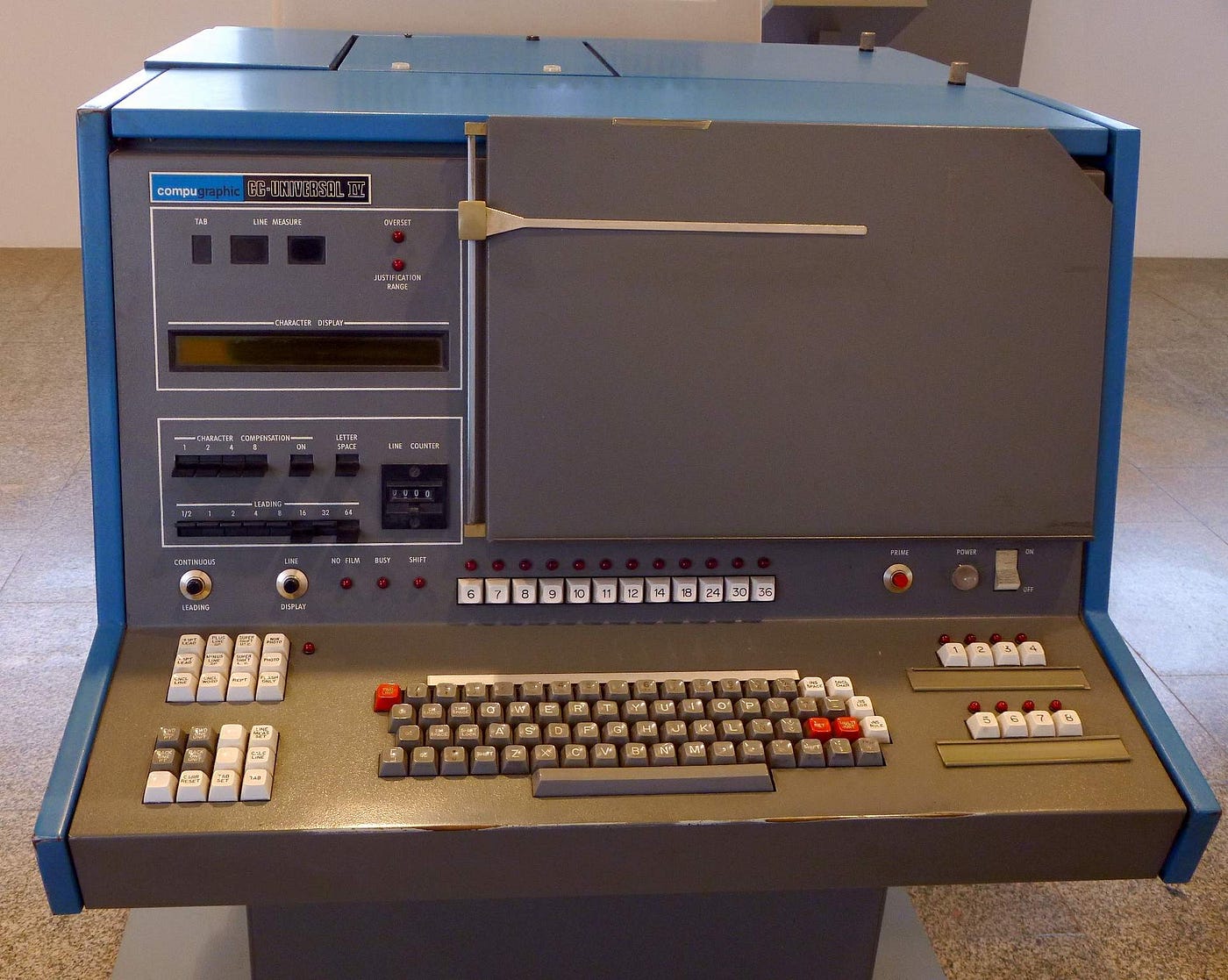
There was a whole typesetting industry doing this in the 70's, with a typographic quality still unsurpassed by today's computers: AutoLogic APS-5, Compugraphic, the Pegasus font system running on DataGeneral minis.
My mother owner two Compugraphic machines. Boy was it ever fun playing with what looked kinda like the bridge of the Enterprise as a boy.
Re: Ask HN: What feature did you find after years of using macOS?
#366Does an app have shortcut you don't like? Go to System Preferences > Keyboard > Shortcuts > App Shortcuts and click the plus. As prompted, enter the exact title of menu action you want trigger and the new shortcut. I use the on all my machines to rebind Quit Safari / Chrome / Firefox /Mail to Cmd + Option + Q to avoid killing the application when I fat-finger Cmd + Q instead of Cmd + W. Others already mentioned: - th…
That's a really neat trick! Worth noting: Chrome actually no longer dies when you fat-finger cmd-w. It shows a "hold cmd-q to quit" overlay and only dies if you keep holding the keys down.
That's a setting you enable in the app menu, not the default
Re: Ask HN: What feature did you find after years of using macOS?
#367Not macOS specific, but it took me too long to find out the tab key changed the focused text field in a web browser.
Re: Ask HN: What feature did you find after years of using macOS?
#368Three-finger drag is the one thing I just can't live without.[0] Finder: Cmd+Shift+G to navigate wherever I want (with autocomplete) Text input: Control+Command+Space for the emoji list and search Text input (switching keyboards for Japanese input): Control+Space for quick toggles Text input (accents in my native language): all the accents and letters of various European languages are usually made by using Option+[ke…
The great thing about three-finger drag is when you reach the end of the trackpad, you can lift one finger and put another finger to continue the drag. Tap and drag on Windows couldn't do that.
I think you can actually lift two fingers as soon as you've started the 3-finger drag and it'll continue dragging. If you're quick enough you can lift all three fingers and reposition them, too. They really put in a lot of work into the software behind the trackpad, which is still a major selling point for macbooks in my opinion.
Re: Ask HN: What feature did you find after years of using macOS?
#369Re: Ask HN: What feature did you find after years of using macOS?
#370Earlier quoted context omitted.
This is a holy war topic. Some people, myself included, prefer how Windows render fonts. Others prefer MacOS. From what I recall the last time this came up on HN, MacOS tries to render true to the font as if in a professional work flow that ends with a physical product. Windows aims for on screen legibility as it's primary goal. Also remember that most Windows machines have a much lower DPI screen that what comes wit…
That's a hard pill to swallow when my ability to read anything is so strained by trying to focus letters. I mean if I was just able to read the words better I'd not be complaining, that's what I want to do lol. I'm on 1440p here and microsoft sells devices with higher resolutions so I don't know how much legs this argument has to keep going on. I mean this is what I see in windows system preferences promising to make…
It's complicated.
So there is subpixel antiiasing, which I prefer, it works really well on lower res displays and gives you more horizontal dpi, but not all app frameworks support it (...) and some people /hate/ it.
Then there is the classic grayscale anti-aliasing.
Finally there is the nightmare of different DPI monitors.
I've also witnessed a machine (Surface Book!) that decided to start rendering all fonts in MS office applications in some weird super jaggy way like it was 1992 or something.
The fonts should never be blurry, IIRC Microsoft tries go snap characters to pixel boundaries, which is less "correct" than Apple but should be more legible.
Unless something goes wrong...