Live data from Hacker News

Ask HN: Why does Apple refuse to add window snapping to macOS?

news.ycombinator.com

291–300 of 573 posts

Re: Ask HN: Why does Apple refuse to add window snapping to macOS?

#291

Earlier quoted context omitted.

But also annoying when you're trying to tile some (of a bunch) of windows at full height. Yes, there are ways to do it without unintentionally maximizing, but it takes more attention to detail.

Windows-style snapping can also be extremely irritating with how easily accidental snap-proposals are triggered when moving around windows that you don't want snapped or maximized. I would say that when using Windows (or Linux DE with similar snap proposal UX) the bulk of proposals triggered are unintentional. In aggregate it's a surprising amount of unnecessary noise. This is why on macOS I prefer utilities like Moo…

I don’t have the same experience. Is your mouse sensitivity turned up very high?

Re: Ask HN: Why does Apple refuse to add window snapping to macOS?

#292
post #104

Earlier quoted context omitted.

Rectangle integrates the way I expect window snapping to work: with easy and sensible keyboard shortcuts. They keys are much easier to aim than the tiny green circle on the corner. I'm not saying moom doesn't have those, I just haven't used it and Rectangle serves my purposes perfectly well. To each their own, of course. Just trading anectodes. :)

FWIW Moom does also support keybinds too, including for custom sizing. I have binds for left/middle/right third and left/right two-thirds.

I imagined it did. Just didn't want to assume as I never used it. :)

Re: Ask HN: Why does Apple refuse to add window snapping to macOS?

#293
post #129

Earlier quoted context omitted.

Maybe it's inherently slow, because it's a "loading transition" like in video games. Takes a second for the new backing virtual desktop to be allocated, and for the window to potentially grab new assets to redraw (think: resizing iMovie window larger ⇒ larger timeline preview ⇒ re-rendering timeline thumbnails); and the animation plays on the old desktop while this is going on in the background on the new desktop, so…

These rationalizations don't justify it. The animation still has ugly pop-in and jerkiness despite being so slow and despite the fact that most apps can relayout and redraw their window in a tiny fraction of the time that animation takes. And screen sharing shouldn't make things slow when you're not using it. Anyway, I'd trade a bit of pop-in for a faster computer if that was necessary. There's no excuse to not offer…

> most apps can relayout and redraw their window in a tiny fraction of the time that animation takes

Re-rendering to the same compositor target buffer (when you e.g. resize a window), and allocating new textures in (potentially) new formats under control of a new compositor target buffer, are different orders-of-magnitudes of work. Think about how much delay there is from the point you plug in an external display, to the point your windows finish "popping over" onto it and it becomes usable. Allocating a new virtual desktop and moving a window to become fullscreen on it, is doing 90% of that same work.

Why does each virtual desktop have its own compositor and own target buffer? Because each virtual desktop has its own active display mode it's operating under: its own display resolution, its own bitplane format [think RGB vs BGR displays], different memory allocation constraints depending on whether it's currently being mirrored / screen-shared or not, maybe allocated in the VRAM of a different GPU if it's being drawn on a monitor plugged into a discrete GPU's HDMI/DP socket, etc.

This "distinct target buffers with their own compositors" approach is also why you can't span windows across displays on macOS 10.9+. (Before that, macOS used a different approach, that allowed for single virtual desktops that span multiple monitors, but where this would use one big target buffer, formatted to the lowest-common denominator format acceptable to all display targets. So if you plugged in a shitty external display like a 720p projector, and "extended" your desktop to it, then the whole compositor target buffer would get reformatted, and so your internal display's resolution/color depth/refresh rate would decrease.)

> Anyway, I'd trade a bit of pop-in for a faster computer if that was necessary.

My point is that this wouldn't be the trade-off. Instead, you'd switch over to the new fullscreen view, half-rendered — and then it would very likely still take just as long to finish re-rendering and accept input as if there was no animation.

You can actually try this "experience" out for yourself: try having an external display connected; opening Mission Control; and then dragging the focused virtual desktop from your internal display, over to the external display (or vice-versa.) It takes about 3 seconds before all texture assets finish re-allocating in the new compositor target buffer's texture format and re-rendering; and because there's no animation to paper over this case, it just feels unresponsive, like the whole shell has stalled for 3 seconds.
Re: Ask HN: Why does Apple refuse to add window snapping to macOS?

#294

Can anyone also tell me how to get the dock on all my 4 monitors together? The best I can do is get it on the bottom 2 monitors using the mouse hover features. But is there a way to get it to show on all 4 monitors all the time? If it could show the open windows on each monitor (like windows taskbar) that would be even more amazing! Please this has been bugging me for so long and any help is appreciated. P.S. There i…

I believe probably the issue with this is that there are only a tiny handful of devs with 3+ monitors hooked up who could develop a dock/taskbar with such features and test that it works as intended.

Re: Ask HN: Why does Apple refuse to add window snapping to macOS?

#296

I always feel like Apple must have some grand 1000IQ concept for window management and I just don't get it. Stage Manager, Spaces, Mission Control, Expose, Window Zooming, Hiding, Minimizing (which is different from Hiding), Fullscreen/Splitscreen... yet the first thing I do is install a third-party window manager. I tried for months to go vanilla and get my head around the features. But why, why do fullscreen window…

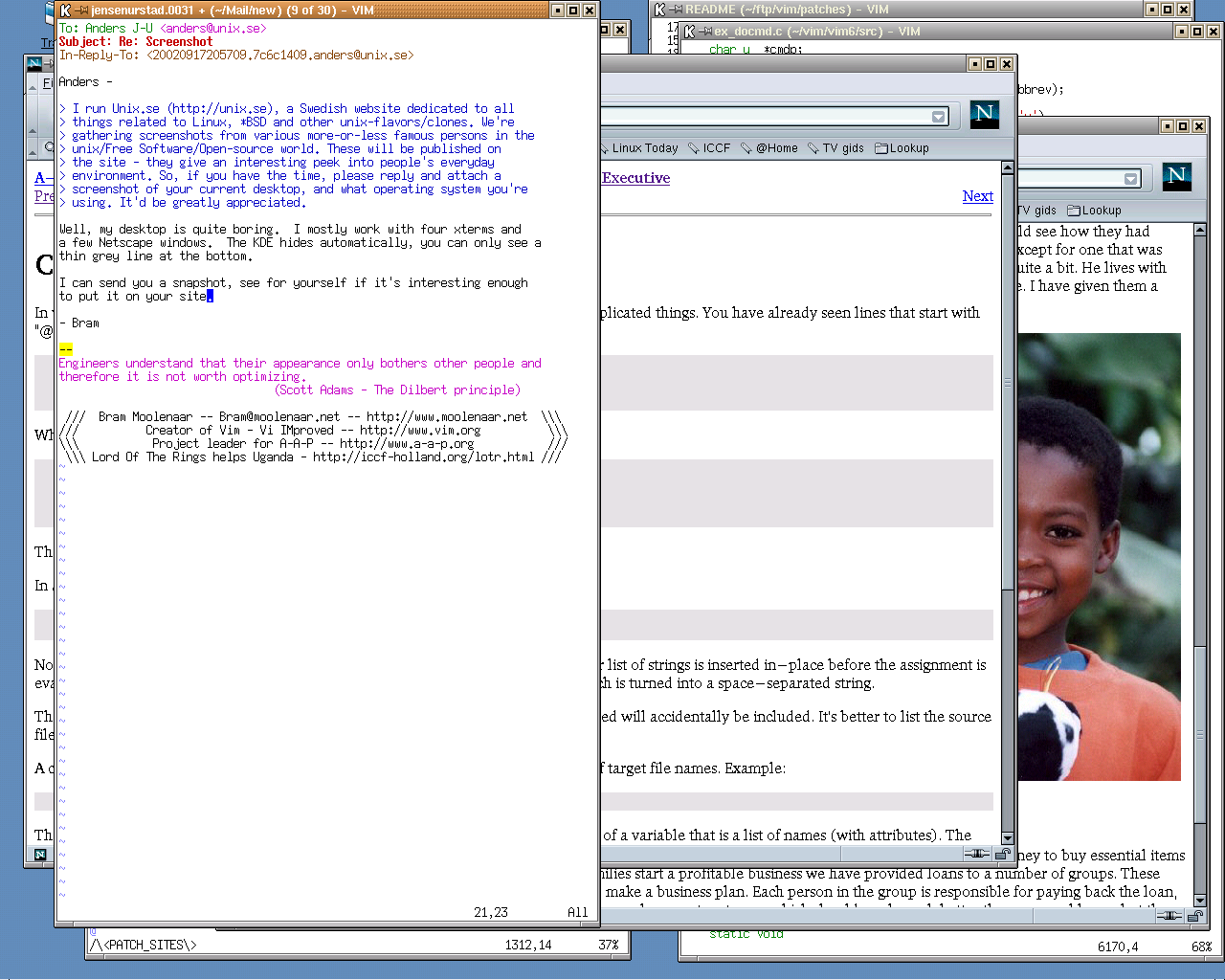
If you look at old screenshots of how people used desktop computers [1], it was rare to see fullscreen windows, even on the tiny monitors of the day, and when most people used only a single monitor.

Today, we all have gigantic monitors, many have more than one, but for whatever reason people want to maximize or tile windows. Maybe it's the influence of the fullscreen only, unitasking paradigm from phones and tablet computers, but it just doesn't make much sense to me on a desktop computer.

1: https://anders.unix.se/images/desktop_b_moolenaar.png https://anders.unix.se/2015/10/28/screenshots-from-developer...

Re: Ask HN: Why does Apple refuse to add window snapping to macOS?

#297
post #242
post #141

Well, because it has? Hover over the green stoplight, you get a popover with fullscreen options. Press Option and the fullscreen options mutate into snap left/snap right/zoom. These can also be found in the Window menu. Again, press option to mutate the fullscreen ones to snap. And since these are menu options, one can set any keyboard shortcut of their choosing through the keyboard shortcut prefpane+. So it is not "…

That's awful. Instead of windows where you can BAM drag a window to one side and snap it in 0.2 seconds, you have to hover over the window, wait a second, press option, wait .1 second, figure out which option you want, mouse over to it, then finally click it. That's insane.

> Instead of windows where you can BAM drag a window to one side and snap it in 0.2 seconds

You can do just that. Drag it to either side to make it half-width or to the top to make if full width and height.

Re: Ask HN: Why does Apple refuse to add window snapping to macOS?

#298
post #141

Well, because it has? Hover over the green stoplight, you get a popover with fullscreen options. Press Option and the fullscreen options mutate into snap left/snap right/zoom. These can also be found in the Window menu. Again, press option to mutate the fullscreen ones to snap. And since these are menu options, one can set any keyboard shortcut of their choosing through the keyboard shortcut prefpane+. So it is not "…

It's much worse than Ubuntu or Windows though. I just want to snap a window to the sides. The macOS solution forces you to go full screen to snap.

Re: Ask HN: Why does Apple refuse to add window snapping to macOS?

#300

Can an Ask HN self-post be clickbait? Apple isn’t refusing to do anything. They just haven’t done some minor thing that you personally would like. The fact that you’re “shocked” by something as banal as “lack of window snapping” is kind of funny actually.

Almost everyone I know immediately installs a third-party app to handle windows when they get their Mac. That includes me.

I almost always disable window snapping on Windows and Linux. Having a single window maximized, or even snapped to 50% of the screen is wasteful of screen space. I currently have 6 firefox windows visible, they're just overlapped. I can quickly access them, move them and resize them using the mouse.
Post reply on HN