Live data from Hacker News

Ask HN: How do you use checklists?

news.ycombinator.com

21–30 of 59 posts

Re: Ask HN: How do you use checklists?

#21
post #9

My entire productivity system is a checklist in a pocket-sized notebook. When I get to work, I write down the things I need to do, have been asked to do, and want to do (in that order) — most days it's 3–5 things. Each item is a specific task that I know how to do. This system, if you can even call it that, works for me for two reasons: 1) It gets the thoughts out of my head, so I don't have a constant "background no…

Problem with a book (there are many benefits of course) is : you lose the book. So I have a strict policy these days of only taking notes either on a piece of paper that sits on my desk, or in electronic form synced to all my devices (using OneNote fwiw but document files in Google Drive would probably work just as well). I also have around 20 notebooks scattered around the house, office, car, friends's houses, etc.

You can also periodically take photos of new pages and sync that.
Re: Ask HN: How do you use checklists?

#22
Mostly through Wunderlist. I try to keep as few lists as possible so I force myself to prioritize, so I only have two: Work and Not-Work (my "Inbox").

I'll make temporary lists for specific, detailed tasks like a moving checklist or a packing checklist. Afterwards, I'll delete them.

As for the tasks themselves, I try to make them as fine-grained as possible. Like, "write tests for that function you wrote", or "talk to Allen about something". Sometimes they're just questions I have that I need to think about, like "what about this edge case?" or "how far back do we look?"

Usually there's something else that tracks what I have to do at a higher level, i.e. JIRA or Trello. In those cases, at the end of my current tasks, I simply have a "look at JIRA"

Re: Ask HN: How do you use checklists?

#23
post #21

Earlier quoted context omitted.

Problem with a book (there are many benefits of course) is : you lose the book. So I have a strict policy these days of only taking notes either on a piece of paper that sits on my desk, or in electronic form synced to all my devices (using OneNote fwiw but document files in Google Drive would probably work just as well). I also have around 20 notebooks scattered around the house, office, car, friends's houses, etc.

You can also periodically take photos of new pages and sync that.

Been there, done that..

You can also take pictures of all letters you mail, right before you slide them into the mailbox, so if you ever wonder if you really mailed the mortgage check or perhaps it just slid under your car seat or blew away when the car door opened, there it is in your phone..

Re: Ask HN: How do you use checklists?

#24

I more than one time tried to incorporate checklists in my daytoday life, like for morning/evening routine, starting work for the day, etc. The problem I had is the medium: * Paper: You check it today and have to rewrite for tomorrow, as the checkboxes are filled. Also, I tend to not look at my notebook at all, or lose it. Its never gonna be where I am. * Apps: I tested a few, from regular todo apps to specialized "r…

I like OmniFocus. It works on laptop, tablet, and phone.

Re: Ask HN: How do you use checklists?

#25
Most comments are talking about todo lists. I use those a lot. I keep a detailed hierarchical list of tasks in OneNote, and move them to a done list when complete.

But I think you meant checklists like pilots use to avoid human error. I make those very reluctantly, preferring to simplify whatever system seemed to need a list.

Re: Ask HN: How do you use checklists?

#26

I more than one time tried to incorporate checklists in my daytoday life, like for morning/evening routine, starting work for the day, etc. The problem I had is the medium: * Paper: You check it today and have to rewrite for tomorrow, as the checkboxes are filled. Also, I tend to not look at my notebook at all, or lose it. Its never gonna be where I am. * Apps: I tested a few, from regular todo apps to specialized "r…

I like OmniFocus. It works on laptop, tablet, and phone.

Which is, to my best knowledge, a relatively pure todo app, not really suitable for checklists, or am I wrong?

Re: Ask HN: How do you use checklists?

#27

I use a lot of checklists, mostly via emacs org-mode. Here's an example of my daily sales workflow (B2B SaaS; formatting didn't survive very well, sorry): * Daily work DONE Check commission goal for EOY and update DONE Start airtable timing DONE Log in to TalkDesk (reboot, make sure active) DONE Sales startup * DONE select rotating priority of the day, tag with dailyFocus * DONE check calendar for any major events un…

Wow this is a very good idea. FYI if you indent the whole thing with 4 spaces (each line), then

    *** HN keeps the formatting
     ^-> see?

Re: Ask HN: How do you use checklists?

#28
While building stock trading robots, essentially I am automating check lists from the stock selection, trough the trade until the exit... No guess work, can be precisely back tested, etc...

It literally did transform my life and made me free and independent...

Re: Ask HN: How do you use checklists?

#29
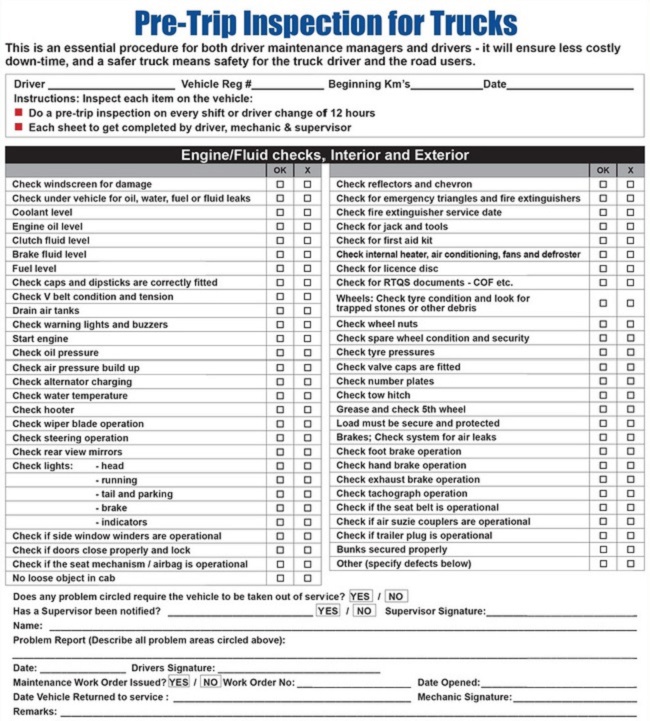
Keeping organized and safe on road trips.

I keep a book of cards similar to this on the dash. Fill one out on any trip over an hour. [1] Have been helpful in tracking tire/brake wear. Have not had a breakdown in the bush since using these.

Taped 3x5 cards to the steering wheel with packing lists and important equipment for field work. (Laptop, cell phones, Radios, spare clothing, chargers)

[1] https://www.fueloyal.com/wp-content/uploads/2016/09/How-To-F...

Re: Ask HN: How do you use checklists?

#30

I use a lot of checklists, mostly via emacs org-mode. Here's an example of my daily sales workflow (B2B SaaS; formatting didn't survive very well, sorry): * Daily work DONE Check commission goal for EOY and update DONE Start airtable timing DONE Log in to TalkDesk (reboot, make sure active) DONE Sales startup * DONE select rotating priority of the day, tag with dailyFocus * DONE check calendar for any major events un…

Could you elaborate on how you manage this with org-mode? Do you have to manually reset the lists every evening?

Not for TODO items, but org-mode specifically has the RESET_CHECK_BOXES property which will reset the checkboxes when a repeating task goes back to it's start state (eg, habits). TODO items can be repeating and there is a way to make it so that a parent heading will switch to DONE when all sub-entries are done (and that parent heading can be repeating as well).

Just to add my two cents to the conversation, it's a personal call between using checkboxes versus sub-heading TODO items, but I typically use checkboxes for physical items (packing lists) or actions with a duration that is sub-minute (eg, areas of vehicle to check for weekly inspection).

Post reply on HN