Live data from Hacker News

Ask HN: Does anyone use keyboard/mouse extra buttons for coding?

news.ycombinator.com

121–130 of 160 posts

Re: Ask HN: Does anyone use keyboard/mouse extra buttons for coding?

#121

I recommend anyone to download powertoys, a collection of utilities, and to use the keyboard manager to remap the caps lock key to the backspace key and vice versa. The pinky distance is substantially reduced. I use the split, column staggered iris keyboard. With another layer I can access any common key or symbol from at most one key away. Nicest thing is how the arrow keys, backspace, space, home, and end are right…

Whats the powertoys version for linux?

no idea

Re: Ask HN: Does anyone use keyboard/mouse extra buttons for coding?

#122

I have a Moonlander from ZSA. Flippin' sweet keyboard. I have a layer for mouse movement with wasd. On the same layer, I've bound hjkl to the arrow keys, so I can get vimish movement wherever. Below these keys on the same layer I have some browser navigation shortcuts. I use evil-mode in Emacs. The key below my left thumb is control on hold, escape on tap, and it works beautifully. On my left thumb cluster, I have a…

Do you ever turn on chip-tunes mode? The first time I did I couldn't remember how I turned it on. That was a fun few minutes

Re: Ask HN: Does anyone use keyboard/mouse extra buttons for coding?

#123

I don't use a keyboard or a mouse much at all! (because I can't anymore.) instead, I've written and memorized a growing arsenal of voice commands. Saying stuff like "review approve" to approve PRs is handy, though I'm slower over all than I was with working hands.

There's something wholesome and epically 'sci-fi' about this idea. Thanks for sharing!

Re: Ask HN: Does anyone use keyboard/mouse extra buttons for coding?

#124
post #113

Earlier quoted context omitted.

I was around 12 years old, so not super well :) But oddly I ended up working on text entry after graduating from college, working on a system called Dasher. I type qwerty around 130wpm, so I appreciate the arcade skills. I'd love to get into stenography but it seems like the amount of memorizing involved is akin to learning a new foreign language, too much to learn as a hobby.

> I'd love to get into stenography but it seems like the amount of memorizing involved is akin to learning a new foreign language, too much to learn as a hobby. Why learn when you can invent your own shorthand, more natural for you and unless you want somebody else to read the shorthand - not an issue and even then can just translate with a script. When I started out programming (COBOL) in the early 80's we had a cho…

> Why learn when you can invent your own shorthand

If I don't want to sign up for learning a new language, I should hardly sign up for creating one :)

Re: Ask HN: Does anyone use keyboard/mouse extra buttons for coding?

#125
post #68
post #46

Earlier quoted context omitted.

Mapping CAPS LOCK to CONTROL is another popular option. But I suspect when one takes into account the entire population of computer users, CAPS LOCK remains CAPS LOCK and likely largely unused.

I use CAPS LOCK as language switch button.

I use ⌘-1/⌘-2 for English/Russian layouts. It's better than using a switch key because it's deterministic - you don't need to look at the layout indicator or whatnot.

Re: Ask HN: Does anyone use keyboard/mouse extra buttons for coding?

#126
post #100

My mouse (Logitech G604) has six side buttons, three extra top bottoms, and has the following programmed on it: - copy - paste - enter - forward - back - Zoom mic toggle[0] - OSX screen left/right (activated by pushing the mouse wheel left or right). - Volume up/down (on top of the mouse) Screen left/right is the most important things I do with the mouse aside from the normal pointing and clicking. For the side butto…

Post the Zoom control box!

I’ll make a blog post soonish and post it here. I’m mostly putting it off because it’s a pain to open and photograph.

Re: Ask HN: Does anyone use keyboard/mouse extra buttons for coding?

#127

I have a Dygma Raise which is a ~60% keyboard and uses layers. My layer 2 is full of useful macros. I need macros even for the keyboard arrows because my Keyboard doesn't have arrows (arrows are layer2+hjkl or layer2+esdf). I also make heavy use of custom mappings in Vim and Bash aliases. I have a macro for ctrl+shift+v on my Keyboard since it's the Evolution (Linux mail app) shortcut for moving emails. I also have m…

I picked up similar cd aliases alias 1='cd ..' ; alias 2='cd ../..' and etc...

Re: Ask HN: Does anyone use keyboard/mouse extra buttons for coding?

#129
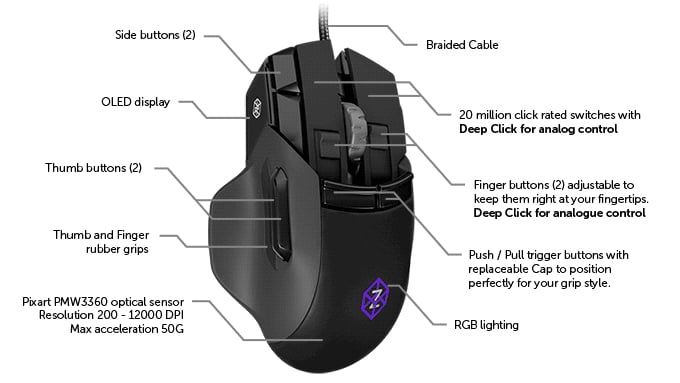
I have Swiftpoint Z[0][1] Mouse, and while the software lefts a lot to be desired, it allows me to do a lot

I suggest to look at picture[0] to follow this post, as the button layout is highly unusual

The mouse have 2 primary mouse buttons that have pressure sensing. Pressing hard Left actually triggers CTRL+Shift+LeftClick, so when I hardpress over link it opens it in a new tab and switches to it directly (as opposed to MMB click that opens it in the background)

There are two fingertip buttons (also pressure sensitive) that are at the base of primary buttons, so fingers have to curl to reach them. One is CTRL+C or CTRL+X if I press it with force, the other is CTRL+V or CTRL+V -> Enter if I press it with force.

Another two buttons (push/pull triggers) are at the base of those, but higher, and the middle of the finger rests over them. You press them not by curling your finger, but by pressing them down with the "undercnuckle" of the finger. Left one is ALT+TAB, where TAB gets released immidiately, but ALT is left held down until button is released. As long as the button is held, every 150 units of mouse movement to either direction simulates arrowkey press in said direction, allowing me to pick a program I want to alt tab to. The other is CTRL+W if pressed without mouse movement (to close tab), or CTRL+Arrow (same fashion as ALT+Arrow on the left button) to select active tab in the browser. Those two buttons also works together. Pressing them together invokes Windows+D or Alt+F4, depending if I press left or right button first. The great thing about those two buttons is that hand or fingers dont have to change their position at all. Those two buttons also can be pulled from underneath. Left one is CTRL+Shift+T to reopen last closed tab, and the other is to recalibrate gyro to 0 (tends to drift a bit, usually once a week it drifts 2 degrees, which is enough to start triggering my tilt keybind).

Two more buttons next to the side of Left Mouse Button, which are pressed by index finger having to move over them, are bound to F10 and F11, and I use them in games/work programs only.

Finally, two remaining thumb buttons are of course Back and Forward. Kinda wish for more thumb buttons tho.

For some games I also use tilt functions to bind to keys (the mouse have gyro and is made to be tilted, with magnetically held plates at the bottom, allowing you to choose the amount the mouse physically tilts (left-right) all the way to 0.)

Tilting the mouse to the right for more than 30 degrees makes it enter config mode, where with 2 buttons you can select what the little OLED (black&white) displays (current XYZ angles, force applied to one of 5 pressure buttons, DPI [and change it by mousewheel], profile name, spinning cube), change active profile (with subprofiles) or start recalibration (lay flat, wait 3 sec).

The mouse have vibrations that allow me to tell whether force or tilt action has been executed, but my choosen keybinds make it obvious anyway.

--

I used the mouse at home for gaming, and was carying it to work every day (I work with 3D software with terrible fixed keybinds, which I mapped to the mouse) for a month before I bent over and bought another one.

Its the best mouse I ever owned, but its not all flawless. Working with software is a pain and unintuitive. They released new version which strips control from you, or you can enter "expert mode" which throws you back into the original. Theres no way to display custom images on the OLED, and text can only be changed to predefined strings on predefined triggers, forget about putting a clock there. Updates are rare and featurewise empty.

Support is helpfull when the desired function is doable with current software and actually provide a guide how to structure the profile to achieve the goal, but for my request to be able to display clock or text pulled from outside the program the answer was "we informed the developers, mby in next version."

The magnetically held plates are nice way to easily set up your mouse, but after I found my optimal settings for it I havent changed it then. The downside of it is it being magnetic, so in the rare ocasion where I have to work on site, and only metal table is avaiable, the mouse gets stuck to the table. A mousepad solves this.

[0] picture: https://theawesomer.com/photos/2016/07/swiftpoint_z_gaming_m...

[1] mouse: https://www.swiftpoint.com/products/gaming-mice-swiftpoint-z
Re: Ask HN: Does anyone use keyboard/mouse extra buttons for coding?

#130

I recommend anyone to download powertoys, a collection of utilities, and to use the keyboard manager to remap the caps lock key to the backspace key and vice versa. The pinky distance is substantially reduced. I use the split, column staggered iris keyboard. With another layer I can access any common key or symbol from at most one key away. Nicest thing is how the arrow keys, backspace, space, home, and end are right…

Whats the powertoys version for linux?

KMonad is a cross-platform tool to customize how the keyboard behaves.

Or if you're always working from the same desk, you could invest in a fancy QMK-powered keyboard where it's easy to customize the firmware.

Post reply on HN